
Livraison le jour même ou le lendemain

Qualité garantie

Débloquez vos offres de bienvenue: Livraison GRATUITE | Jusqu'à -80 % | 30 jours d'essai gratuits à JoyPlus
Téléchargez l'application
A car dashcam can preserve video evidence in the event of an accident, minor collision or act of vandalism. However, not all in-car cameras are equal or suited to the same needs. Advertised resolution, parking mode and Wi-Fi connectivity can all come with practical limitations that reduce the device’s usefulness in everyday situations.
Before placing your order, here are the main pitfalls to avoid and the key criteria to consider when choosing a car video recorder suited to your vehicle and driving habits.
A 4K dashcam captures more detail than a Full HD model. However, sharpness also depends on the sensor, lens, aperture and video compression. High resolution alone therefore does not guarantee a readable number plate in the rain, inside a tunnel or when facing headlights.
In particular, check:
24-hour parking mode generally requires a permanent power supply. Depending on the model, a separately sold hardwire kit may be essential. Without this accessory, the camera can often only record when the cigarette lighter socket is powered.
The kit must be compatible with the camera’s exact model number. You should also check that it includes protection against draining the vehicle’s battery. If you would rather not work on the electrical system, it is best to have the installation carried out by a professional.
A car in-car camera records continuously. When the card is full, loop recording will generally overwrite ordinary files, while videos locked by the G-sensor are retained. However, a card that is too slow, incompatible or worn can cause recording errors.
Choose a microSD card designed for continuous video recording, check the files regularly and format the card from the camera when recommended by the manufacturer.
A front-facing camera is sufficient for documenting what happens ahead of the vehicle. A front and rear dashcam adds visibility of sudden braking, rear-end collisions and certain traffic-related disputes. For a car parked in the street or a commercial vehicle exposed to side impacts, a 360-degree dashcam or four-channel system provides broader coverage of the front, rear and sides.
Check the viewing angle, but do not rely solely on a high figure: an ultra-wide-angle lens can distort the edges of the image.
A night-vision dashcam should retain enough detail when lighting levels drop. A wide aperture, sensitive sensor and HDR processing can improve image clarity, although they cannot work miracles in every situation.
For a vehicle exposed to sunlight or parked outdoors, a supercapacitor may be preferable to an integrated battery. The technical specifications should state the operating temperatures and recommended storage conditions.
A GPS dashcam can record the location, speed or route alongside the video, depending on the settings selected. This information can help reconstruct a journey, but it does not replace the other evidence required for an insurance claim.
A Wi-Fi car camera lets you view and download footage from a phone without removing the memory card. However, transfer speeds depend on the network being used, the file size and the smartphone. Voice controls can also reduce the need for handling the device while driving, provided they are available in a language the user understands.
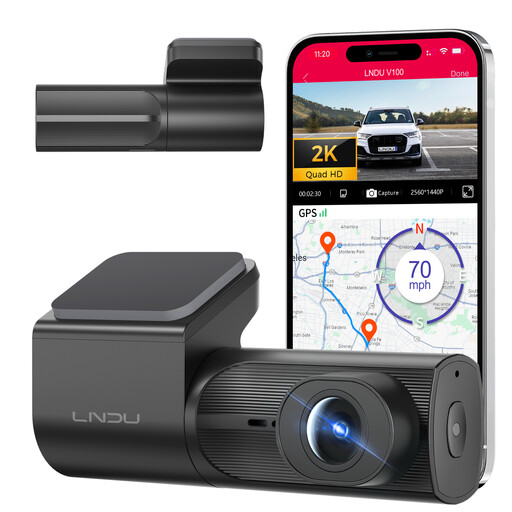
Why it suits this type of user : Its front-camera design, app and Wi-Fi connectivity make it well suited to everyday journeys, urban driving and a first installation without a built-in screen.
The product details specify that parking mode requires a separately sold hardwire kit. This means you can budget for the total cost from the outset.
The advertised features include 2K resolution, Wi-Fi, a G-sensor, loop recording and night vision.
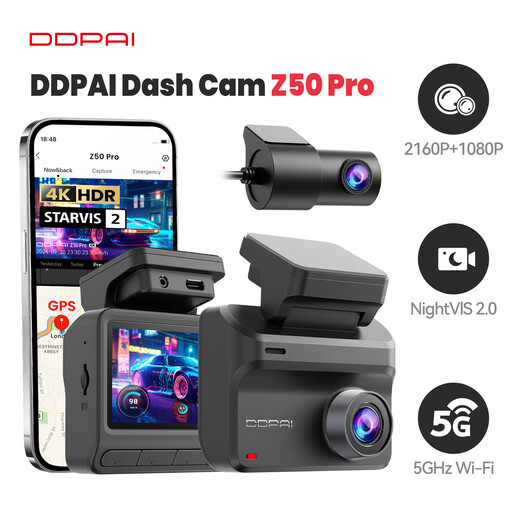
Why it suits this type of user : Its dual-camera setup, GPS and 3-inch screen are ideal for drivers who want to check settings and recorded journeys more easily.
The product details clearly distinguish the 4K front camera from the 1080P rear camera and specify that the dedicated parking surveillance kit is available as an optional extra.
Advertised features include 4K front and 1080P rear recording, integrated GPS, 5 GHz Wi-Fi, a 3-inch IPS screen and support for cards of up to 512 GB.
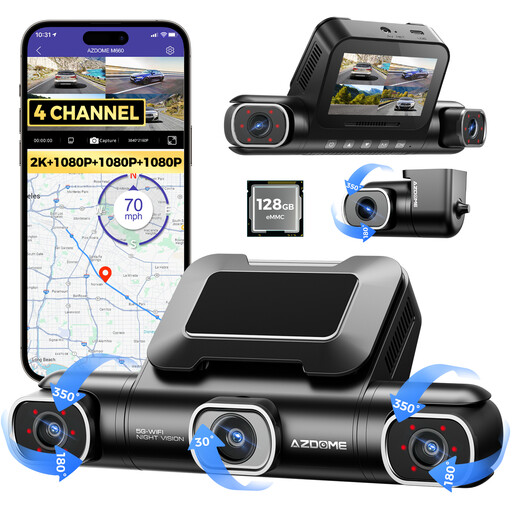
Why it suits this type of user : Its four-camera coverage is designed for SUV and commercial vehicle drivers, as well as anyone who wants to monitor several sides of their vehicle.
All four channels are clearly detailed: one 2.5K front camera and three 1080P cameras. The 128 GB eMMC storage is integrated, so you do not need to buy a microSD card when setting the system up.
Advertised features include front, rear and side views, GPS, 5 GHz Wi-Fi, infrared vision and several parking surveillance modes.
Install the camera behind the interior rear-view mirror, without restricting your field of vision. The cable can be concealed along the headlining and pillar, provided it does not interfere with the airbags or the vehicle’s controls.
Before your first journey:
A dashcam is only one piece of video evidence among others. In the event of an incident, keep the original file and avoid altering it before sending it to your insurer or the relevant authorities.
Their use in a private vehicle is not automatically prohibited. However, you must comply with the Highway Code, privacy requirements and data protection regulations. The camera must not distract the driver, and identifiable images must be shared responsibly.
In addition to the price of the device, you may need to budget for a microSD card, a hardwire kit for parking mode and, on some models, a remote connectivity module. A front-only camera setup generally limits the number of accessories required, while a front-and-rear or four-channel solution needs more storage.
This depends on the temperature, power supply quality, frequency of writing to the memory card and maintenance. Replace any card that develops errors, avoid leaving a device in a very hot car if it is not designed for such conditions, and regularly check that recordings have been saved correctly.