
Livraison le jour même ou le lendemain

Qualité garantie

Débloquez vos offres de bienvenue: Livraison GRATUITE | Jusqu'à -80 % | 30 jours d'essai gratuits à JoyPlus
Téléchargez l'application
A car dashcam can record your journeys, save footage after a collision or document an incident while your vehicle is parked. However, product listings sometimes combine resolution, connected features and essential accessories without making the differences clear. The advertised price therefore does not always reflect the true cost of installation.
Before ordering a dashboard camera, be sure to check the following three points.
A 4K car dashcam records more pixels than a 2K model. However, image clarity also depends on the lens, compression, lighting and mount stability. A 4K image can lose much of its detail at night or behind a dirty windscreen.
Resolution should therefore be chosen according to your typical journeys. 2K is suitable for most everyday driving, while 4K can be worthwhile if you frequently use motorways or want to examine finer details. Also check the rear camera’s resolution: some packages advertise “4K” for the front camera but offer only 1080p at the rear.
24-hour parking mode generally does not work with the cigarette-lighter charger alone when the engine is switched off. The models featured here require a hardwire kit sold separately to monitor the vehicle while it is parked.
Before placing your order, check that the kit is compatible with your car and have it installed in accordance with the manufacturer’s recommendations. An incorrect installation can disrupt the power supply or place excessive strain on the battery. Some systems include low-voltage protection, but its operation often depends on the kit being used.
Loop recording automatically replaces older, unprotected videos when the card is full. This is convenient, but a card that is too slow, worn or incompatible can cause recording errors.
Choose a microSD card designed for continuous video recording—typically Class 10 and U3 for high-definition footage—while checking the maximum capacity supported by the camera. You should also regularly back up important clips to your phone or computer.
For everyday use, a 2K camera offers a good balance between image detail and storage requirements. A 4K dashcam creates larger files and may therefore require a higher-capacity memory card.
Frame rate also deserves your attention. Recording at 60 frames per second produces smoother motion, but generally increases the amount of data. For a front and rear dashcam, review the specifications of both sensors separately.
Sony STARVIS 2 night vision is used in several models equipped with Sony sensors. This label identifies the component being used, but does not by itself guarantee flawless footage in every condition. The final image also depends on the lens aperture, software processing, exposure and reflections on the windscreen.
HDR can help balance very bright and very dark areas, such as when exiting a tunnel. However, nothing replaces reviewing sample footage and positioning the camera carefully.
A GPS dashcam can associate information such as location, time and speed with recorded videos. This data can help reconstruct the circumstances of a journey, but it should be stored and shared responsibly.
A WiFi car camera lets you view or download footage from a smartphone without removing the memory card. The app also simplifies file management. However, WiFi does not necessarily mean that the camera can be accessed remotely. This feature may require a separate 4G module.
In France, avoid publishing footage that could identify people or number plates without taking appropriate precautions. In the event of a dispute, keep the original file and limit sharing to the relevant parties.
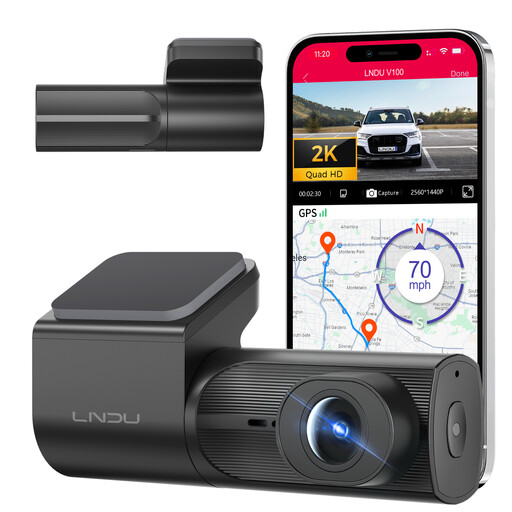
Why this model is a good fit: A compact front camera, well suited to everyday journeys, with footage accessible through the LNDU app.
The listing specifies that 24-hour parking mode requires the LNDU JYX05 kit, sold separately. You can therefore include this accessory in your budget from the outset.
2K resolution, integrated WiFi, G-sensor, loop recording and night vision listed in the technical specifications.
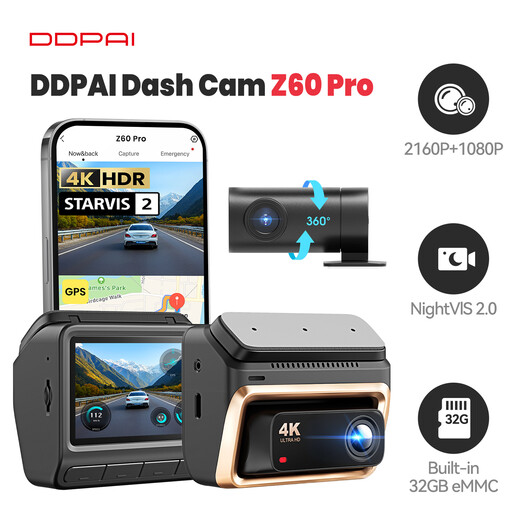
Why this model is a good fit: Its dual-channel system suits drivers who want to document what happens both in front of and behind the vehicle.
The listing clearly distinguishes the 4K front camera from the 1080p rear camera. Parking mode and the hardwire kit are available separately.
Sony IMX678 front sensor, HDR, integrated GPS, 5 GHz WiFi, 32 GB internal eMMC storage and support for microSD cards up to 512 GB.
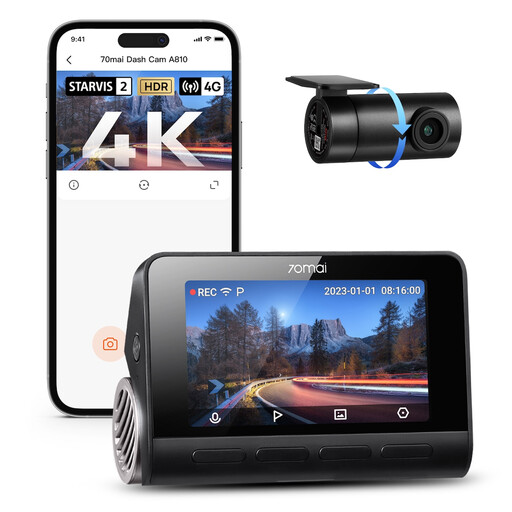
Why this model is a good fit: This dual-camera system is designed for those who drive frequently and want to combine GPS, alerts and parking surveillance.
The SD card is not included, and parking functions require the 70mai UP04 kit. Plan for these items before installation.
4K front recording, 1080p rear recording, integrated GPS, voice control, 4G support with an accessory and advertised motion detection.
We have brought together an up-to-date selection of products suited to different vehicle monitoring and parking surveillance needs.
Install the camera behind the central rear-view mirror without obstructing your field of vision. Clean the windscreen before attaching the mount, and route the cable away from the airbag deployment area. Once installation is complete, check that the number plate and road remain visible without allowing the cabin to occupy too much of the frame.
Format the memory card in the camera when recommended by the manufacturer, then test several recordings in both daylight and at night. Also check the date, time, time zone and GPS position. The collision sensor can automatically lock a file after an impact, but make sure its sensitivity does not protect too many videos when driving over speed bumps.
Personal use is generally permitted, provided that privacy is respected and the device does not interfere with driving. Publicly sharing footage that identifies individuals raises more significant concerns. In the event of an accident, submit the relevant files to the parties involved or the appropriate authorities rather than publishing them freely.
Start by checking the maximum capacity specified by the manufacturer. For 4K or dual-channel models, a fast Class 10 microSD card—U3 where this specification is required—is generally suitable. Replace the card if recording errors appear, and back up important files.
In addition to the price of the camera, you may need a microSD card, a hardwire kit and, depending on the model, a 4G module. The cost depends on the vehicle, installation and accessories selected. Compare the price of the complete setup you need rather than the camera alone.