
Livraison le jour même ou le lendemain

Qualité garantie

Débloquez vos offres de bienvenue: Livraison GRATUITE | Jusqu'à -80 % | 30 jours d'essai gratuits à JoyPlus
Téléchargez l'application
A bump, an emergency stop or damage in a car park can quickly become difficult to prove. A dash cam lets you keep a useful video record – provided you choose the right setup and install it correctly.
The 70mai A200 dash cam is available as a front-only version or as a front-and-rear bundle. Before you place your order, there are a few points worth your attention.
The term 1080p tells you the image resolution, but says nothing about its smoothness or how it performs in every situation. At 30 frames per second, a video can lack sharpness during an overtake or fast movement. The 70mai A200 offers 1080p recording at 60 FPS for the front camera in single-channel mode, which should deliver smoother footage.
However, check which mode is used when the rear camera is connected. A dual-camera dash cam isn't judged on resolution alone: frame rate, field of view and installation quality all play a significant role.
HDR and image processing designed for low-light scenes can help balance very bright and very dark areas. But they won't eliminate problems caused by a dirty windscreen, dashboard reflections or particularly dazzling headlights.
To get the most from a HDR dash cam with night vision, clean the section of windscreen behind the rear-view mirror and make sure the lens is completely unobstructed. The camera must never reduce the driver's field of view.
The memory card isn't always included. Both setups shown here state that the microSD card is sold separately. Also consider the power cable, routing the cable to the rear camera, and the card's ability to handle repeated recordings.
Automatic recording triggered by a collision doesn't guarantee unlimited file storage either. Protected footage should be copied regularly to a phone or computer.
For everyday journeys, the 70mai A200 1080p dash cam offers Full HD resolution that's sufficient for viewing videos on a phone or computer. In front-only mode, recording at 60 FPS is designed to reduce blur during fast movement.
Its lens provides a 130-degree angle. That's enough to cover a wide portion of the road, provided you position the camera correctly so it doesn't capture too much bonnet or sky. A front-and-rear car camera adds a view behind the vehicle, which can prove useful in town, when parking or changing lanes.
HDR aims to balance exposure between dark and bright areas. The 70mai Night Owl Vision feature is described by the manufacturer as processing designed for low-light scenes. This is a stated technical characteristic, not a guarantee of readability in all conditions.
To decide between two models, also consider the camera's position, any reflections and how easy it is to access files. A well-framed image that's simple to retrieve can be more useful than a long list of features you'll hardly ever use.
A dash cam equipped with a G-sensor can detect a shock or sudden change and move the relevant footage to an event folder, preventing it from being overwritten by loop recording. After an incident, still check that the file is present and save it promptly.
A Wi-Fi dash cam lets you view and download videos from the 70mai app without removing the memory card. The 2-inch IPS screen is used to check the device status and navigate menus. For watching longer footage, the app is far more comfortable.
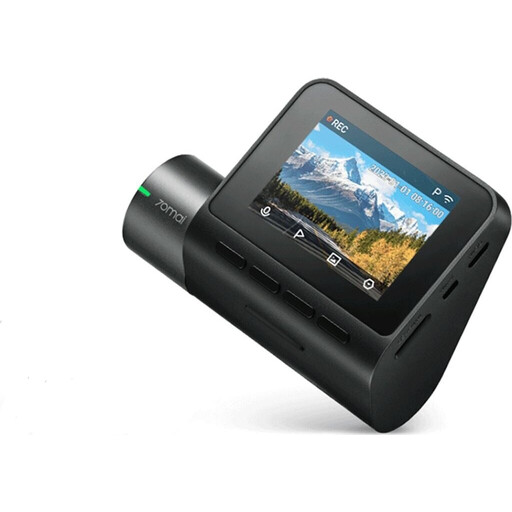
Why this choice suits this profile: This front-only version is aimed at drivers who want a simple setup for their daily journeys, without installing a rear camera.
The listing clearly states it's a front-only camera and that neither the rear camera nor the microSD card are included – so you can buy these items separately.
Front recording in 1080p at 60 FPS in single-channel mode, HDR, Wi-Fi, 2-inch IPS screen and G-sensor.
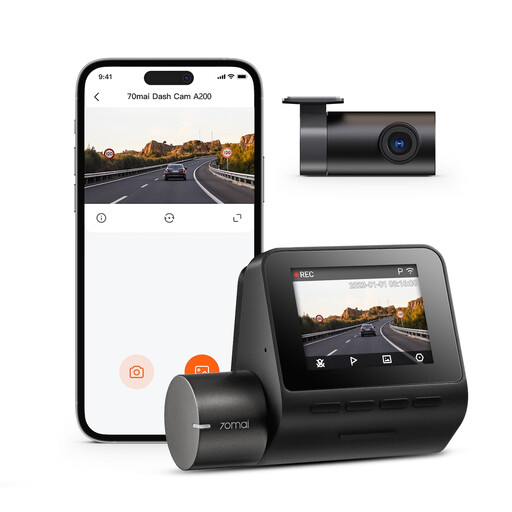
Why this choice suits this profile: The front-and-rear bundle is aimed at drivers who want wider coverage and a more complete installation in their vehicle.
The RC11 rear camera is included, unlike the front-only version. The microSD card still needs to be bought separately, as the listing clearly states.
Two cameras in 1080p, stated 130-degree angle, HDR, night vision, Wi-Fi, 2-inch IPS screen and G-sensor.
Why this choice suits this profile: Drivers who are on the road often, park in busy areas or cover long distances may benefit from recording in both directions.
The rear camera reduces the blind spot of a front-only setup. However, you'll still need to plan for routing the rear cable and a suitable memory card.
Front-and-rear coverage, front recording stated at 60 FPS in the appropriate mode, HDR, Wi-Fi and event file creation via the G-sensor.
We've put together a comprehensive, real-time updated selection of products that meet these strict criteria as well as European safety requirements.
The product listing states that the microSD card is not supplied. You will therefore need to provide one to record and store your videos. Check the manufacturer's manual for compatible capacities and models.
No. The front-only version includes the A200 camera, while the 70mai Dash Cam A200-1 Dual model includes the RC11 rear camera and its signal cable. Check the package contents before ordering.
The built-in Wi-Fi connection lets you access videos from the 70mai app. The 2-inch IPS screen is mainly used to check the camera status and browse menus. To keep evidence, download the footage to your phone, then make an additional copy.