
Livraison le jour même ou le lendemain

Qualité garantie

Débloquez vos offres de bienvenue: Livraison GRATUITE | Jusqu'à -80 % | 30 jours d'essai gratuits à JoyPlus
Téléchargez l'application
Choosing a new gaming mouse can often feel like an uphill battle. Between spec sheets riddled with jargon and misleading marketing promises, it's easy to get lost and end up regretting your purchase. Too many gamers are lured in by overrated features with no real in-game advantage, while overlooking the criteria that truly make a difference?: performance and comfort.
Before you splurge on the Razer Basilisk V3, or any other model, it's crucial to avoid a few common pitfalls?:
To make an informed choice, focus on the technical specifications that have a direct impact on your gaming experience.
The heart of the mouse is its sensor. The Razer Basilisk V3 is equipped with the Razer Focus Pro 35K Gen-2 optical sensor. Beyond the 35000 DPI, what really matters is its ability to provide precise tracking on a wide variety of surfaces, including glass. It allows for adjustments in 1 DPI increments, offering incredibly fine-tuned control for players looking to optimise their aim. A high-performance mouse must guarantee 1:1 tracking, with no hardware acceleration, so that your movements are translated on-screen with absolute fidelity.
A mouse should be an extension of your hand. The Basilisk V3 is a right-handed mouse with a shape designed for long-lasting comfort, whether you use a palm grip or a claw grip. Its 11 programmable buttons are a major asset, provided you make good use of them. The multi-function trigger, easily accessible with your thumb, is particularly useful for quick actions like push-to-talk or on-the-fly DPI switching. A good programmable gaming mouse also depends on its software?: Razer Synapse allows you to remap every button and create complex macros.
The details often make the difference. The Basilisk V3 stands out with its smart scroll wheel, the famous Razer HyperScroll. It offers three modes?: a tactile, notched scrolling mode, perfect for weapon selection?; a free-spin mode for scrolling through inventories at high speed?; and a smart mode that automatically switches between the two. For clicks, it uses 3rd-gen Razer optical switches. Their advantage is twofold?: near-instant actuation (0.2 ms) and a rated durability of 90 million clicks, as the lack of mechanical contact protects them from wear and tear.
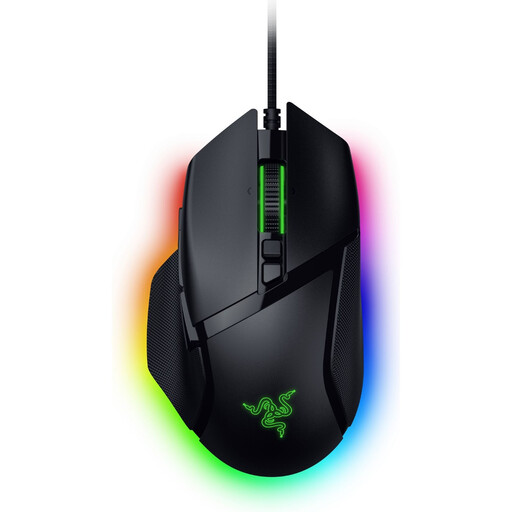
Why it's a great fit: Ideal for players who switch between FPS, MOBA, and RPG titles. Customisation is king here, from the RGB gaming mouse lighting via Razer Chroma to the configuration of the 11 buttons and the smart scroll wheel.
Its 11 buttons are ergonomically placed, and the trigger is a real bonus. The Speedflex cable makes the wired experience almost unnoticeable, combining responsiveness with freedom of movement.
The HyperScroll smart wheel is its secret weapon : a rare versatility that's as useful in-game as it is for web browsing or office work.
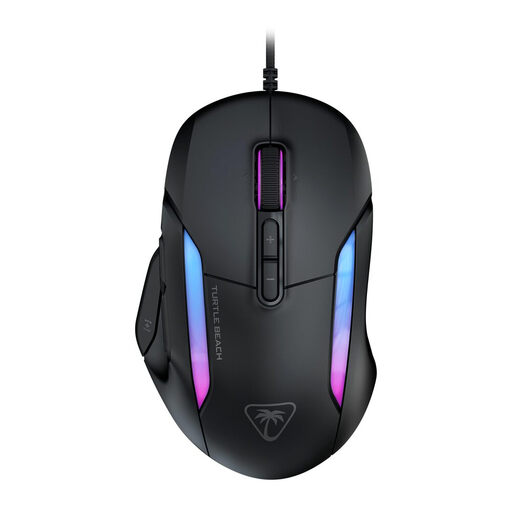
Why it's a great fit: For gamers who want a proven ergonomic shape and maximum controls without cluttering the mouse with physical buttons. Its light weight (82g) is an asset for wide, fast movements.
Rather than adding more physical buttons, it uses Easy-Shift[+] technology to double the functions of existing controls. The result : 23 programmable actions, all intelligently accessible.
The Easy-Shift[+] technology and the 4D wheel (click, vertical scroll, and side tilts) offer incredible customisation depth for complex games like MMOs or Battle Royales.
We have compiled a complete, up-to-date list of products that meet these strict selection criteria and safety regulations.
Yes, it's an excellent option in the best gaming mouse for FPS category. Its precise sensor, ultra-responsive optical switches, and programmable trigger offer tangible advantages. However, its weight of 101g is something to consider. Players accustomed to lightweight mice (under 80g) might find it a bit heavy for wide, fast sweeps.
The Razer HyperScroll wheel is one of its biggest strengths. It has three modes, selectable via a dedicated button just behind it?:
The mouse is plug-and-play for basic use right out of the box. However, to unlock its full potential, installing the Razer Synapse software is highly recommended. It will allow you to?: