
Livraison le jour même ou le lendemain

Qualité garantie

Débloquez vos offres de bienvenue: Livraison GRATUITE | Jusqu'à -80 % | 30 jours d'essai gratuits à JoyPlus
Téléchargez l'application
Choosing a new gaming mouse can quickly become a headache. Between the technical jargon, marketing promises, and sometimes flashy designs, it's easy to get lost or end up regretting your purchase. As a product expert at Joybuy, my mission is to cut through the noise and give you clear, concrete advice. Let's break down the common pitfalls and the criteria that truly matter to find the mouse that's right for you.
The market is flooded with features that look impressive on paper but are often useless, or even counter-productive, in daily use. Here are the three most common mistakes.
The ultimate marketing heavy-hitter is the race for higher DPI (Dots Per Inch). We see models proudly advertising 30,000, 45,000 DPI, and even more. In reality, a high-DPI mouse is absolutely no guarantee of performance. Most gamers, including e-sports pros, set their sensitivity between 800 and 3200 DPI. An astronomical number is often unusable in practice and says nothing about the actual quality of the sensor. The precision and reliability of the tracking are far more crucial than the maximum sensitivity.
The current trend is towards feather-light gaming mice, some of which weigh less than 60 grams. This is an undeniable advantage for FPS (shooter) games, where every millisecond counts. However, for strategy games (RTS), MMOs, or even office work, a slightly heavier model often provides better stability and more precise control. A mouse that's too light can also feel flimsy and lack substance in your hand.
A wireless gaming mouse promises complete freedom of movement, that's a fact. But be careful, as not all technologies are created equal. Entry-level models can suffer from latency, interference, or laughable battery life, completely ruining your gaming experience. It is therefore essential to check the wireless technology used (2.4 GHz RF remains the standard for gaming) and the advertised battery life under real-world conditions, not just on standby.
To make the right choice, focus on these three essential parameters instead.
Rather than the raw DPI figure, look at the quality of the optical sensor. Names like the Razer Focus Pro or the ASUS ROG AimPoint are trusted performers. They ensure perfect tracking, without unwanted hardware acceleration or spin-outs, even during the swiftest movements. The sensor's ability to work on a wide range of surfaces, including glass, is also a significant plus.
The ideal weight depends on your favourite games and your grip style.
The shape of the mouse is just as crucial. An ergonomic mouse suited to your grip style (palm, claw, or fingertip grip) will reduce fatigue during long gaming sessions.
The polling rate, measured in Hertz (Hz), is the number of times per second the mouse reports its position to the computer. For competitive gaming, a minimum of 1000 Hz is now the standard for flawless responsiveness. The most advanced pro-gaming mice go up to 8000 Hz, for nearly imperceptible latency. If you opt for wireless, prioritise proprietary technologies like Razer HyperSpeed or ASUS ROG SpeedNova. They guarantee a connection as stable and fast as a wired one.
Instead of an endless list, here are a few standout models for specific player profiles, applying the criteria we've just discussed.
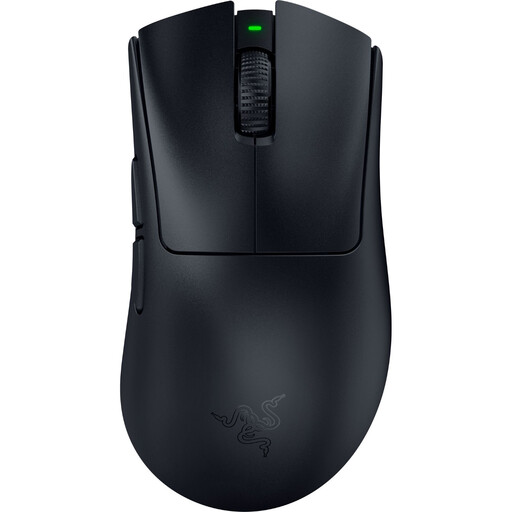
Who is it for? For FPS players who want to maximise their speed and responsiveness. Its feather-light weight and near-zero latency wireless technology are decisive advantages in competition.
It doesn't bet everything on DPI, but on tangible assets: an optimised weight (56g) and an 8000 Hz wireless technology that make a real difference in-game.
Feather-light weight and 2nd Gen Razer HyperSpeed Wireless technology for absolute responsiveness.
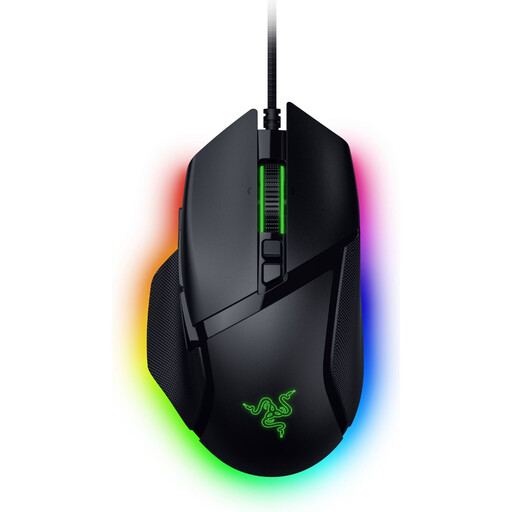
Who is it for? Perfect for MMO and strategy players, or those who juggle gaming and productivity. Its numerous programmable buttons and smart-reel scroll wheel make it incredibly versatile.
It embraces its weight (101g) by focusing on formidable functional versatility (13 controls, smart-reel wheel) that makes it indispensable far beyond just gaming.
Razer HyperScroll Tilt Wheel and multi-function trigger for absolute control.
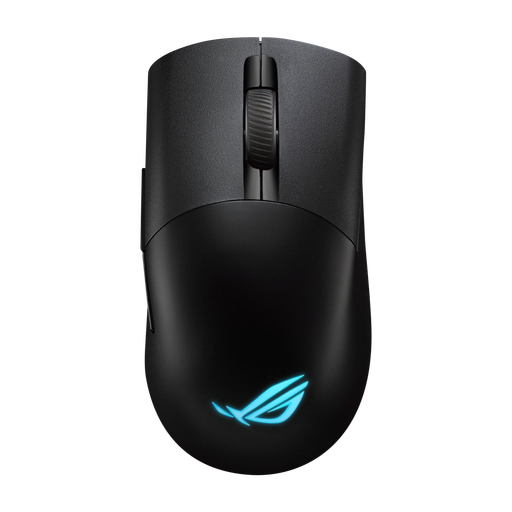
Who is it for? For enthusiasts who love to tinker and fine-tune their gear to perfection. The ability to swap out switches and its triple connectivity make it a future-proof and durable model.
It focuses on useful customisation (the click feel) rather than gimmicks like over-the-top RGB gaming mouse lighting. Here, performance and feel take precedence.
Hot-swappable Push-Fit II switch sockets and triple connectivity (2.4 GHz RF, Bluetooth, Wired).
We have curated a complete range of products that meet our selection criteria and the strictest quality standards.
The longevity of a gaming mouse primarily depends on the quality of its switches. Models from major brands like Razer or ASUS ROG feature optical or mechanical switches rated for tens of millions of clicks (often between 60 and 100 million). Under normal use, a well-made mouse can easily last you for several years.
No. For the vast majority of gamers, a stratospheric DPI number is unnecessary. Most e-sports pros set their mice between 800 and 1600 DPI to favour precise and controlled movements. Higher sensitivity might be useful on very large monitors (4K and above) or for certain game genres, but the quality of the sensor remains the number one criterion for performance.
For regular maintenance, a simple soft, dry microfiber cloth is enough to wipe the shell and buttons. For harder-to-reach areas, like crevices or around the sensor, a can of compressed air can be used with caution. Avoid cleaning liquids or chemical products at all costs: they could damage the electronics and the mouse's coatings.