
Livraison le jour même ou le lendemain

Qualité garantie

Débloquez vos offres de bienvenue: Livraison GRATUITE | Jusqu'à -80 % | 30 jours d'essai gratuits à JoyPlus
Téléchargez l'application
Whether you're a gamer seeking ultimate responsiveness, a professional cranking out lines of code, or an enthusiast of beautiful setups?: the mechanical keyboard is the centerpiece that can radically change your daily experience. The problem?: the market is a jungle of marketing promises and opaque spec sheets. The risk?? Ending up with a peripheral that doesn't suit you at all. Our mission is to cut through the noise and give you the keys to making the right choice.
Before you even start looking at models, it's crucial to know the most common mistakes that lead to buyer's remorse.
custom mechanical keyboards, are sold with an American QWERTY layout by default. If you're in the UK or another region, buying without checking could leave you with the wrong symbols or a different physical key shape (like the Enter key). For most users, a standard QWERTY layout for their specific region is non-negotiable.wireless gaming keyboard promises a clean desk setup, but not all technologies are created equal. A Bluetooth connection can introduce deal-breaking latency in games, while a weak battery will force you to keep it plugged in permanently... which defeats the whole purpose of going wireless.To avoid these pitfalls, your decision should rest on three pillars that will determine if a keyboard is truly right for you.
The switch is the mechanism under every keycap. It defines the typing feel, sound, and responsiveness of the keyboard. There are three main families:
office keyboard.Some models are also hot-swappable, which allows you to change the switches without any soldering. This is a fantastic feature for enthusiasts who love to experiment and fine-tune their typing experience.
The size of your keyboard directly impacts your desk ergonomics and which keys you have access to.
TKL keyboard, it condenses the function keys and arrow keys next to the main cluster. The ideal compromise between compactness and functionality.wireless gaming keyboard.keyboard for Mac). Its potentially higher latency makes it less suitable for fast-paced gaming. The best models, known as "tri-mode," combine all three options for maximum flexibility.Here are a few options that cater to distinct user profiles, applying the criteria we've just covered.

Why It's a Match: Ideal for those who switch between intense gaming sessions and work. Its 75% form factor frees up mouse space without sacrificing essential keys, while its metal volume knob offers media control that's as practical as it is satisfying to use.
It counters the unreliable wireless pitfall with a massive 8000 mAh battery (several weeks of autonomy) and a low-latency 2.4 GHz connection. Heads-up: This type of product often comes in various regional layouts. It's crucial to check the product page to ensure you get the standard QWERTY version for your region.
Tri-mode connectivity (2.4G, Bluetooth, Wired); Hot-swappable switches for easy customisation; Internal structure with dampening foams for a refined typing sound.
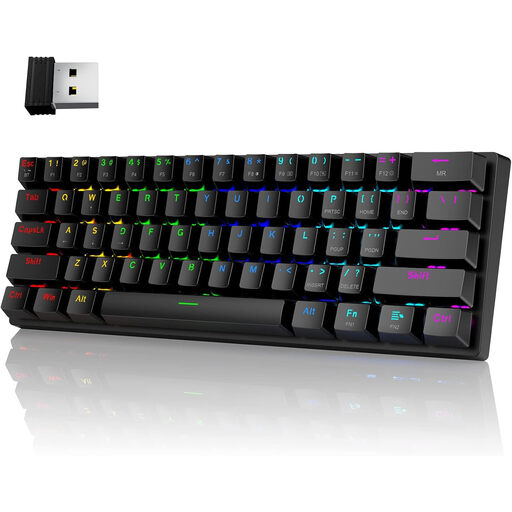
Why It's a Match: For those who prioritise a minimalist workspace and portability. This 60% keyboard frees up maximum desk space and slides easily into a bag. Its tri-mode connectivity makes it compatible with a PC, laptop, or tablet.
It avoids the "fake mechanical" pitfall. This is a true mechanical keyboard, not a membrane imitation, offering an authentic typing feel in an ultra-compact form factor. Like many keyboards of this size, it typically comes in a standard QWERTY layout, which is perfect for developers and power users.
Ultra-compact form factor; 2.4G and Bluetooth wireless connectivity; RGB keyboard backlighting for customisable aesthetics.
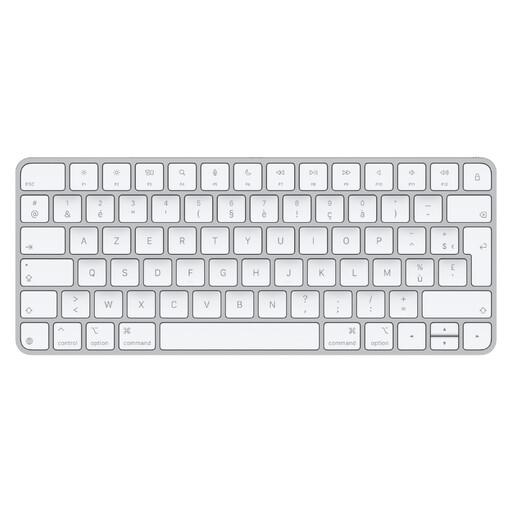
Why It's a Match: For the Apple ecosystem user seeking seamless integration, minimalist design, and ease of use. This keyboard is designed specifically for Mac and iPad devices.
It shatters the layout pitfall by coming in a native French AZERTY keyboard layout. Although it isn't mechanical, it provides a quiet and comfortable scissor-switch typing experience, renowned for its quality.
Seamless integration with macOS and iPadOS; Slim and lightweight aluminium design; Long-lasting rechargeable battery via USB-C; Stable Bluetooth keyboard connection and instant pairing.
Our complete and regularly updated selection brings together products that check all the right boxes for quality and performance.
1. What is the lifespan of a mechanical keyboard? A good quality mechanical keyboard is a long-term investment. Its switches are typically rated for tens of millions of keystrokes (often 50 million or more), guaranteeing many years of heavy use—far beyond that of a standard membrane keyboard.
2. Are mechanical keyboards always loud? Absolutely not; that's a stubborn misconception. The noise depends entirely on the switch type. "Clicky" switches (like Blues) are intentionally loud. Conversely, "Linear" (Red) and "Tactile" (Brown) switches are much quieter and perfectly suitable for an office or late-night gaming sessions.
3. Can you use a gaming keyboard for work? Absolutely. A good mechanical gaming keyboard is often far more ergonomic and comfortable for long typing sessions than a basic office keyboard. By opting for tactile or linear switches and a suitable form factor (like TKL or 75%), you get a work tool that is as high-performing as it is pleasant to use daily.