
Livraison le jour même ou le lendemain

Qualité garantie

Débloquez vos offres de bienvenue: Livraison GRATUITE | Jusqu'à -80 % | 30 jours d'essai gratuits à JoyPlus
Téléchargez l'application
Choosing a mechanical gaming keyboard? It can be a daunting task. Between the opaque technical jargon and marketing promises, it's easy to go wrong. As a product specialist at Joybuy, I'm here to cut through the noise and give you the keys to finding the perfect keyboard for your playstyle and budget.
Before diving in headfirst, here are the three common pitfalls to avoid so you don't regret your purchase:
To avoid these traps, focus on the features that truly make a difference. They are the real DNA of your future PC gaming keyboard's performance, comfort, and lifespan.
This is what dictates the feel under your fingertips and the keyboard's responsiveness. There are three main families:
And let's not forget the newer optical gaming keyboard technology, which detects keystrokes via a light beam. The result: near-instantaneous actuation and virtually zero mechanical wear.
Your keyboard's size has a direct impact on your ergonomics and gaming space.
For English-speaking users, a standard QWERTY gaming keyboard layout is non-negotiable to avoid disrupting your typing habits.
Rather than an endless list, here is our curated selection for specific gamer profiles. The goal: to help you find the model that will truly meet your expectations.
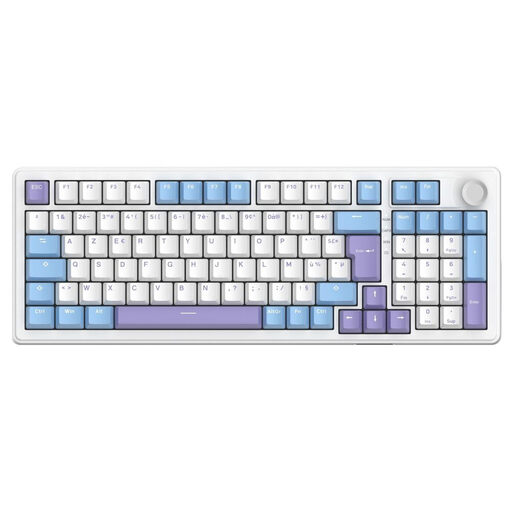
Why it's for you: Perfect for those who switch between intense gaming sessions and remote workdays. Its 96% layout keeps the number pad in a more compact frame, and its triple connectivity (wired, 2.4 GHz, Bluetooth) ensures rock-solid versatility.
It doesn't sacrifice features for a smaller footprint. The 96% layout is the smart compromise that solves the "full-size or TKL?" dilemma.
Its gasket-mount structure and pre-lubed switches deliver a smooth and surprisingly quiet typing experience. The bonus? It's hot-swappable, so you can change switches on the fly.
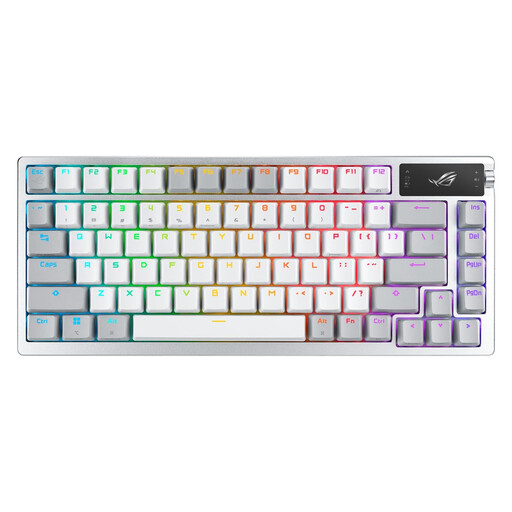
Why it's for you: For the connoisseur who sees their keyboard as the centrepiece of their setup. This model takes customisation to the extreme, with its integrated OLED screen and a complete DIY switch-lubing kit.
It proves that premium design and performance are not mutually exclusive. Far from being mere gimmicks, the OLED screen and lube kit are genuine assets that enrich the experience.
The included lubrication kit and hot-swappable sockets make it an ultra-upgradeable keyboard. Wirelessly, ROG SpeedNova technology guarantees imperceptible latency, on par with a wired connection.
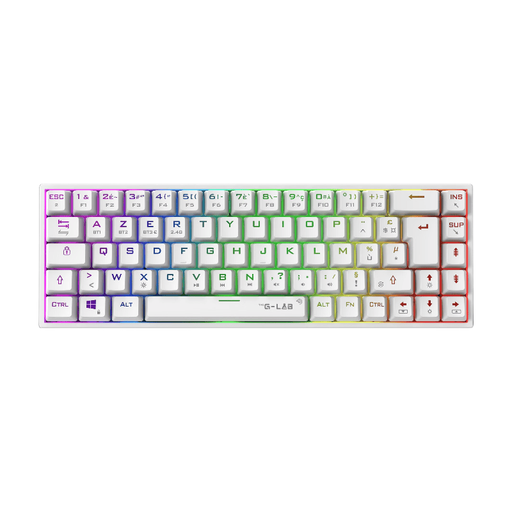
Why it's for you: Ideal for gamers who need maximum mouse room (hello, FPS players!) or are aiming for a clean setup. Its 65% form factor strikes the perfect balance between compactness and essential functions.
It avoids the trap of ultra-compact layouts by keeping the arrow keys, which are often sacrificed on more radical 60% models. A detail that makes all the difference in daily use.
Its dual wireless connectivity (2.4 GHz / Bluetooth) lets you say goodbye to cables. The Outemu Red (linear) switches provide the speed and responsiveness needed for competitive play.
We've put together a complete selection of models that meet our selection criteria and European safety standards.
Absolutely. It all comes down to the switches. A quality switch is rated for 50 to 100 million keystrokes. In other words: years of heavy use, whereas a standard membrane keyboard would have given up long ago.
No, that's a stubborn misconception! The noise depends entirely on the switch type. Linear switches (Reds) are nearly silent, perfect for late-night gaming. Tactile switches (Browns) are also very discreet. Only clicky switches (Blues) fully embrace their characteristic audible "click."
Just a few years ago, wired was non-negotiable for competitive play. Today, quality 2.4 GHz wireless technologies offer latency so low it's become imperceptible, even for a pro gamer. Bluetooth still lags behind with noticeable latency, so reserve it for office tasks. The final choice depends on your desire for a clean desk and your need for mobility.