
Livraison le jour même ou le lendemain

Qualité garantie

Débloquez vos offres de bienvenue: Livraison GRATUITE | Jusqu'à -80 % | 30 jours d'essai gratuits à JoyPlus
Téléchargez l'application
A gaming mechanical keyboard can transform typing comfort and in-game precision. However, product listings do not always tell the full story. Between compact formats, switches marketed as silent, RGB backlighting and wireless connections, highly visible features can sometimes overshadow what matters most.
To avoid an unpleasant surprise in France, start by checking the key layout, compatibility with your computer and the keyboard’s upgrade potential. Here are the points to review before choosing a PC keyboard, gaming keyboard or model designed for office work and everyday typing.
The US QWERTY layout does not place letters or certain symbols in the same positions as French AZERTY. Even if Windows or macOS lets you change the keyboard language, the markings printed on the keys will not move.
For gaming, the difference may remain manageable if you mainly use the Z, Q, S and D keys according to your habits. When working remotely, programming or writing in French, accents, the “@” symbol and certain shortcuts may require a period of adjustment. Always check the physical layout before ordering instead of relying solely on the language mentioned in the title.
A wireless mechanical keyboard frees up desk space, but not all wireless connections perform the same way. Bluetooth is convenient with a laptop, tablet or smartphone. The 2.4 GHz connection with a USB receiver is better suited to immediate PC use, with generally more consistent latency. As for the USB-C cable, it remains essential for recharging the keyboard, installing certain updates or enjoying a stable connection.
A tri-mode mechanical keyboard combines all three options. This versatility is particularly useful on a desk shared by a gaming PC, Mac and tablet. It does, however, usually come at a higher price and introduces one additional consideration: keeping an eye on battery life.
An RGB keyboard adds personality to a desk and can make keys easier to locate in a dark room. It cannot compensate for poor construction, however. The plate, stabilisers, internal dampening and keycap material have a far greater impact on everyday comfort.
PBT keycaps generally resist shine better than conventional ABS keycaps. A gasket mount structure, which places flexible elements between the plate and the case, can make typing softer and better damped. None of this guarantees a perfectly silent keyboard: noise levels also depend on the switches, keycaps and the surface on which the keyboard rests.
The format determines both the keyboard’s footprint and access to its various functions.
A compact keyboard fits easily on a small desk or in a bag for travel. Before choosing a 75% or 80% keyboard, however, make sure it includes the keys you genuinely use in your daily routine.
Linear switches provide consistent resistance without a pronounced tactile bump. They are often preferred for fast-paced gaming and smooth typing. Tactile switches add physical feedback beneath the finger, which can be pleasant when entering long texts. Clicky blue switches, meanwhile, produce considerably more noise: think twice before using them in an open-plan office, bedroom or shared home.
Also check the actuation force, total travel and switch compatibility. A hot-swappable keyboard lets you replace switches without using a soldering iron, provided you choose models compatible with the PCB—generally 3-pin or 5-pin switches. It is a practical feature for customising the typing feel or quickly replacing a faulty switch.
With Windows, macOS, iOS and Android, check the stated compatibility and how the keyboard switches between operating systems. A wired USB-C keyboard eliminates battery-related constraints, while a Bluetooth or tri-mode model provides greater freedom of movement.
For a workstation in France, AZERTY is generally the simplest choice. US QWERTY can nevertheless be perfectly suitable for gamers, developers and users who are already accustomed to it.
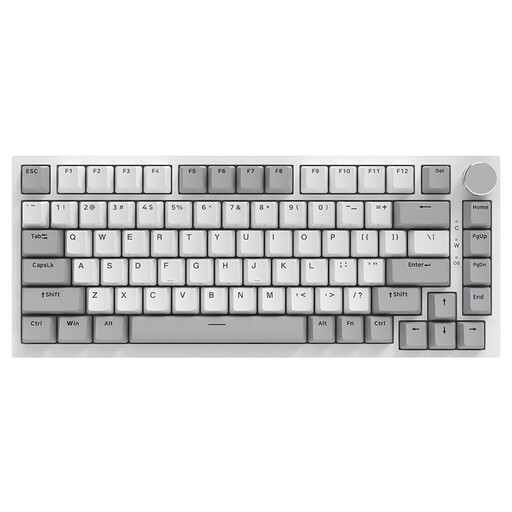
Why choose it: its compact format fits easily on a small desk, in a student bedroom or on a space-constrained gaming setup.
The wired Type-C connection means you never have to worry about recharging. The model also features a gasket structure, PBT keycaps and hot-swappable switches.
75% layout, volume knob, RGB backlighting, Windows and macOS compatibility, and a PCB compatible with 3-pin or 5-pin switches.
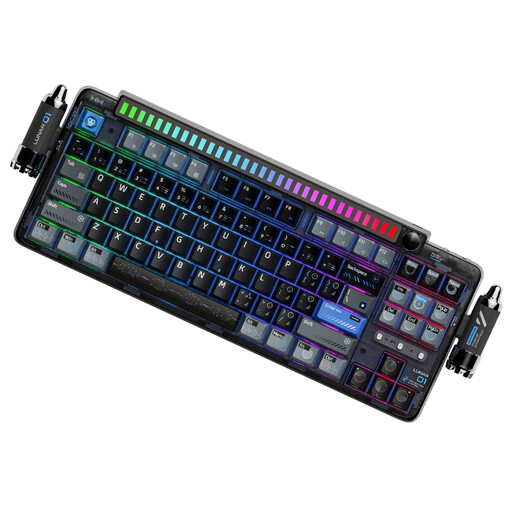
Why choose it: it is designed for users who regularly switch between work and gaming, sometimes across several devices.
The three connection modes let you switch between Bluetooth, 2.4 GHz and USB-C depending on the situation. Hot-swapping also makes it possible to upgrade the mechanical components over time.
4,000 mAh battery, PBT keycaps, 5-pin linear switches, programmable knob and compatibility with Windows, macOS, iOS and Android.
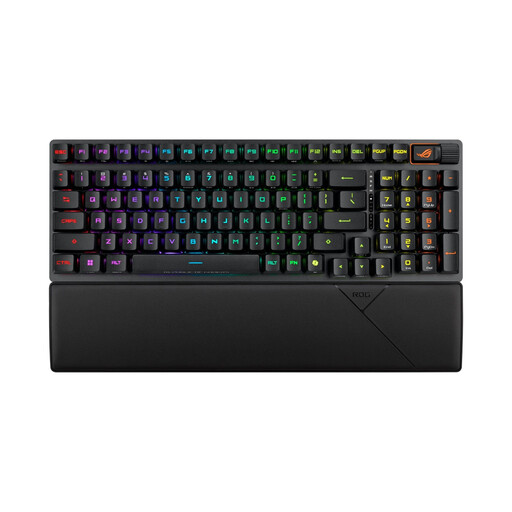
Why choose it: its 96% format retains the numeric keypad while taking up less space than a standard keyboard.
The listing specifies a French AZERTY layout and three connection options: 2.4 GHz, Bluetooth and USB-C. The numeric keypad also eliminates the need to purchase a separate accessory.
RX Red linear optical switches, PBT keycaps, per-key RGB backlighting, multimedia wheel and magnetic wrist rest.
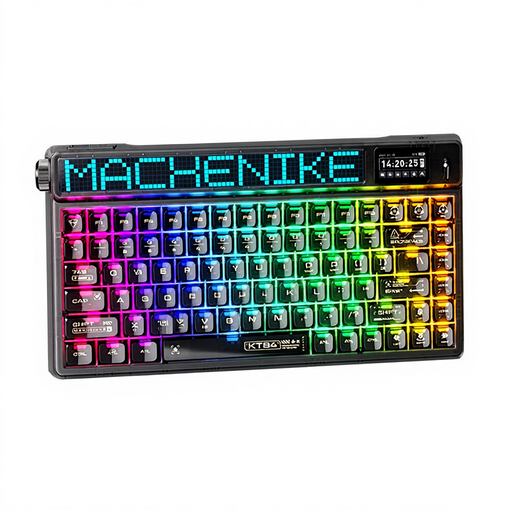
Why choose it: this US QWERTY keyboard is aimed at gamers and setup enthusiasts who value mobility, with an integrated screen as an added bonus.
The listing confirms Bluetooth, 2.4 GHz and wired modes. You can therefore choose the connection best suited to the situation.
75% format, Gateron North Pole 2.0 Yellow switches advertised as linear, backlighting and a dot-matrix TFT display.
Browse a regularly updated selection of keyboards and computer accessories, organised by format, connectivity and intended use.
Yes, provided you choose a suitable format and switch type. Linear switches offer consistent keystrokes, while tactile switches provide more distinct feedback. In a shared space, it is best to avoid clicky switches if the noise could disturb colleagues or housemates. A 75% or 80% format also frees up desk space without sacrificing every useful key.
The stated lifespan varies according to the manufacturer, switch type and conditions of use. Some product listings claim several tens of millions of keystrokes, but this figure alone cannot predict the lifespan of the keyboard as a whole. Maintenance, keeping liquids away and the ability to replace switches or keycaps also play an important role.
For a fixed workstation and predictable latency, a wired USB-C connection remains the simplest solution. Bluetooth is convenient for connecting several devices, such as a laptop or tablet. A tri-mode mechanical keyboard makes the most sense if you regularly switch between these different use cases. Even so, check the stated battery life, charging method and whether the 2.4 GHz receiver is included in the box.