
Livraison le jour même ou le lendemain

Qualité garantie

Débloquez vos offres de bienvenue: Livraison GRATUITE | Jusqu'à -80 % | 30 jours d'essai gratuits à JoyPlus
Téléchargez l'application
An AZERTY gaming keyboard has to balance several requirements: a genuinely French layout, responsive keys, a format that fits your desk, and reliable connectivity. Disappointing purchases aren't always the cheapest ones – they often result from details overlooked before ordering.
An RGB gaming keyboard inevitably catches the eye, but its lighting effects won't speed up your commands. Instead, focus on the type of switches, anti-ghosting, and the ability to programme shortcuts. RGB is first and foremost a customisation feature, though it's also handy for finding keys in a dimly lit room.
A mechanical gaming keyboard can come with linear, tactile, or clicky switches. Red switches, for example, typically offer a linear keystroke with no pronounced tactile feedback. They can feel pleasant in games that repeatedly use the same keys, but their feel is nothing like that of a tactile or clicky switch.
The term "mechanical" alone isn't enough to distinguish between two models. Also check the travel distance, actuation force, noise level, and whether the switches can be replaced.
A full-size keyboard with a numeric keypad takes up noticeably more space than a TKL, 75%, or 65% model. Conversely, a compact keyboard may remove certain keys that are useful for office work or number entry.
A wireless gaming keyboard keeps your desk tidier, but you'll need to keep an eye on charging, the receiver, and the different connection modes. A wired gaming keyboard, on the other hand, is simple to set up and independent of any battery.
In France, look for an explicit mention such as AZERTY FR or French Layout. A different physical layout can alter the position of characters, even if Windows is set to French. Also check compatibility with your equipment: PC, PS5, PS4, Xbox, or macOS depending on your needs.
Anti-ghosting limits errors when several keys are pressed simultaneously. N-Key Rollover means each key can be recognised separately, up to the limit stated by the manufacturer. For action or strategy games, this criterion is far more concrete than a vague promise of "responsiveness".
Product specifications sometimes mention 12 simultaneous keys, 88 keys, or the entire keyboard. Compare this information with your gaming habits.
A wrist rest, adjustable height, or detachable cable can also make a difference during extended use. These features don't replace good posture, but they make your setup more comfortable day to day.
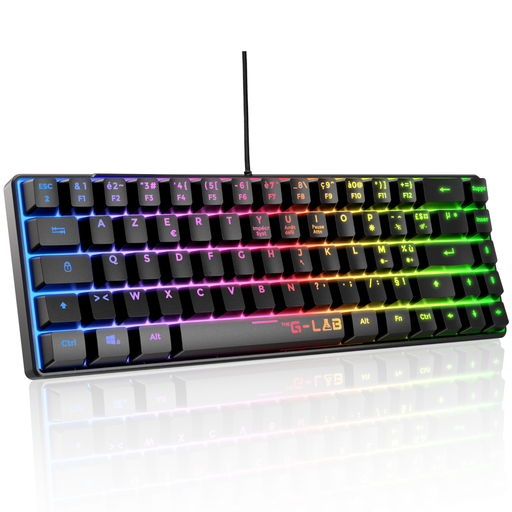
Why this choice suits this profile: this wired mechanical gaming keyboard focuses on a TKL format, linear red switches, and driver-free installation. The manufacturer states compatibility with PCs and consoles.
The specification clearly states the AZERTY format, 87 keys, anti-ghosting up to 88 keys, and the red switch characteristics: 45 g actuation force and 2 mm travel distance.
TKL format, 32 programmable macros, 12 multimedia shortcuts, and a reinforced braided cable.
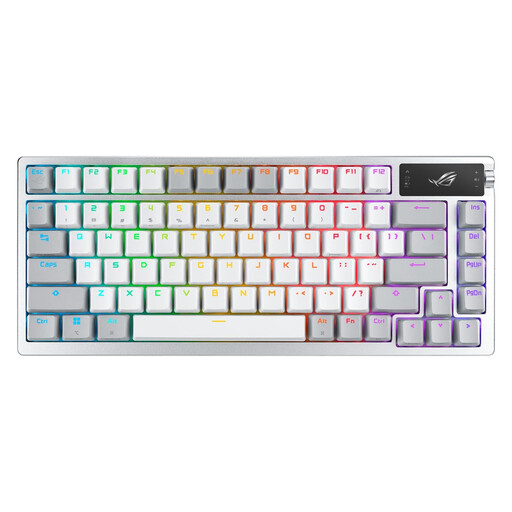
Why this choice suits this profile: its 75% format, 2-inch OLED screen, and 2.4 GHz, Bluetooth 5.1, and USB connections cater to setups that value customisation and versatility.
Its three connection modes prevent reliance on a single use case. The model is also hot-swap: compatible mechanical switches can be replaced without soldering.
OLED screen, control wheel, ROG NX switches, and a claimed battery life of up to 2,000 hours with RGB and OLED disabled in 2.4 GHz mode.
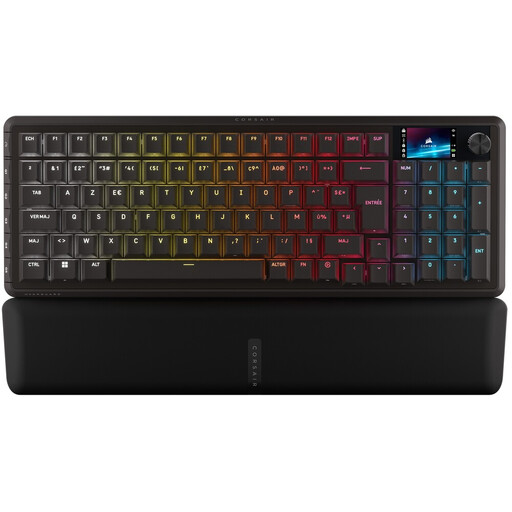
Why this choice suits this profile: this 96% keyboard keeps the numeric keypad in a more compact chassis. It suits gamers who also work with numbers or use custom commands.
The specification mentions 2.4 GHz, Bluetooth, and USB connections, as well as hot-swap magnetic switches. You can switch from wireless to cable depending on the session.
Six programmable G keys, LCD screen, control wheel, double-shot PBT keycaps, and customisation via CORSAIR Web Hub or iCUE.
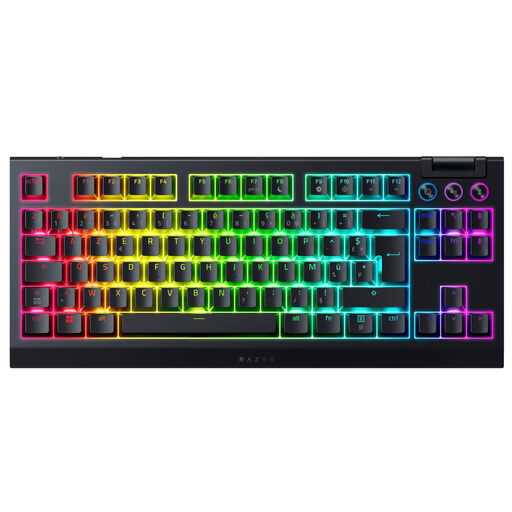
Why this choice suits this profile: its TKL format minimises the footprint, while HyperSpeed 2.4 GHz and Bluetooth connections let you easily switch between devices.
The claimed battery life can reach up to 980 hours, depending on the mode used. The hot-swap circuit accepts 3- or 5-pin switches to change the typing feel.
Razer Orange tactile switches, per-key RGB, multifunction control wheel, and a claimed polling rate of 1,000 Hz.
We've put together a comprehensive list, updated in real time, of products that meet these demanding selection criteria as well as European safety standards.
Plug the keyboard in via USB or pair it via Bluetooth depending on the model, then select French (France) in the Windows language settings. To manage RGB, macros, or profiles, the manufacturer's software may be required. The keyboard will still work in basic mode without a dedicated application.
It depends on the switches, usage, and maintenance. Technical specifications often claim several tens of millions of keystrokes, or even more for certain optical or magnetic models. These figures are provided by the manufacturers and don't guarantee an identical lifespan in every household.
A model using a 2.4 GHz connection with a dedicated receiver can be suitable for demanding gaming use, provided you check the stated latency, polling rate, and battery life. If you'd rather avoid charging and potential interference, a wired gaming keyboard remains a simple and reliable solution.