
Livraison le jour même ou le lendemain

Qualité garantie

Débloquez vos offres de bienvenue: Livraison GRATUITE | Jusqu'à -80 % | 30 jours d'essai gratuits à JoyPlus
Téléchargez l'application
A wireless keyboard can clear clutter from your desk, simplify working from home or turn a tablet into a handy workstation. But some purchases quickly lose their appeal: unfamiliar layouts, battery life that is hard to assess or an unreliable connection depending on the device you use.
Before comparing models, three potential pitfalls deserve your attention.
For everyday use in France, a wireless AZERTY keyboard is generally the simplest choice for Windows. Students, remote workers and families switching between several devices should also check compatibility with macOS, iOS, iPadOS and Android.
The format affects both the amount of space it takes up and your typing habits:
Compact mechanical models may offer replaceable keycaps and several types of switches. However, take the time to check the layout: many mechanical keyboards sold in France use QWERTY, including models designed for gaming.
A Bluetooth keyboard connects directly to many laptops, tablets and smartphones without taking up a USB port. Multi-device functionality lets you switch from one screen to another, provided you check how many devices it supports.
A 2.4 GHz connection usually works through a Nano USB receiver. It is suitable for computers with a USB-A port and avoids the pairing process. On the other hand, the receiver can easily be lost, and USB-C ports may sometimes require an adapter.
A wired USB-C connection lets you recharge certain keyboards while continuing to use them. Tri-mode models generally combine USB-C, Bluetooth and 2.4 GHz, offering useful versatility when you switch between several devices.
A rechargeable keyboard should specify its battery capacity, charging time and, where possible, an estimated battery life. These figures vary depending on the backlighting, frequency of use and connection mode.
A backlit keyboard makes the keys easier to see in a dimly lit room, but the lighting reduces battery life. For both work and gaming, single-colour lighting with several brightness levels may be perfectly sufficient.
For a mechanical gaming keyboard, also check the polling rate, switch technology and whether the keycaps can be replaced. An advertised rate of 1,000 Hz corresponds to a very regular theoretical polling frequency, but it cannot compensate for imperfect compatibility with your computer or poor support from the game you are playing.
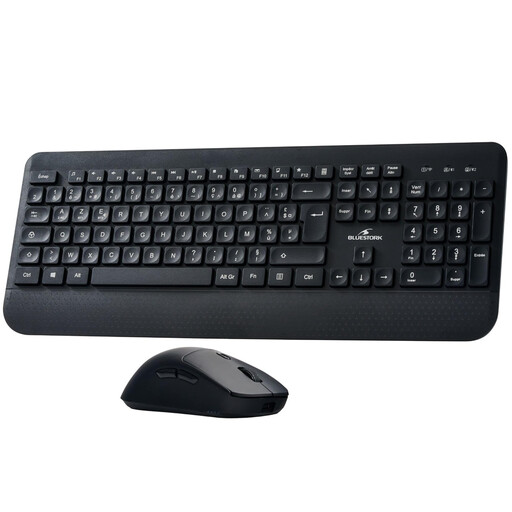
Why this choice suits this profile : This pack combines an AZERTY keyboard and mouse, with Bluetooth and a 2.4 GHz receiver. It is a simple way to equip a first Windows office setup without having to buy the mouse separately.
The AZERTY layout is clearly indicated, and the two connection modes make it easier to use with a device that does not have Bluetooth.
Keyboard and mouse pack, switching between three devices according to the technical specifications, and powered by alkaline batteries.
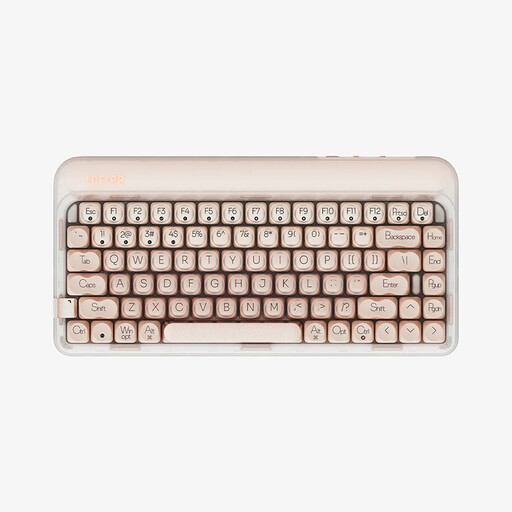
Why this choice suits this profile : Its 75% format and tri-mode connection are ideal for users who want to customise their keyboard while retaining several connection options.
The specifications clearly distinguish US QWERTY, Bluetooth 5.3, 2.4 GHz and USB-C. Make sure this layout suits your typing habits before placing your order.
84 keys, hot-swappable linear switches, a 4,000 mAh battery and warm backlighting with seven effects.

Why this choice suits this profile : With its 68 keys, this compact mechanical keyboard frees up space on a small desk. It connects via Bluetooth 5.1 or USB-C to a Mac, Windows PC, tablet or compatible smartphone.
The specifications state the number of keys, the versions of the compatible operating systems and an advertised charging time of around three hours.
US QWERTY layout, transparent keycaps, Jellyfish linear switches and an integrated 2,000 mAh battery.
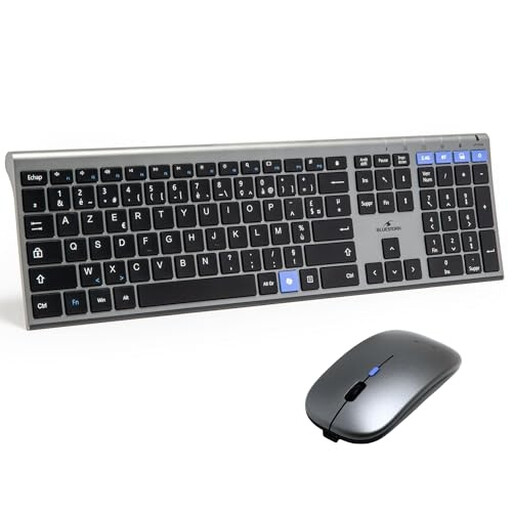
Why this choice suits this profile : This rechargeable AZERTY set combines a keyboard and mouse for a hassle-free office setup, with Bluetooth or 2.4 GHz connectivity.
The rechargeable battery means you do not need to buy batteries regularly. The specifications recommend using a certified 5 V charger together with the supplied cable.
AZERTY layout, integrated lithium battery, shared Nano USB receiver and blue keys on a black background.
We have put together a complete, real-time updated selection of products that meet these demanding criteria, while taking European safety regulations into account.
No. The computer must support Bluetooth and use a compatible version. For a desktop PC without Bluetooth, a model with a 2.4 GHz USB receiver or USB-C connection will often be simpler. Also remember to check the stated compatibility with Windows, macOS, Android and iPadOS.
This depends on the build quality, frequency of use, condition of the keys and battery. A rechargeable keyboard should be protected from moisture and charged using suitable equipment. For a battery-powered model, remove the batteries if it will be stored for a long time to reduce the risk of leakage.
It can reduce the cost of buying batteries, but you should also consider the purchase price, cable and gradual battery wear. A battery-powered model remains a practical choice for occasional use or equipment that needs to be ready immediately. The right choice therefore depends more on how often you use it than on the word ‘rechargeable’ alone.