
Livraison le jour même ou le lendemain

Qualité garantie

Débloquez vos offres de bienvenue: Livraison GRATUITE | Jusqu'à -80 % | 30 jours d'essai gratuits à JoyPlus
Téléchargez l'application
The iPad is an incredibly versatile tool, but to unlock its full productivity potential, an iPad keyboard case is often essential. Whether you're a student, professional, or creative, this accessory can transform your tablet into a genuine laptop alternative. However, the market is flooded with options, and it's easy to fall into common traps that will make you regret your purchase.
As a Product Expert at Joybuy, my role is to help you navigate this jungle. Here are the three most common mistakes to avoid and the essential criteria for making the right choice.
Before diving into features, it's crucial to identify the hidden flaws that can turn a good deal into a purchase you'll bitterly regret.
To avoid these pitfalls, focus on three non-negotiable technical points. This will guarantee a long-lasting investment that's perfectly suited to your needs.
Don't rely on marketing names like "iPad 10" or "iPad Air 2024." The only information that matters is the model number, which starts with the letter "A" followed by four digits. You can find it on the back of your iPad or in Settings > General > About.
Before adding a case to your cart, meticulously check that your device's model number (e.g., A2696 for a keyboard for iPad 10th generation) is listed in the compatible models provided by the manufacturer.
A simple keyboard is good. A keyboard with a trackpad for iPad is a game-changer. Since the arrival of cursor support on iPadOS, a quality trackpad allows you to use Multi-Touch gestures to navigate, select text, and juggle apps without ever touching the screen. Ensure the trackpad is large enough and supports native iPadOS gestures for seamless productivity.
Your choice will depend on your primary use case:
To help you see how these criteria apply in practice, here are a few recommended options, each tailored to a specific user profile.
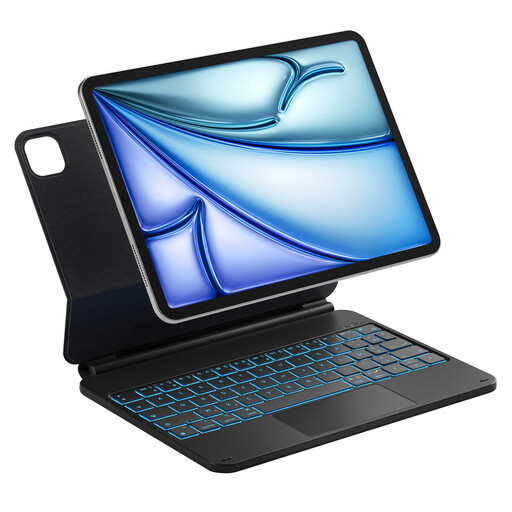
Why we love it: For students and mobile professionals looking for the best balance of features, portability, and price. It transforms an iPad Air keyboard or iPad Pro keyboard into a true mobile workstation.
It checks the two essential boxes: a native AZERTY layout and an ultra-precise compatibility list (by model number), eliminating the two biggest risks of error.
Its "floating" magnetic stand that lets you perfectly adjust the viewing angle, and its 7-color backlight for working day or night.
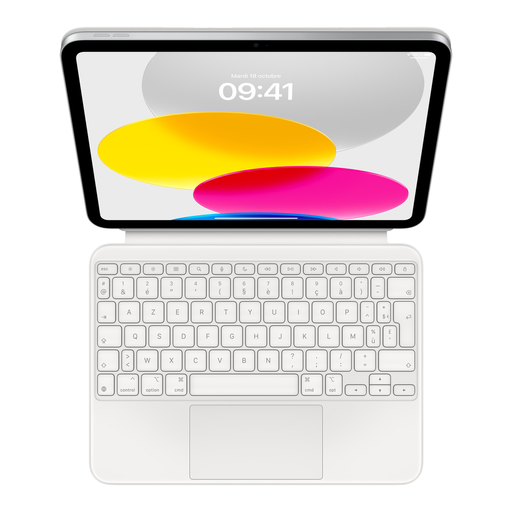
Why we love it: For those who demand seamless integration with the Apple ecosystem, impeccable typing quality, and peace of mind: no battery to charge, no Bluetooth pairing.
Thanks to the Smart Connector, it draws power and data directly from the iPad. Goodbye to battery woes and Bluetooth lag. The correct local layout is, of course, included.
Its two-piece modular design (separable keyboard and protective back panel) and its 14-key function row, a real bonus for accessing system shortcuts.
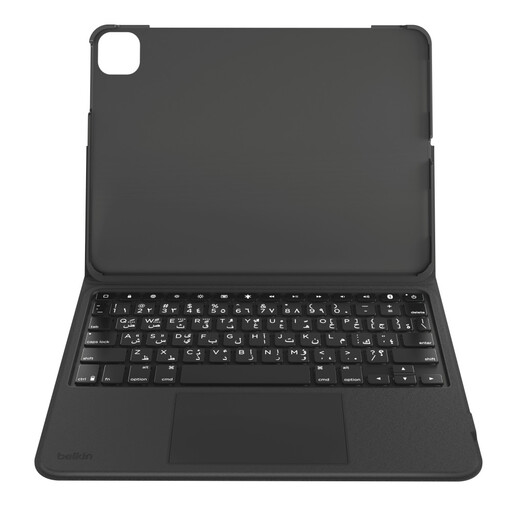
Why we love it: Perfect for those who want total flexibility to switch from "desk mode" for work to "tablet mode" for reading or drawing in an instant, without the keyboard's weight.
Its design with a detachable keyboard is the perfect answer to the problem of one-piece cases, which are often too heavy and bulky in tablet mode.
The versatility of the removable keyboard, the magnetic slot to ensure you never lose your Apple Pencil, and a record-breaking 365-day standby battery life.
Discover our full selection of tested and approved products, all meeting our demanding selection criteria.
Yes, absolutely. For any writing task (emails, reports, note-taking), a keyboard with your local layout is essential for fast, natural typing. Using a foreign layout will force you to relearn key positions and use complex combinations for special characters, which is a real headache in daily use.
The Bluetooth keyboard is the most common solution. It requires an initial pairing with the iPad and has its own battery that needs to be recharged regularly. The Smart Connector is a proprietary Apple technology available on certain iPad models. It consists of three small magnetic contacts that handle both power and data transfer. A keyboard using the Smart Connector has no battery to charge and no pairing to perform: it's ready to go the second you connect it to the iPad.
The only 100% reliable method is to find your iPad's model number. It's engraved in small print on the back of your tablet (e.g., Model A2757). You can also find it in Settings > General > About. Once you have this number, simply check the spec sheet for the keyboard case you're interested in and make sure your model number is listed in the "Compatibility" section.