
Livraison le jour même ou le lendemain

Qualité garantie

Débloquez vos offres de bienvenue: Livraison GRATUITE | Jusqu'à -80 % | 30 jours d'essai gratuits à JoyPlus
Téléchargez l'application
The iPad is a fantastic tool, but to turn it into a true productivity powerhouse, a physical keyboard is often essential. Whether you're a student, a professional on the go, or a content creator, transforming your tablet into a viable laptop alternative comes down to the right accessory. However, the market is flooded with options, and it's easy to fall into common traps that will make you regret your purchase.
As the head of product testing at Joybuy, I'm here to demystify the accessories market for you. Here are the most common pitfalls to avoid and the essential criteria for making the right choice.
iPad keyboard case that seems perfect, only to discover it doesn't fit your iPad generation? It's a classic disappointment. The dimensions and connector placements change subtly from one model to another (iPad Pro, iPad Air, etc.).wireless keyboard whose battery dies after just a few hours of heavy use defeats the very purpose of portability. Constant recharging is a hassle you can do without.To ensure you make the right choice, focus on a few key points that will make all the difference in your daily use.
First and foremost, precisely identify your iPad's model and generation (this information is in Settings > General > About). Once you've confirmed this, you'll have a choice between two main connection types:
Typing comfort is non-negotiable. A good keyboard must, above all, offer a responsive and pleasant feel under your fingers.
keyboard with a trackpad is a game-changer. It allows you to control iPadOS with a cursor, just like on a laptop. It's a dramatic productivity boost for more complex tasks.backlit keyboard significantly improves visual comfort and typing accuracy.To help you make sense of it all, here's how these criteria translate into real-world products, tailored for different user profiles.
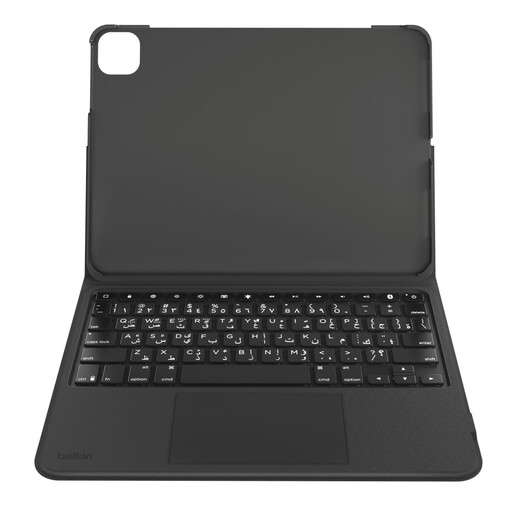
Why we chose it: The perfect all-in-one solution for students and professionals. It protects the iPad, offers comfortable QWERTY typing, and includes a trackpad for smooth navigation, all without breaking the bank.
Custom-designed for the 10.9" iPad (10th gen), it guarantees a perfect fit. Its battery provides excellent life, and its QWERTY layout is natively designed for the English-speaking market.
The keyboard is detachable. This allows you to switch from "laptop" mode to "tablet" mode in an instant, while still keeping the protective case on.
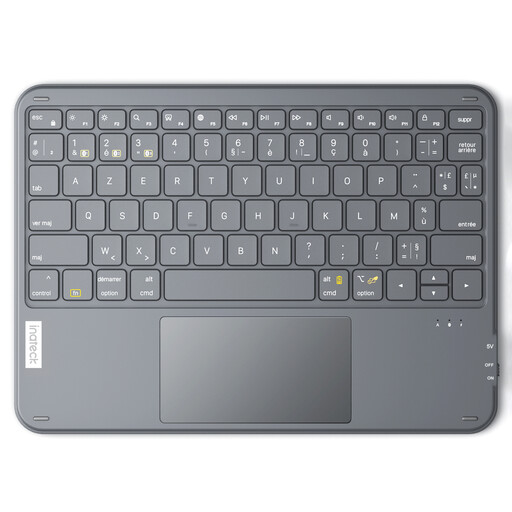
Why we chose it: The secret weapon for those who juggle multiple devices. This ultra-slim and lightweight standalone keyboard connects to an iPad, a smartphone, and a computer, letting you switch between them with a single keypress.
Its universal Bluetooth connection eliminates physical compatibility issues. It boasts record-breaking battery life (up to 150 days on standby, according to the manufacturer) and features a QWERTY layout.
The ability to connect up to 3 devices simultaneously makes it a true central hub for your entire digital ecosystem, all in an ultra-portable format.
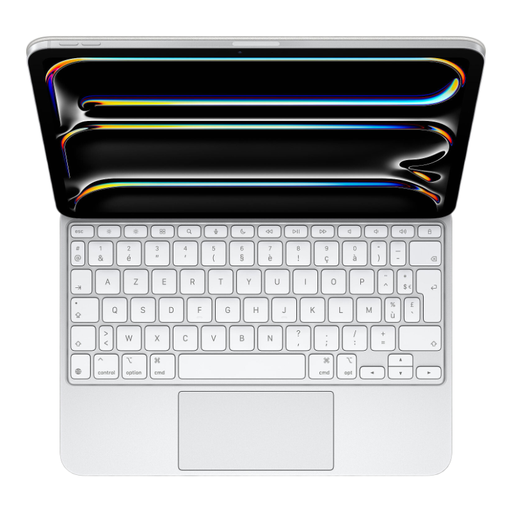
Why we chose it: For iPad Pro owners who accept no compromises. It delivers a first-class typing and navigation experience, perfect software integration, and a design that is in complete harmony with the tablet.
Thanks to the Smart Connector, say goodbye to battery woes or Bluetooth pairing. Designed by Apple for the iPad Pro, the compatibility and fit are simply perfect.
Its large glass trackpad with haptic feedback and the typing quality of its keys (scissor mechanism) provide a user experience nearly identical to that of a MacBook.
We've curated a complete selection of products that meet our demanding selection criteria.
The connection is usually a breeze. Turn on the keyboard and activate its pairing mode (refer to its manual if needed). On your iPad, go to Settings > Bluetooth, make sure Bluetooth is enabled, then tap your keyboard's name in the list of devices. The connection will then be established automatically.
Absolutely. For many users, it's a game-changing feature. A trackpad allows you to control an on-screen cursor, select text with high precision, scroll through pages, and use Multi-Touch gestures to navigate iPadOS. The experience becomes much closer to that of a laptop and can significantly boost your productivity.
A Bluetooth keyboard is a standalone device with its own battery that communicates wirelessly with the iPad. It must therefore be charged separately. In contrast, a Smart Connector keyboard physically connects to the iPad via three small magnetic contacts. It draws power directly from the tablet, and the connection is instant, with no pairing required.