
Livraison le jour même ou le lendemain

Qualité garantie

Débloquez vos offres de bienvenue: Livraison GRATUITE | Jusqu'à -80 % | 30 jours d'essai gratuits à JoyPlus
Téléchargez l'application
An iPad keyboard with trackpad can turn your tablet into a proper work tool for writing, following courses, replying to emails or working on the go. But product listings don't always highlight the most important information. A sleek design or a long list of features doesn't guarantee the accessory will suit your needs.
Before buying a keyboard for your iPad, three common pitfalls keep cropping up:
Start by noting your tablet's model and generation in the iPad settings, then compare this information with what's listed on the accessory's product page. This check is essential for a magnetic iPad keyboard case: the position of the magnets, connectors and buttons must match to the millimetre.
A keyboard advertised for an iPad Pro 11-inch may be compatible with several generations, while an accessory designed for an iPad Air 11-inch might show a different list. Also check the case thickness and whether there's a slot for the Apple Pencil.
A Bluetooth keyboard for iPad or a wireless keyboard usually needs its own battery. So make sure to check:
Models that use the Smart Connector communicate directly with certain compatible iPads and don't need Bluetooth or a built-in battery. Setup is simpler, but you're limited to tablets and accessories that support this technology.
If you plan to write regularly, go for keys with a scissor mechanism, consistent key travel and a layout suited to French. A backlit keyboard for iPad can come in handy on a train, in a dimly lit room or in a shared workspace. However, backlighting can reduce battery life on Bluetooth models.
For an iPad keyboard with trackpad, look at the trackpad size, whether it clicks, and its support for multi-touch gestures. Two-finger scrolling, zooming and switching between apps bring the experience closer to that of a laptop. But a surface that's too small can make precise text selection tricky.
The models below target different uses. The compatibility and functionality details match what's stated on the product pages.
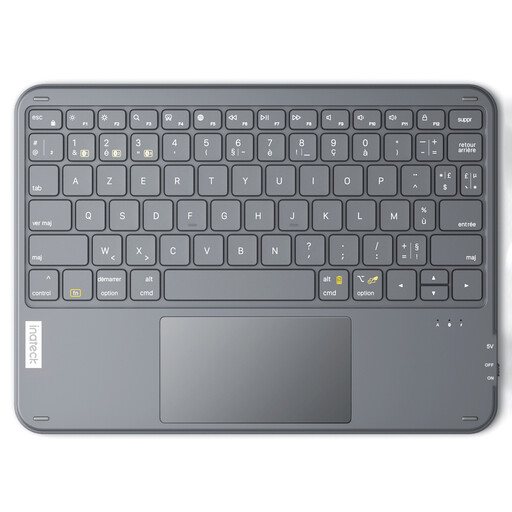
Why this choice suits this profile: This keyboard without a case is aimed at students and users who want to switch easily between an iPad, a computer or a phone. Its slim design and stated weight of 228 g make it easy to carry around.
The listing mentions an AZERTY layout, three Bluetooth channels and iPadOS compatibility. You will, however, need to arrange separate protection for your tablet.
Built-in trackpad, Bluetooth 5.3, switch between three devices and standby battery life stated at up to 150 days.
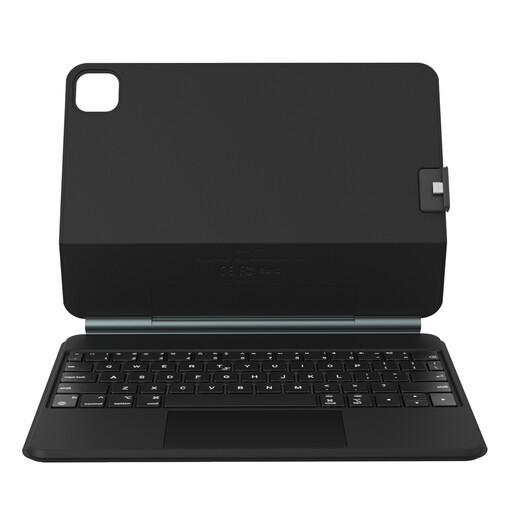
Why this choice suits this profile: This iPad keyboard case is for those who write often, while still wanting to use the tablet separately from the keyboard.
The listing specifies compatibility with the iPad Pro 11-inch as well as several iPad Air models of 10.9 and 11 inches. Still, check your generation before ordering.
Magnetic hinge, detachable back case, multi-touch glass trackpad and use in portrait or landscape modes.
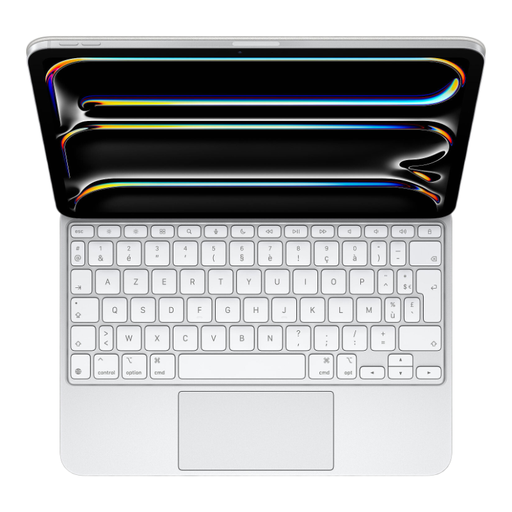
Why this choice suits this profile: It's aimed at mobile professionals with a compatible iPad Pro who want a magnetic connection, a French keyboard and a compact workstation.
The listing clearly states a French layout, compatibility with the iPad Pro 11-inch M5 and a Smart Connector connection, with no Bluetooth or separate charging needed.
Backlit keys, glass trackpad with haptic feedback, 14 function keys and iPad charging via a pass-through USB-C port.
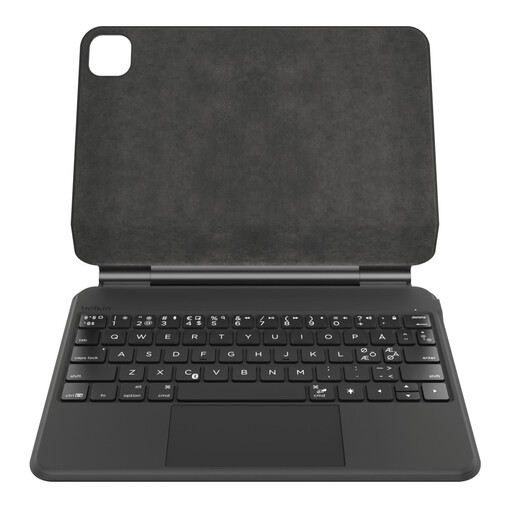
Why this choice suits this profile: This model is for users who switch between writing, browsing and video calls on a compatible iPad Pro 11-inch.
The reference specifies compatibility with the iPad Pro 11-inch M4 as well as an AZERTY layout. As it works via Bluetooth, its battery needs to be charged.
Backlighting, large multi-touch trackpad, magnetic slot for the Apple Pencil and a 600 mAh battery.
We've put together a comprehensive, real-time updated list of products that meet these exacting criteria and European safety standards.
Open Settings > Bluetooth, turn on Bluetooth, switch on the keyboard, then select its name from the list of available devices. With a multi-channel model, first choose the channel you want. Smart Connector keyboards generally don't need any Bluetooth pairing: just align the contacts and compatible magnets.
It all depends on usage, backlighting and battery capacity. Some manufacturers claim very long standby times, but that doesn't necessarily reflect continuous use. To space out charges, turn off the backlight in bright environments and switch off the keyboard when you're not using it for a long period.
That depends entirely on its design. A simple Bluetooth keyboard doesn't protect the iPad. An iPad keyboard case with a magnetic back or flap can protect certain sides, but check the edges that are covered and the hinge's sturdiness. If you carry your tablet around often, go for a detachable structure or add a sleeve when the product listing doesn't mention full protection.