
Livraison le jour même ou le lendemain

Qualité garantie

Débloquez vos offres de bienvenue: Livraison GRATUITE | Jusqu'à -80 % | 30 jours d'essai gratuits à JoyPlus
Téléchargez l'application
The iPad is a fantastic tool, but to unlock its full potential, a keyboard case is often essential. Whether you're writing a report, taking class notes, or just browsing faster, this accessory has the power to transform your iPad into a true laptop. The problem is, the market is flooded with options, and it's easy to fall into a trap, leading to instant buyer's remorse.
As the person in charge of product selections for our editorial team, my role is to help you cut through the noise. Here are the pitfalls to avoid and the criteria to check for a purchase you won't regret.
To avoid these disappointments, you just need to focus on a few key points. It's these often-overlooked details that make all the difference between a genuinely useful accessory and a gadget that's quickly abandoned.
Before you even consider the design, turn your iPad over. On the back, you'll find a model number starting with the letter "A" (for example, A2588). This is your device's unique identifier, its technical ID card.
The keyboard's ergonomics are crucial for your productivity.
Two main families compete:
To illustrate this advice, here are a few models that cater to well-defined user profiles, all while meeting the selection criteria we've just covered.
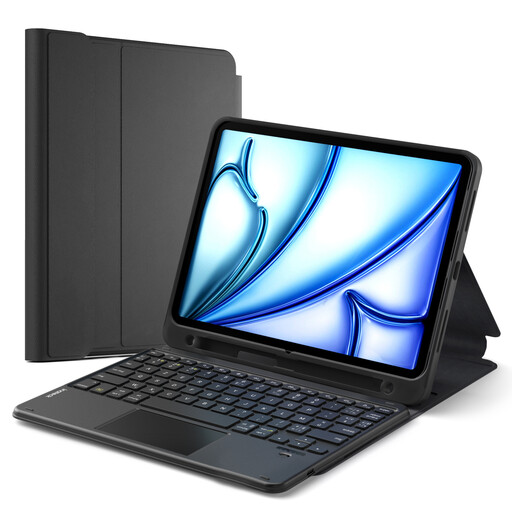
Our take : Perfect for those who juggle between tablet mode and "laptop" mode. Its detachable keyboard allows you to lighten the load when you only need the tablet, while still keeping a protective shell.
The product page precisely lists compatible iPad models (including future A16 models) and confirms the QWERTY layout. Its Bluetooth connection ensures great flexibility of use.
Magnetically detachable keyboard, multiple viewing angles, and a slot for the Apple Pencil.
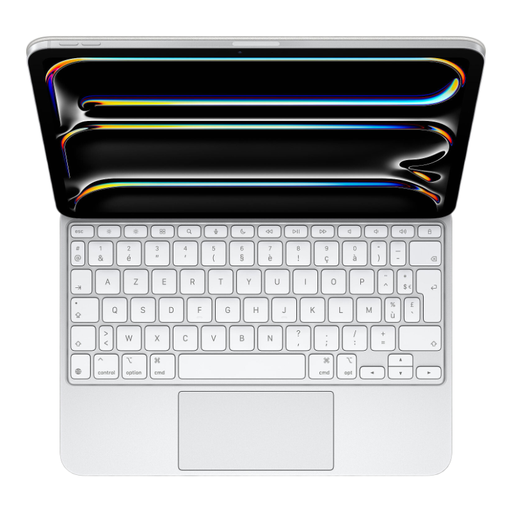
Our take : This is the ultimate solution for those who want to transform their iPad Pro into a laptop, without any compromise. The integration is flawless, the build quality is impeccable, and the user experience is nearly identical to a MacBook's.
Being an Apple product, compatibility with the M5 iPad Pro is perfect. It uses the Smart Connector, which instantly eliminates any worries about Bluetooth connectivity or battery charging.
"Floating" cantilever design for the perfect viewing angle. Glass trackpad with haptic feedback. USB-C port for pass-through charging of the iPad.
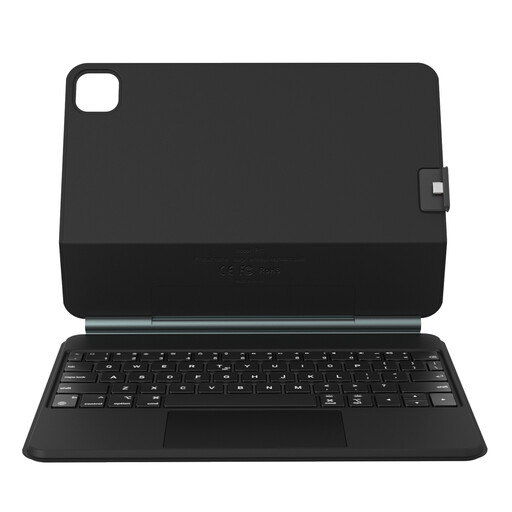
Our take : An excellent compromise that borrows features from premium models (floating design, precise trackpad) but at a much more accessible price point. A smart choice for students or content creators.
Compatibility is clearly displayed for a wide range of 11" iPad Pro and iPad Air models. The Bluetooth connection, combined with the detachable structure, offers maximum flexibility.
Magnetic floating design for an optimal viewing angle. Detachable back cover to switch to tablet mode while maintaining protection.
We've curated a complete selection of products that meet our selection criteria and the demands of the market.
It all depends on the connection technology. A Smart Connector keyboard is powered by the iPad, so its consumption is negligible. A Bluetooth keyboard, on the other hand, has its own battery. The battery life varies wildly, from 40 to over 100 hours of active use. Be aware that activating the backlighting often cuts this duration by half or even a third. Fortunately, most recent models charge via USB-C and have an automatic sleep mode to save power.
Vigilance is key, especially on online marketplaces. Never rely on the main photo alone.
Most keyboard cases offer good 360° protection (front and back) against everyday scratches and minor bumps. They are often made of polyurethane and polycarbonate. However, they never reach the level of ruggedness of a reinforced case designed specifically to withstand drops. It's all a matter of balancing productivity, slimness, and level of protection. For heavy-duty mobile use or on a job site, pairing it with a transport sleeve or opting for a ruggedized model is a safer bet.