
Livraison le jour même ou le lendemain

Qualité garantie

Débloquez vos offres de bienvenue: Livraison GRATUITE | Jusqu'à -80 % | 30 jours d'essai gratuits à JoyPlus
Téléchargez l'application
The iPad is a fantastic tool, but to unlock its full potential, an external keyboard quickly becomes essential. Whether you're writing reports, taking class notes, or just navigating more quickly, a good iPad keyboard can transform your tablet into a credible laptop alternative.
The only problem: the market is saturated with options, making it easy to fall into classic traps that lead to immediate buyer's remorse. As a product expert at Joybuy, my mission is to help you navigate the choices. Here are the mistakes to avoid and the essential criteria to scrutinize.
Before we even talk about specs, it's crucial to know the most common problems—the ones that can make a keyboard frustrating, or even unusable, for daily tasks.
To make an informed choice, focus on these three fundamental parameters. Your daily user experience depends on them.
This is the absolute starting point. Don't just rely on the screen size. For guaranteed compatibility, you need to know the exact model of your iPad.
Settings > General > About. The "Model Name" (e.g., iPad Pro 11-inch (M4)) is a good start, but the "Model Number" (which begins with A, e.g., A2696) is the most reliable reference.There are two main ways to connect a keyboard to your iPad, each with its own pros and cons.
A keyboard is, first and foremost, a tool for typing. Therefore, its comfort is paramount.
Rather than a random list, here are options that cater to specific user profiles, taking into account the criteria we've just discussed.
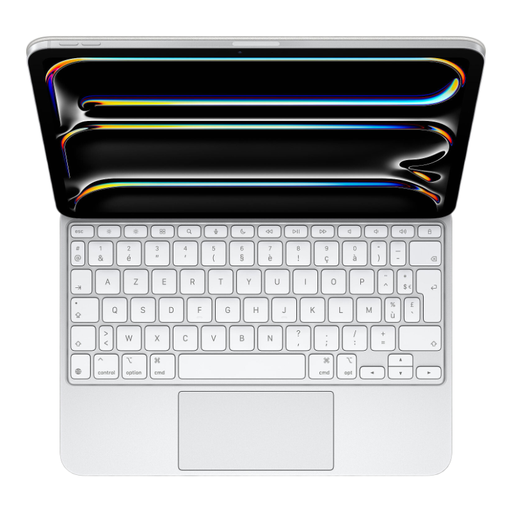
Why this pick? For those seeking a no-compromise experience and wanting to turn their iPad Pro into a true workstation. The integration is total, and the build quality is designed for heavy use.
The Smart Connector connection eliminates any compatibility or pairing issues. Its glass trackpad with haptic feedback is a benchmark for precision, and the AZERTY layout is perfectly integrated into iPadOS.
A fluid and instant user experience. MacBook-level typing quality and trackpad navigation. The USB-C port for passthrough charging is a real bonus.
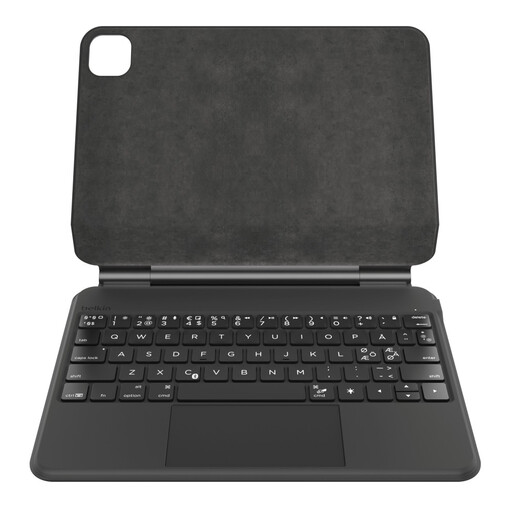
Why this pick? Ideal for students and users who want a complete package (protection, a comfortable keyboard, and a responsive trackpad) without the premium price tag of Apple's solutions.
Belkin is a brand known for its quality accessories. This model offers perfect compatibility with the 10th-gen iPad, a true backlit AZERTY keyboard, and a large trackpad that supports Multi-Touch gestures.
An all-in-one solution that effectively protects the iPad. Impressive battery life (up to 365 days on standby, according to the manufacturer). A well-designed magnetic slot for the Apple Pencil.
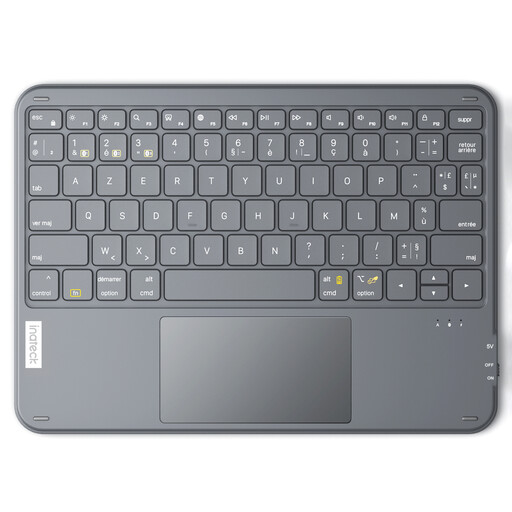
Why this pick? For those who prioritize portability and juggle multiple devices. This standalone keyboard is ultra-slim, lightweight, and can switch between an iPad, a computer, and a smartphone in a flash.
Since it's not a case, there are no fitment issues. It offers a stable Bluetooth 5.3 connection and a responsive trackpad. Its AZERTY design was engineered to ensure comfortable typing despite its slim profile.
Allows you to connect up to 3 devices simultaneously. Extremely portable at only 228g. Compatible with iPadOS, Windows, and Android.
We have compiled a complete and up-to-date selection of products that meet our strict selection criteria and current standards.
1. How can I be sure a keyboard is compatible with my iPad? The foolproof method is to find your iPad's model number (e.g., A2757), which you can find in Settings > General > About. Then, check the keyboard's spec sheet to verify that this model number is on the list of compatible devices. Never rely solely on the year or screen size.
2. What's the difference between a Bluetooth keyboard and a Smart Connector keyboard? The Smart Connector is an Apple technology that provides an instant, magnetic connection with no pairing or battery charging required. It's very convenient, but it limits the keyboard to a specific iPad model. Bluetooth is more universal, allowing you to use the same keyboard with other devices. In return, it requires an initial pairing and periodic recharging of its internal battery.
3. Is a keyboard with a trackpad really worth it on an iPad? Yes, absolutely, for anyone who wants to replicate a laptop experience. A good trackpad lets you navigate the interface, select text with precision, and use iPadOS Multi-Touch gestures without having to lift your fingers to touch the screen. It's a significant productivity boost for office tasks and web browsing.