
Livraison le jour même ou le lendemain

Qualité garantie

Débloquez vos offres de bienvenue: Livraison GRATUITE | Jusqu'à -80 % | 30 jours d'essai gratuits à JoyPlus
Téléchargez l'application
Choosing an original Epson ink cartridge isn’t just about colour or price. The reference must match your printer, your print volume and the documents you produce. Mixing up an Epson 29 cartridge, an Epson 603 cartridge and an Epson 604 cartridge can leave you with a consumable that simply won’t work, even if they look similar.
For households, students, remote workers and small businesses, three common pitfalls keep cropping up: picking a neighbouring reference, confusing standard capacity with high capacity, or comparing page yields calculated under different conditions.
Names like “Claria Home Ink”, Claria Photo HD and DURABrite Ultra describe a type of ink technology, but they don’t guarantee compatibility with your printer. An Epson 29 cartridge works with several Expression Home XP models, while an Epson 603 cartridge is designed for different Expression Home and WorkForce printers.
Always check the full reference on your old cartridge or in your printer’s menu. The exact model – for example, XP-2150 or WF-2850DWF – matters far more than just the Epson brand.
An Epson high-capacity cartridge, such as a 603XL or 24XL, can be a good choice if you print regularly. But it’s not necessarily better for someone who only prints a few pages each month. An opened cartridge stored for too long is more likely to dry out.
On the other hand, in a home office or small business, constantly replacing standard cartridges can quickly become a hassle. So compare the stated page yield, ink volume and cost per page when that information is available.
An original Epson cartridge is designed to work with the recognition system and print head of the specific printer. A compatible printer ink can be an alternative, as long as it’s clearly listed as compatible with the right model.
For example, the compatible Epson 604 magenta cartridge advertised for the Expression Home XP-2200, XP-3200 and XP-4200 is not an original cartridge. You need to check this distinction before buying, especially if you’re looking for an original Epson cartridge.
Before ordering, note down the following information:
References cover a wide range of families: Epson 18 for several older Expression Home models, Epson 29 for certain XP-235 to XP-455 models, Epson 603 for XP-2100 to XP-4105 and several WorkForce printers, or Epson 604 for XP-2200 to XP-4205 models.
Pigment inks are generally used for text and documents that need to resist smudging better. Dye-based inks are often associated with colour and photo printing. Product listings often mention a pigment black ink paired with dye-based colour inks in many multi-packs.
The Epson Claria Home Ink range is designed for everyday home use, while Claria Photo HD Ink equips certain Expression Photo printers. On WorkForce Pro models, DURABrite Ultra and DURABrite Pro technologies use pigment inks, depending on the reference.
The ISO/IEC 24711 page yield provides a common basis for comparison. It’s an estimate made under standardised conditions; your actual results will vary depending on page coverage, print head cleaning and how often you print.
Here are some benchmarks from the references available:
Don’t add these figures together as if they guaranteed a total usage time – each colour is used up at its own rate.
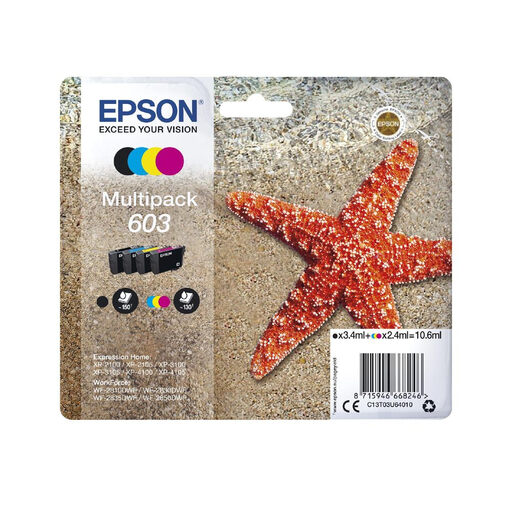
Why this suits this profile: this four-cartridge multi-pack is ideal for school, admin and family printing on compatible Expression Home and WorkForce models.
The 603 reference and list of compatible models are clearly stated, reducing the risk of picking a neighbouring series.
Black, cyan, magenta and yellow pack; stated yield of 150 pages in black and 130 pages per colour according to ISO/IEC 24711.
Why this suits this profile: this cartridge is aimed at Expression Photo users who print images regularly and want a higher capacity.
The 24XL format is clearly identified, with compatibility limited to the specified Expression Photo printers.
Claria Photo HD ink, 8.7 ml volume and stated yield of approximately 740 pages.

Why this suits this profile: this cartridge targets professional environments with a WorkForce Pro WF-6090DW or WF-6590DWF and a high print volume.
The T9072 reference and the two compatible models are specified, so you won’t confuse it with the T9074 yellow.
DURABrite Pro pigment ink, 39.8 ml volume and stated yield of approximately 7,000 pages.
We’ve put together a complete, real-time updated list of products that fully meet these strict selection criteria and European safety regulations.
Take the cartridge out of its packaging just before you install it, then remove the orange protective cap and the seal. Insert it into the slot matching its colour until it clicks into place. Don’t touch the gold contacts – static electricity can interfere with the cartridge recognition.
Store unopened cartridges in their original packaging, away from heat and direct sunlight. Never force a cartridge that doesn’t slide in properly. An Epson 18, 24XL, 29, 35XL, T9072 or T9074 cannot be arbitrarily replaced with another series.
Used cartridges should be taken to an appropriate collection point, such as a recycling centre or a dedicated scheme, rather than thrown in with household waste.
Compare the cartridge reference with your printer’s exact model number. Also check the colour and format. For example, the 603 series doesn’t automatically replace the 604 series, even if some printer models have similar names.
Not necessarily. It can reduce how often you need to replace cartridges if you print a lot, but whether it’s worthwhile depends on the price, the ISO/IEC 24711 page yield and your actual usage. For occasional printing, a standard cartridge may be a better fit.
Claria Home Ink equips several domestic Expression Home printers, with a mix of pigment and dye-based inks depending on the reference. DURABrite Ultra is used in certain WorkForce ranges and uses pigment ink. In both cases, compatibility with your exact model is still the first thing to check.