
Livraison le jour même ou le lendemain

Qualité garantie

Débloquez vos offres de bienvenue: Livraison GRATUITE | Jusqu'à -80 % | 30 jours d'essai gratuits à JoyPlus
Téléchargez l'application
Choosing an original Epson ink cartridge involves more than picking a colour or looking at the price. The right cartridge depends on your exact printer model, the page yield you need and how often you print. An Epson 603 cartridge won’t necessarily fit a printer that uses the 604 series, even if the packaging looks similar.
Whether you’re a household, student, remote worker or small business, three mistakes are especially common: buying an incompatible cartridge, confusing standard and XL capacities, or replacing just one cartridge when a multipack would better suit your printing needs.
Epson Expression Home, WorkForce, Expression Photo, Stylus Pro and EcoTank printers use different supplies. An Epson 29 is designed for certain Expression Home XP models, while the 603 is used in models including the XP-2100, XP-3100 and several WorkForce WF-28xx printers.
Before ordering, check the reference on your old cartridge or in your printer’s menu. Check the colour too: black, cyan, magenta and yellow Epson cartridges each have their own reference and must be fitted in the matching slot.
A standard cartridge can be perfectly suitable if you only print occasionally. But if you regularly print documents, invoices or course materials, having to replace cartridges frequently can soon become a nuisance. Conversely, a high-yield XL cartridge may not be the best choice for a printer used only a few times a month.
Yields quoted under the ISO/IEC 24711 standard provide a useful point of comparison. They are only a guide: ink consumption varies depending on page coverage, printhead cleaning and the type of documents you print.
A compatible Epson ink cartridge can replace a particular reference without being made by Epson. If you choose one, check the reference it replaces, the colour, the yield and whether it has a chip recognised by your printer.
Choosing an original Epson ink cartridge generally means you can stick with the compatibility set-up intended by the manufacturer. You should still check your exact printer model before ordering.
Start by matching the two details: your printer model and the ink series. For example:
This list is a guide only: always check the product details against the model shown on your printer.
Black ink is often pigment-based, making it better suited to documents, while cyan, magenta and yellow inks may be dye-based depending on the series. The 603, 18, 29 and 604 references featured here are separate cartridges, so you can replace just the colour that has run out.
According to the product details, WorkForce Pro 405 and 35XL series use DURABrite Ultra pigment ink. For large-format printing, the T5803 uses UltraChrome K3 pigment ink and is designed for the Stylus Pro 3800 and 3880.
An Epson multipack can save you from having to place repeat orders if your printer regularly uses all four colours. However, check the yield of each cartridge: in a mixed pack, the black cartridge may last longer than the colour ones.
XL packs are also worth checking carefully. For example, the Epson 603XL pack includes one XL black cartridge rated at around 500 pages and three standard colour cartridges rated at around 130 pages each, according to the ISO/IEC 24711 standard. So, it isn’t a pack of four XL cartridges.
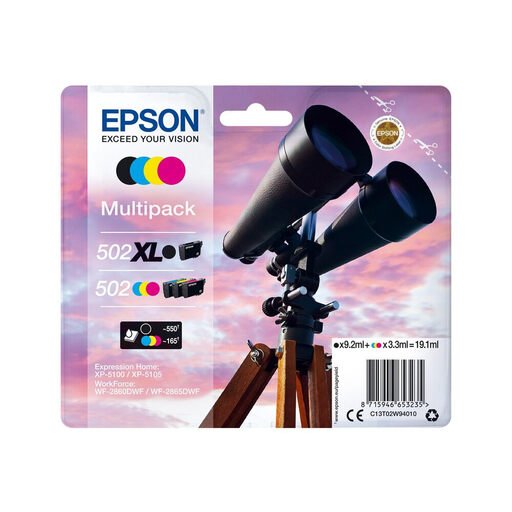
Why it suits this type of user : This four-colour pack is a good choice for a household or student looking to replenish their ink supply in one order, provided they have a printer compatible with Epson 502 cartridges.
The 502 reference and pack contents are clearly listed, helping to reduce the risk of mixing up a colour or ink series.
A pack of four original cartridges, with pigment black ink and separate colour cartridges.
Why it suits this type of user : This magenta cartridge is designed for Expression Photo users who print images regularly and need a higher capacity.
The 24XL format and stated yield of around 740 pages make the cartridge’s capacity clear.
Claria Photo HD ink, 8.7 ml capacity and a separate cartridge for compatible models.
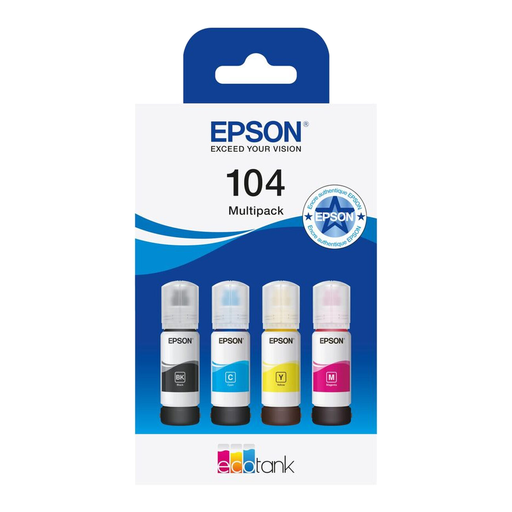
Why it suits this type of user : This pack is for Epson EcoTank users who print frequently at home, while working remotely or in a small business.
The bottles are designed for 104 tanks and colour-coded, helping to reduce filling mistakes when you follow the instructions.
Four 65 ml bottles, giving you 260 ml in total, with a stated yield of around 4 500 pages in black and 7 500 pages per colour according to the ISO/IEC 24712 standard.
We’ve put together a comprehensive, regularly updated list of products that meet these strict selection criteria and comply with European safety regulations.
Only take the cartridge out of its packaging when you’re ready to replace it. Remove the protective strip or film without touching the gold contacts. Insert it into the slot for its colour until it clicks into place.
Keep unopened cartridges in their original packaging, away from heat and direct sunlight. Never pierce a cartridge or mix inks from different sources. Used supplies should be taken to an appropriate collection point rather than put in your household rubbish.
Check the reference on your old cartridge, in the manual or in your printer’s menu. Then compare your exact model with the compatibility list in the product details. The name “Expression Home” or “WorkForce” alone isn’t enough.
Not necessarily. An XL cartridge can be worthwhile if you print often and regularly use the same colour. If you print very little or rarely use your printer, a standard-capacity cartridge may be a better choice than keeping ink for too long.
It depends on the date shown on the packaging and how the cartridge is stored. Once opened, a cartridge should be installed promptly to reduce the risk of the ink drying out. Actual yields also vary depending on page coverage, automatic cleaning and the type of documents you print.