
Livraison le jour même ou le lendemain

Qualité garantie

Débloquez vos offres de bienvenue: Livraison GRATUITE | Jusqu'à -80 % | 30 jours d'essai gratuits à JoyPlus
Téléchargez l'application
Empty cartridge, urgent document to print?? It's a nightmare scenario we've all faced. Changing ink cartridges can quickly become a headache. Between confusing model numbers, packs with vague promises, and marketing jargon, it's easy to make a purchasing mistake. An error that can be costly, and even damage your printer.
Before you click "?Add to Cart?", let's review the pitfalls to avoid when buying an Epson 603XL cartridge multipack.
To leave nothing to chance, focus on these three objective criteria.
Step one?: confirm your cartridge series. The 603 range is easily identifiable by its pictogram?: a starfish. This reference is designed for very specific printer models.
Epson XP-2100 ink, XP-2105, XP-3100, XP-4100 and their variants.cartridge for WorkForce WF-2810DWF, WF-2830DWF, WF-2850DWF, etc.The best practice?: always check that your printer model is listed on the compatibility list on the Epson 603 4-colour pack packaging.
The choice between standard capacity and the XL size depends entirely on your printing volume.
For schoolwork or text-heavy professional documents, the multipack with an XL black cartridge is the smartest choice to reduce your cost per page.
The Epson 603XL multipack uses a hybrid ink technology. Understanding its composition helps you anticipate the quality of your prints.
This dual technology makes this pack especially versatile, equally adept at handling kids' homework and family photos.
The best cartridge is, above all, the one that matches your needs. Here is our selection for three typical user profiles.
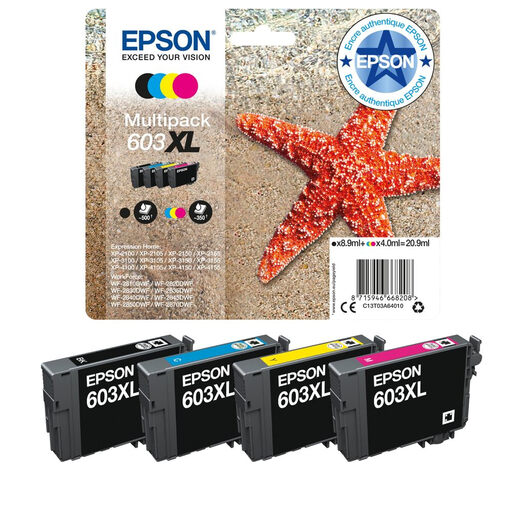
The right choice for : Those who regularly print text documents (reports, coursework, invoices). The high-capacity black cartridge allows for less frequent replacements and optimises the cost per page for black and white printing.
This pack fully justifies its "XL" label with a tangible benefit : the black 603XL cartridge prints around 500 pages compared to 150 for the standard version. The savings are very real for high volumes of text.
Versatility : The pigment black ink ensures flawless, long-lasting text, while the dye-based colour inks make your photos shine. A true all-in-one pack.
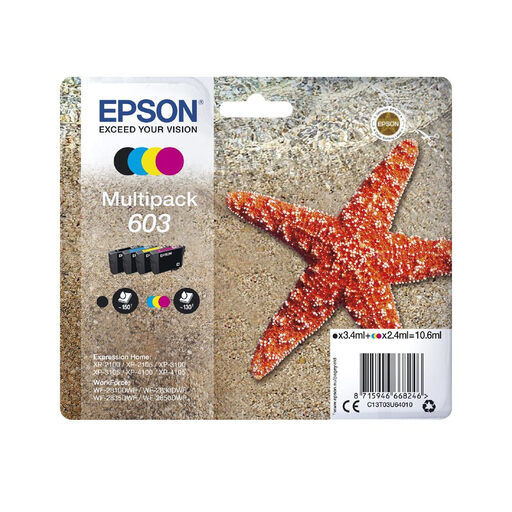
The right choice for : Those who only print from time to time (train tickets, administrative forms...). The initial purchase cost is lower, and you avoid the risk of a large amount of ink drying out from lack of use.
This pack prevents you from overspending. There's no need to invest in an XL capacity if the ink won't be used. The standard size is perfectly calibrated for light use, ensuring a smart purchase.
Budget-Friendly : It's the most affordable solution to get your printer up and running again without breaking the bank. The pack includes all colours for immediate use.
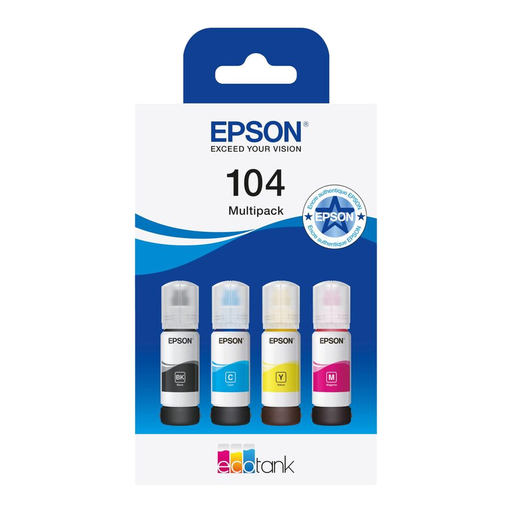
The right choice for : Note, this product is exclusively for owners of Epson EcoTank printers (a different range). It represents the ultimate alternative for very heavy ink users, for whom even XL cartridges are not enough.
It completely shatters the cost-per-page problem. For small businesses or large families, the EcoTank system offers a negligible printing cost, making the very concept of cartridge replacement obsolete.
Record-Breaking Yield : Epson claims up to 4,500 pages in black and 7,500 in colour with a single pack. The keyed filling system (Key Lock) makes colour-mismatch errors impossible.
Discover our full selection of products that meet our selection criteria and market standards.
The difference is huge, especially for the black ink. According to the manufacturer's data (ISO/IEC 24711 standard), a standard 603 black cartridge prints approximately 150 pages, while the 603XL black version reaches about 500 pages. For the colours (Cyan, Magenta, Yellow), the standard version is rated for around 130 pages per cartridge.
As a general rule, no. Epson printers require all cartridges to have a minimum ink level to operate, even for a simple black and white print. This mechanism is designed to protect the Micro Piezo printhead from potential overheating. According to Epson, attempting to force printing with an empty cartridge could damage it. It is therefore best to replace the empty cartridge as soon as the alert appears.
To ensure their effectiveness, keep new cartridges in their original sealed packaging. Store them at room temperature, away from direct sunlight and extreme temperatures (both hot and cold). Ideally, store them upright, as often indicated on the box, to prevent ink from settling and clogging the nozzles. Once installed, it is recommended to use the cartridge within six months.