
Livraison le jour même ou le lendemain

Qualité garantie

Débloquez vos offres de bienvenue: Livraison GRATUITE | Jusqu'à -80 % | 30 jours d'essai gratuits à JoyPlus
Téléchargez l'application
Buying a PS5 Slim is about more than simply looking at the price. Choosing between a digital console and a version with a disc drive, checking accessory compatibility and considering the space available around your TV can all make a noticeable difference to your everyday experience. To help you avoid unnecessary purchases, the Joybuy Product Recommendation Officer will help you separate genuinely useful features from marketing claims.
The PS5 Slim Digital Edition does not have an integrated optical disc drive. It is suitable for players who buy their games from the PlayStation Store, but it cannot play PS5 or PS4 disc-based games, or Blu-ray and DVD films, directly.
The PS5 Slim Standard Edition, on the other hand, includes a Blu-ray disc drive. It allows you to:
Choosing the digital edition simply because it appears cheaper can therefore prove inconvenient if you already own a collection of physical games.
A cover designed for the original PS5 will not necessarily fit a PS5 Slim console. The dimensions, openings and disc-drive position are different. Always check for the wording « PS5 Slim », then make sure that the accessory is designed for either the disc-drive version or the digital edition.
The PS5 Slim disc drive, sold separately, is designed for the PS5 Slim Digital Edition. It does not turn an older digital PS5 into a standard model and should not be confused with a universal external disc drive.
A PS5 Slim fan can improve airflow, but it does not replace essential precautions : keep the console away from heat sources, do not block the vents and leave enough space around the chassis. A closed cabinet or build-up of dust remains a problem, even when you use a cooling accessory.
Start by reviewing your game library. If you mainly buy downloadable titles, the digital edition may be perfectly suitable. If you use discs, a PS5 Slim Standard Edition saves you from having to buy a disc drive separately.
The advertised SSD capacity varies between models. Storage of 825 GB or 1 TB does not correspond entirely to the space actually available for games : some of it is used by the system. As PS5 games are often large, be prepared to delete and re-download certain titles, or add compatible storage in line with Sony’s recommendations.
Check that the essential accessories are included in the box : HDMI cable, power cable, USB cable and controller. The supplied PS5 DualSense controller connects via USB for the initial pairing, then works wirelessly.
The console can be installed horizontally using the supplied support components. For a vertical installation, a compatible PS5 Slim stand provides a more secure fit. Before choosing a stand with lighting, check the following:
A silicone PS5 Slim cover can help prevent scratches and marks caused by everyday use. However, it is not complete protection against a significant fall. The cut-outs must leave the buttons, ports and ventilation openings fully accessible.
For a multifunction accessory, also look at verifiable specifications : number of charging ports, output voltage, disc storage capacity, fan speed and quoted noise level. These details are more informative than a simple cooling claim.
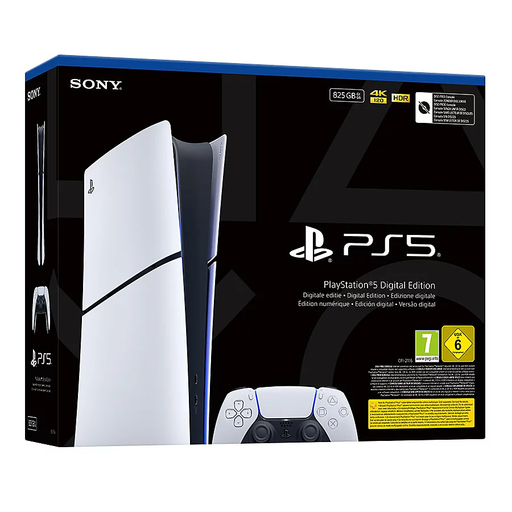
Why this choice suits this profile : this console is ideal for households that download their games and want a compact setup with a controller included.
The listing clearly states that there is no optical disc drive, so you know from the outset that this console is intended for digital games.
Advertised 825 GB SSD, support for up to 4K and 120 frames per second depending on the game and display, plus a DualSense controller included.
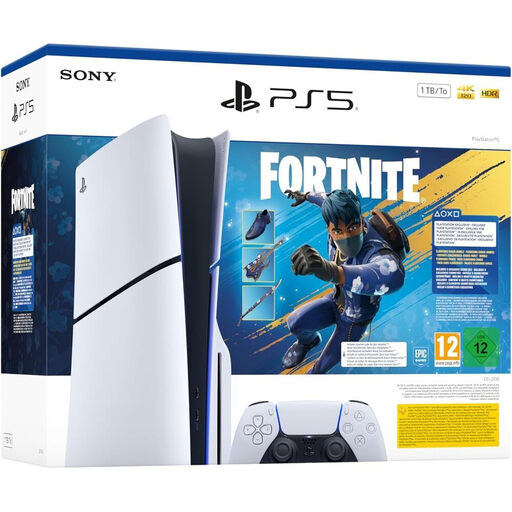
Why this choice suits this profile : its Blu-ray disc drive and advertised 1 TB SSD meet the needs of players who switch between physical games, digital content and films.
The 4K Blu-ray disc drive is integrated, so there is no need to make a separate purchase to play compatible discs.
Blu-ray disc drive, advertised 1 TB SSD, HDMI cable included and Fortnite content stated in the product listing.
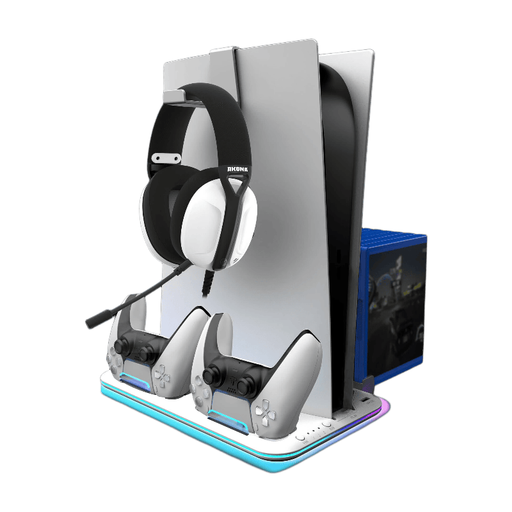
Why this choice suits this profile : this base combines a stand, storage, ventilation and charging for two controllers, making it practical for a family setup or one that is used very regularly.
The listing details three fan speeds, two charging ports and storage capacity for up to 15 discs.
Fan with an advertised noise level of 31.2 dB(A), RGB lighting with 14 effects, headset stand and USB-A output.
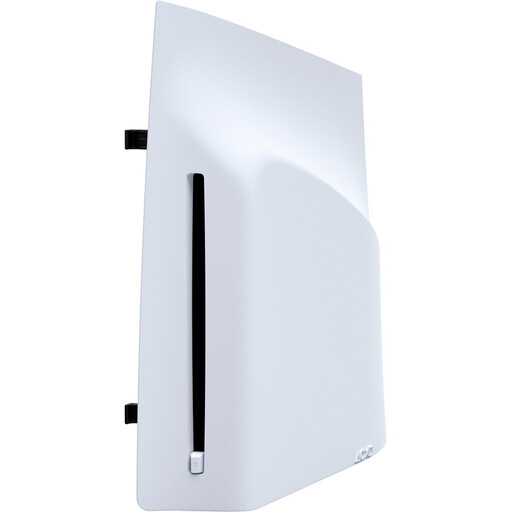
Why this choice suits this profile : this accessory allows PS5 Slim digital owners to add disc playback without changing consoles.
Compatibility with the PS5 Slim Digital Edition is clearly stated. Switch off and unplug the console before installation, then follow the guide provided.
Advertised playback of PS5, PS4, Blu-ray and DVD discs ; tool-free installation and a white design to match the console.
Yes. The PS5 Slim disc drive featured above is stated to be compatible with the PS5 Slim Digital Edition. The console must be switched off and unplugged before installation. Check your console’s model group before placing your order.
It depends on the game being played, the room temperature, ventilation and the condition of the vents. Leave clear space around the console, avoid placing it in a closed cabinet and take breaks during long gaming sessions. An additional fan does not remove the need for these precautions.
Power consumption varies depending on the game, downloads, video playback and rest mode. To reduce your bill, enable automatic shut-off, avoid leaving the console switched on when you are not using it and unplug unused accessories. The actual cost depends on the tariff charged by your electricity provider.