
Livraison le jour même ou le lendemain

Qualité garantie

Débloquez vos offres de bienvenue: Livraison GRATUITE | Jusqu'à -80 % | 30 jours d'essai gratuits à JoyPlus
Téléchargez l'application
Buying a console, controller or PS5 games sounds simple… until you start comparing the different versions, connectivity options and available languages. Between the PS5 Slim, PS5 Digital Edition, PS5 Standard Edition and Sony PlayStation accessories, a compatibility mistake can quickly drive up the total cost.
The PS5 Digital Edition does not include a disc drive. It works with games downloaded from the PlayStation Store, but it cannot play physical PS4 or PS5 games or Blu-ray films. If you already own a boxed-game collection, like lending games to friends or regularly buy pre-owned titles, this distinction is far from insignificant.
The PS5 Slim Digital can nevertheless accommodate a PS5 Blu-ray Disc Drive sold separately. Be careful to choose a model that is compatible with the Slim Digital console. Sony’s CFI-ZDD1 drive is designed for this configuration, not for every PS5 generation.
An advertised capacity of 825 GB or 1 TB does not correspond entirely to the space actually available for games: part of it is reserved for the system. Current titles can take up several dozen gigabytes, even before accounting for updates.
Before choosing, estimate how many games you want to install at the same time and check which expansion solutions the console supports.
A vertical stand, stick module or charging station is not necessarily universal. Sony’s CFI-ZVS1 stand is intended for compatible PS5 Standard and Digital consoles, while the stick module is designed exclusively for the DualSense Edge.
The presence of the PlayStation logo alone is therefore not enough to guarantee compatibility.
Start by comparing the included items carefully:
For family use, an integrated disc drive makes it easier to share games. Conversely, if you buy almost everything digitally, the digital version takes up less physical space, but you will need to keep an eye on available storage and have a sufficiently reliable internet connection.
The PS5 connects to your television via HDMI. To take advantage of the supported display features, check your screen’s specifications: 4K resolution, HDR and refresh rates of up to 120 Hz, depending on the game and equipment. These figures do not mean that every title will run at 120 frames per second.
Also make sure there is enough space around the ventilation openings. Sony recommends approximately 10 cm of clearance to avoid restricting airflow. The vertical stand must be secured with its screw on a stable surface; it does not eliminate the need to keep the console properly ventilated.
The DualSense PS5 controller features haptic feedback, adaptive triggers, a microphone, a 3.5 mm headset jack and a rechargeable battery via USB-C. These features nevertheless depend on game compatibility.
The Cosmic Red model, for example, can be used with PS5, PC, Mac and certain mobile devices via Bluetooth or USB-C.
The DualSense Edge is aimed more at players who want to customise their controls, profiles, stick sensitivity and trigger travel. Its replaceable modules are useful in the event of wear, but they are designed exclusively for this controller.
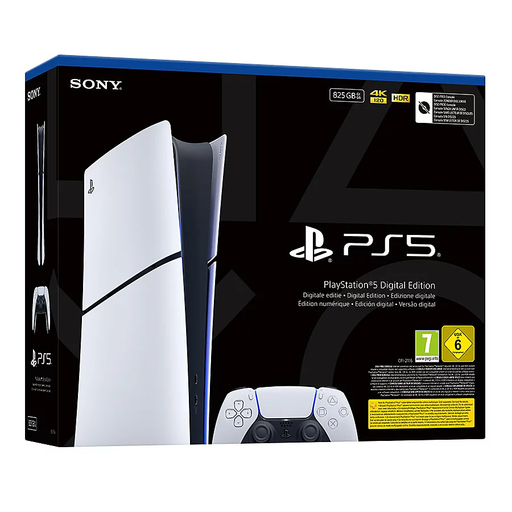
Why it suits this profile: a compact solution for players who buy their games digitally and want to get started with an included DualSense controller.
The product listing clearly states that there is no optical drive, so you are not paying for a feature you do not need.
825 GB SSD advertised, Wi-Fi, Bluetooth, output of up to 4K and an included DualSense controller.
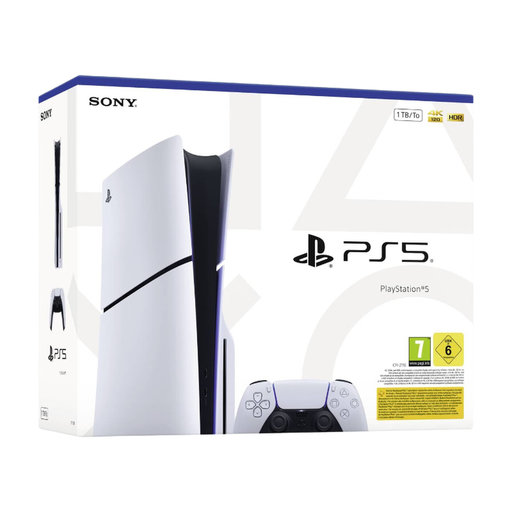
Why it suits this profile: the integrated Blu-ray drive is ideal for households that buy, resell, lend or collect boxed games.
The listing specifies that a disc drive is included: check this before buying physical PS5 games in English.
Blu-ray drive, advertised PS4 backward compatibility and an included HDMI cable.
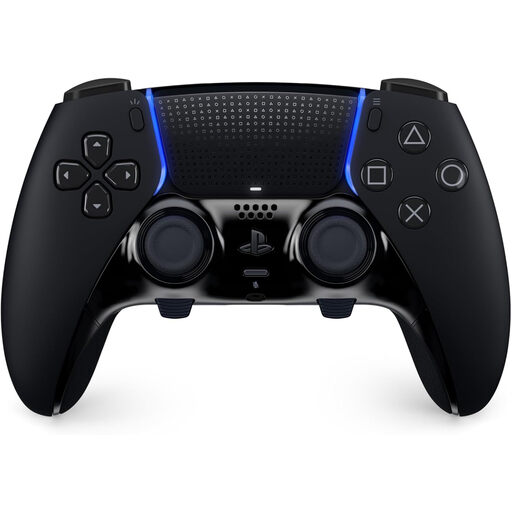
Why it suits this profile: its customisable profiles and interchangeable components meet the needs of players who frequently fine-tune their settings.
The dedicated stick module can be replaced if necessary. Do not confuse it with the module used by a standard DualSense controller.
Three saveable profiles, Bluetooth or USB-C connectivity and several stick caps included.
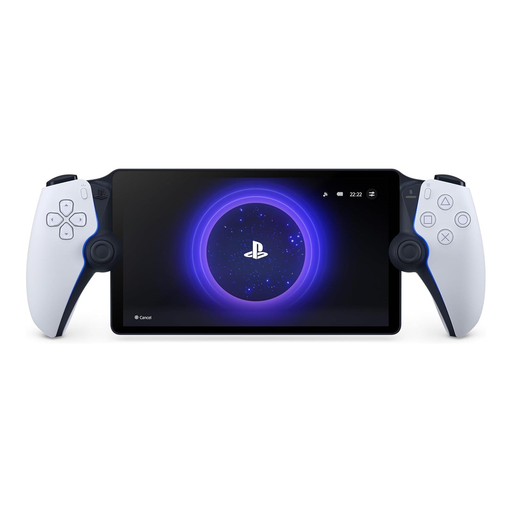
Why it suits this profile: this device lets you play remotely from your PS5 while the TV is in use, provided you have a stable Wi-Fi network.
This product is not a standalone console: it requires a PS5 and a suitable Wi-Fi connection.
8-inch touchscreen LCD, grips with integrated DualSense features and an included USB-C cable.
We have put together an updated selection of PS5 consoles, games and accessories that meet these compatibility and usage requirements in France.
A DualSense charging station can charge two controllers simultaneously while freeing up the console’s USB ports. Check that it comes with a power adapter compatible with French sockets, and use it only with the controllers specified.
The PS5 vertical stand is suitable for shallow furniture, provided it is properly secured with the screw. For multimedia use, the Sony PS5 media remote makes it easier to control streaming services and the Blu-ray player without tying up a controller.
Finally, if you are buying PS5 games in English, check the listed language, edition and PEGI rating. The product listings for God of War Ragnarök, The Last of Us Part II Remastered, Uncharted: Legacy of Thieves Collection, Ghost of Yōtei and Marvel’s Wolverine mention an English physical edition, but availability information may change.
No, not without an accessory. The PS5 Slim Digital Edition can be paired with a compatible Sony drive, such as the CFI-ZDD1 model. Always check your console’s model group before placing an order.
The Sony CFI-ZDS1 station can charge up to two DualSense controllers simultaneously. It connects to a power outlet and should be placed on a flat, dry and unobstructed surface.
No. PlayStation Portal streams games from a PS5 over Wi-Fi. The quality of the experience therefore depends on your network connection, the distance from the console and the stability of your home network.