
Livraison le jour même ou le lendemain

Qualité garantie

Débloquez vos offres de bienvenue: Livraison GRATUITE | Jusqu'à -80 % | 30 jours d'essai gratuits à JoyPlus
Téléchargez l'application
Buying a PS5 console, controller or accessory isn’t simply a matter of comparing technical specifications. Between digital editions, models with a disc drive, performance promises and accessories designed specifically for the PS5 Slim, the wrong choice can quickly push up the total cost.
Before placing your order, check three things: the console format, the accessory’s exact compatibility and how you will actually use it. This approach helps you tell the difference between equipment that is genuinely useful and an option that is mainly appealing on paper.
The PS5 Digital Edition has no built-in optical disc drive. It is designed for players who buy their games from the PlayStation Store, but it cannot play physical games, Blu-ray discs or DVDs directly.
With its Blu-ray drive, the PS5 Standard Edition offers greater flexibility: second-hand games, borrowing a disc or keeping a physical collection. If you’re unsure, compare the price of a separate disc drive and check that it is compatible with the model you have chosen before opting for a digital console.
A protective case designed for the PS5 Slim will not necessarily fit an earlier-generation PS5. The same applies to a PS5 Slim disc drive, charging station or multifunction stand.
The wording ‘compatible with PS5’ can sometimes be too vague. Look for detailed information such as: PS5 Slim with disc drive, PS5 Slim Digital Edition, PS5 Standard or PS5 Pro. This check is particularly important for silicone covers, which must leave the ports, buttons and ventilation openings fully accessible.
4K output, up to 120 frames per second or an extremely fast SSD do not, on their own, guarantee the same result in every game. Your television, HDMI cable, in-game settings and the feature’s actual support also play a decisive role.
The speeds advertised for a 4 TB PS5 SSD generally correspond to maximum values measured under specific conditions. They do not necessarily reflect the speed you experience while gaming. You should also allow for a suitable heatsink when required.
For additional storage, the Lexar NM790 4 TB uses the M.2 2280 format and PCIe Gen4x4 NVMe interface. Its specifications state read speeds of up to 7,400 MB/s and write speeds of up to 6,500 MB/s. To install it in a PS5, check that it has a compatible heatsink — or plan to add one — and that it complies with the dimensions permitted by the console.
The PS5 DualSense controller features haptic feedback, adaptive triggers, a microphone and Bluetooth or USB-C connectivity. However, these functions remain dependent on the game’s compatibility.
A second controller is ideal for local multiplayer. Players who want to customise their controls can choose the DualSense Edge, which adds profiles, programmable buttons, several stick caps and adjustable triggers. Its price and level of customisation make it best suited to a specific type of use.
A PS5 steering wheel requires space, a secure mounting solution and, when supplied, a suitable power supply. The Thrustmaster T128-P offers adjustable rotation from 270° to 900°, magnetic pedals and compatibility with PS5, PS4 and PC. The T248R adds an integrated display, more controls and a T3PM pedal set.
To play from another room, the PlayStation Portal relies on a PS5 and a stable Wi-Fi connection. It is not a standalone console: the quality of the experience depends on your home network and the distance between the device and the router.
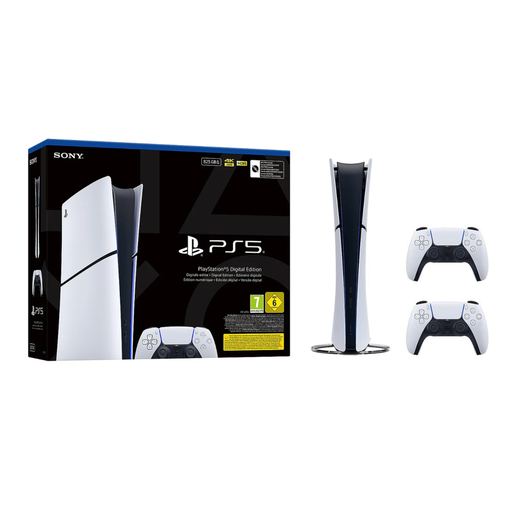
Why this choice suits this profile : This bundle combines a PS5 Slim Digital with a second controller. It is ideal for players who want to start with a digital library and play together.
The digital format is clearly stated, so you cannot accidentally expect a disc drive that is not included. The bundle contents also clearly confirm that two controllers are included.
Compact console, DualSense controller included and everything you need for local multiplayer.
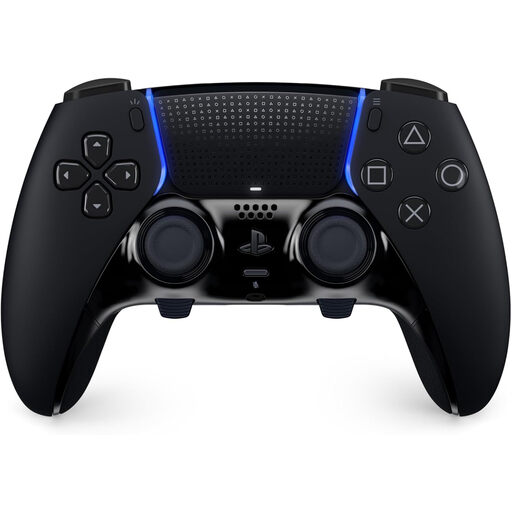
Why this choice suits this profile : Its customisable profiles, programmable buttons and interchangeable components are designed for players who want to fine-tune their controller in every detail.
The available adjustments are clearly defined: profiles, stick sensitivity and trigger resistance. You are therefore paying for customisation you can identify and use.
Three saveable profiles, Bluetooth or USB-C connectivity and a carrying case included.
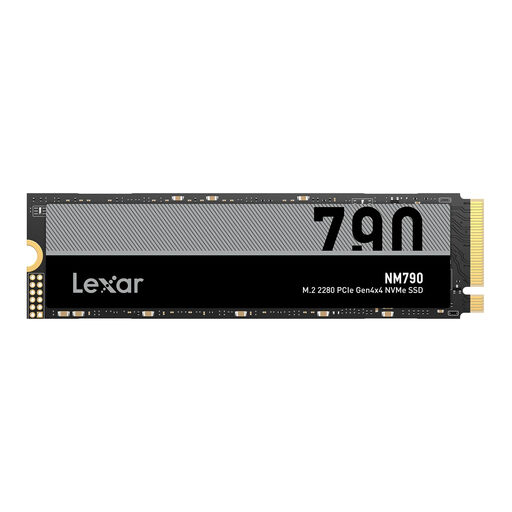
Why this choice suits this profile : A capacity of 4 TB is ideal for players who regularly install lots of PS5 games and want to avoid deleting games to free up space.
The specifications mention the M.2 2280 format, PCIe Gen4x4 interface and the need for a PS5 heatsink. This gives you the essential information needed to check compatibility before buying.
4 TB capacity, standard internal M.2 2280 format and advertised PS5 compatibility, subject to correct installation.
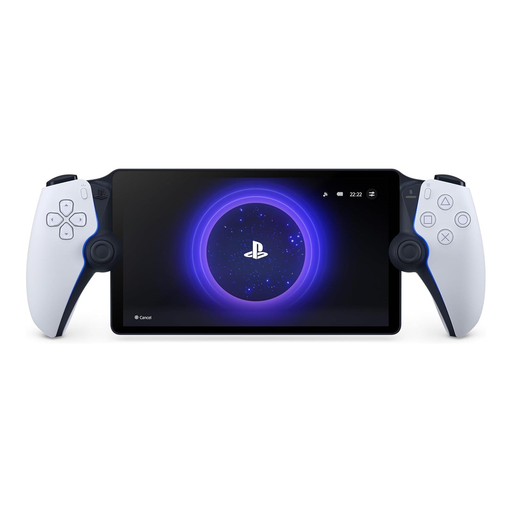
Why this choice suits this profile : It lets you play from another room when the main television is in use, provided you own a PS5 and have a stable Wi-Fi network.
Its reliance on a PS5 and Wi-Fi is clearly stated: it is neither a standalone console nor a device marketed as a universal cloud-gaming solution.
8-inch LCD touchscreen, DualSense-inspired controls and USB-C cable included.
We have put together a complete, real-time updated list of products that meet these strict selection criteria and European safety regulations.
Choose the PS5 Slim Digital Edition if you buy digital games exclusively. The PS5 Standard Edition is a better choice for players who use discs, buy second-hand games or want to play Blu-ray discs and DVDs.
Yes, a disc drive designed for the PS5 Slim Digital Edition can be added if the model is compatible. Switch off and unplug the console before installation. Always check the model number and the conditions stated on the PS5 Slim disc drive product page.
No, it is not essential. An expansion is worthwhile if you keep lots of games installed or regularly play particularly large titles. Before buying, check the M.2 format, PCIe interface, dimensions and whether a compatible heatsink is included.