
Same-day & Next-day Delivery

Quality Guaranteed

Unlock Your Welcome Offers: FREE Delivery | Up to 80% OFF | Free 30-day JoyPlus trial
Download the APP
A second controller, a PS5 gaming headset or a storage solution can make a real difference to your everyday comfort. But with so many options on the market, it's easy to get lost – especially when some marketing claims hide genuine compatibility issues. Before you place an order, check your exact console model, the type of connection you need, and the conditions in which you'll be using the accessory.
A cover designed for the PS5 Slim won't necessarily fit a standard PS5. The same caution applies to a vertical stand, a PS5 Slim fan or a PS5 multi-function base. Read the product description carefully and look for the mention that matches your console: disc-drive model, digital edition or Slim version.
An accessory marketed as quiet, fast or competition-ready should be judged on verifiable information: cable length, button type, fan speed, charging capacity or weight. An additional fan will never replace good airflow around the console. Similarly, a headset with passive noise isolation won't eliminate all background noise.
A wireless PS5 controller can work via Bluetooth, but some uses on PC require a USB-C connection. An arcade PS5 controller is usually wired, and its cable may sometimes be sold separately. For a PS5 USB-C cable, also check the supported power rating and compatibility with fast charging and USB Power Delivery.
Start by identifying your exact console and peripherals. The PS5 Slim disc drive featured in this selection is designed for the PS5 Slim Digital Edition. It is not a universal drive compatible with all PlayStation 5 consoles.
For a protective cover, check the cut-outs around the HDMI, USB, network and power ports. A silicone PS5 protective cover can help reduce scratches and everyday marks, but it won't necessarily protect the console from a significant drop. Also make sure not to block the ventilation areas.
For competitive gaming, a wired professional PS5 controller can help you avoid relying on battery life. The HORI Fighting Commander OCTA, for example, features a 3-metre cable, an adjustable D-pad and six face buttons.
A DualSense charging station should be placed on a stable, well-ventilated surface. The Sony model featured here can charge two DualSense controllers simultaneously using its European power adapter. A multi-function base may also include a stand, storage space for games, a headset holder and adjustable ventilation. However, it will take up more space and needs to be properly powered.
When it comes to ventilation, always check compatibility with your console model. The AKUMA GAMING Cyber W02 fan features three fans, two speeds rated at 3,200 and 4,300 rpm, and a USB-A port. These figures describe the product's specifications, but they don't guarantee a temperature drop in every setup.
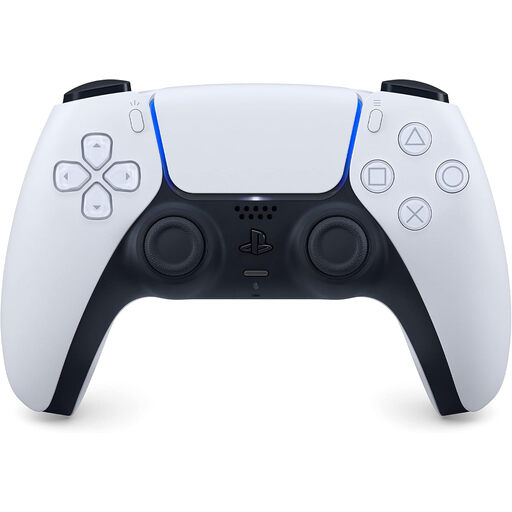
Why this choice suits this profile: A second controller makes multiplayer gaming with family much easier and remains compatible with PS5, PC, Mac and certain mobile devices.
The product page clearly states Bluetooth and USB-C connections, as well as the built-in battery. So you know exactly what to expect for charging and wireless use.
Haptic feedback, adaptive triggers, built-in microphone and 3.5 mm headphone jack.
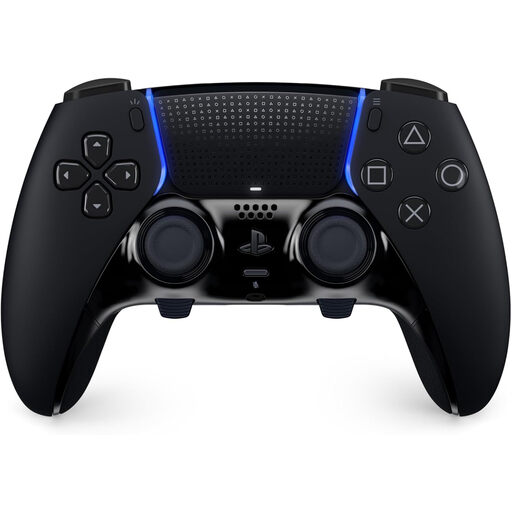
Why this choice suits this profile: Gamers who switch between action games, competitive play and PC can customise the controls and save up to three profiles directly on the controller.
The customisation isn't just a marketing promise: programmable buttons, profiles, interchangeable sticks and removable triggers are all clearly listed on the product page.
Bluetooth or USB-C, long braided cable, three sets of sticks and a carry case included.
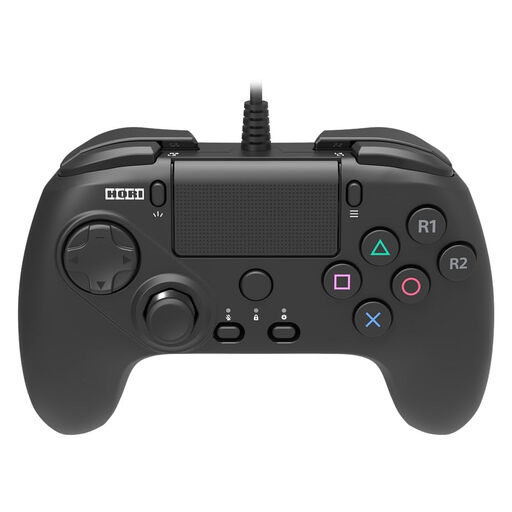
Why this choice suits this profile: Its six-button face layout is designed for fighting games and sessions where precise directional input makes all the difference.
The wired connection and 3-metre cable are clearly stated. This means you won't accidentally buy a wireless controller when consistency in gameplay is your priority.
Micro-switches, adjustable D-pad, headphone jack and four profiles accessible via the HORI Device Manager app.
We've put together a comprehensive, real-time updated list of products that meet these demanding selection criteria and European safety regulations.
If space is tight, the Sony PS5 vertical stand is designed for standard and digital PS5 models and attaches with a screw. Place it on a flat surface, making sure not to block the ventilation openings.
A wired PS5 gaming headset like the Turtle Beach Recon 70 or the Razer BlackShark V2 X plugs directly into the controller via its 3.5 mm jack. A simple solution that avoids having to manage an extra battery. For wireless play, the Razer Hammerhead HyperSpeed earphones use a USB-C adapter and Bluetooth 5.2, depending on the connected device.
Fans of Naruto, One Piece or PSG can also match their accessories to their favourite universe. KONIX covers for PS5 Slim and silicone DualSense shells offer a barrier against dust, marks and light scratches, while keeping the controls accessible.
An arcade PS5 controller or a wired controller with six or eight buttons can be more suitable than a standard DualSense. Check the button layout, cable length and exact compatibility with PS5 and PC.
No. Charging via USB-C is still perfectly possible. A charging station becomes particularly useful if you use two controllers or prefer not to tie up the console's USB ports.
Not necessarily. A fan designed for the PS5 Slim should only be used with the model specified by the manufacturer. In any case, leave enough space around the console and dust the accessible areas regularly.