
Livraison le jour même ou le lendemain

Qualité garantie

Débloquez vos offres de bienvenue: Livraison GRATUITE | Jusqu'à -80 % | 30 jours d'essai gratuits à JoyPlus
Téléchargez l'application
Building a gaming PC or workstation with Lian Li PC components and accessories lets you perfect both the look and the cooling and cable management. But a build that looks flawless in photos can quickly become a headache during assembly if the form factors, connectors and dimensions haven't been checked before purchase.
Three mistakes crop up time and again:
Here are the key points to check when putting together a coherent Lian Li build, so you can avoid purchases that are awkward to return or resell.
Dual-chamber cases generally separate the main components from the cables and power supply unit. This layout is handy for keeping a clean build, but it doesn't automatically make every power supply compatible.
The Lian Li O11D Mini V2 Flow, for example, only accepts SFX or SFX-L power supplies. There's no point — and it's certainly risky — trying to fit a standard ATX power supply inside. Conversely, the Lian Li O11 Vision Compact can accommodate an ATX power supply up to a stated maximum length of 220 mm.
Before choosing a panoramic PC case, always check:
A case with extensive glass panels requires some thought to organise the air intakes and exhausts. Glass panels can offer 270° visibility on certain models, but they don't replace well-directed ventilation.
The Lian Li O11 Vision Compact accepts a side 360 mm radiator, a bottom 360 or 280 mm radiator, plus two 120 mm rear fans. The Lian Li O11D Mini V2 Flow also offers multiple fan and radiator mounting positions, with compatibility up to 360 mm depending on the configuration chosen.
For balanced airflow:
A Lian Li 360 mm water cooler can be an excellent fit for a build with a powerful processor, provided you check the socket compatibility and the available space inside the case. The HYDROSHIFT II LCD-C 360 TL ARGB model is stated as compatible with Intel LGA 1851 and 1700 sockets, as well as AMD AM5 and AM4 platforms.
For a recent graphics card, an ATX 3.1 80 Plus Gold power supply with a PCIe 5.1 connector can simplify assembly. The Lian Li EDGE EG1200 delivers a stated 1 200 W, a fully modular design and a 12VHPWR connector. However, this power rating should be chosen based on your build's actual power consumption, not simply on the price or the wattage printed on the box.
On the RGB side, check the connector type, whether a controller is included, and compatibility with the software you use. The Lian Li ATX RGB 24-pin extension cable features 132 addressable LEDs and a 2.4 GHz wireless controller. It sits between the power supply's 24-pin ATX cable and the corresponding motherboard connector. Never install or remove it while the computer is powered on.
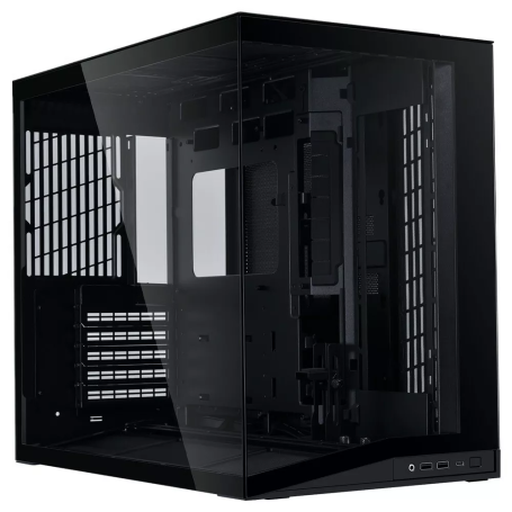
Why this suits this profile: This compact case accepts Mini-ITX, Micro-ATX and ATX motherboards, as well as an ATX power supply up to 200 mm according to the provided specification sheet.
The specification sheet details the form factor and length limits, reducing the risk of choosing an oversized power supply or graphics card.
Dual chamber, support for up to nine fans and compatibility with 240, 280 or 360 mm radiators.
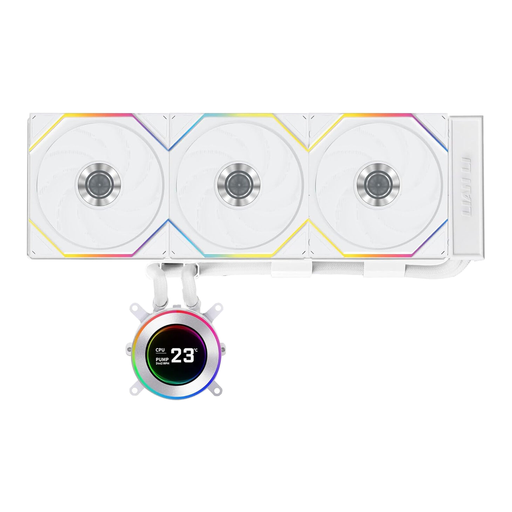
Why this suits this profile: This liquid cooling system combines a 360 mm radiator, TL120 fans and a 2.1-inch round IPS screen.
Check socket compatibility and available dimensions before purchase, rather than relying solely on the build's visual appearance.
IPS 480 × 480 display, offline or wireless control, and a 3-pin power connector.
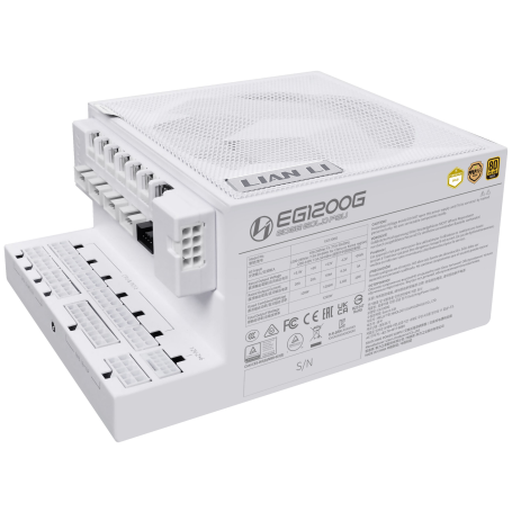
Why this suits this profile: Its ATX 3.1 form factor, stated 1 200 W power output and PCIe 5.1 connector are aimed at builds with particularly power-hungry components.
The modular design eliminates unnecessary cables. However, you must check compatibility with O11 cases based on the chassis dimensions you choose.
80 PLUS Gold certification, individually sleeved cables, semi-passive 120 mm fan and a detachable USB/PWM hub.
We've put together a comprehensive, real-time selection of products that meet these strict criteria, all while complying with European safety regulations.
No. The power rating must match the consumption of your processor, graphics card and other components. Also check the case form factor, the power supply length and the required connectors. A 1 200 W power supply would be completely overkill for a modest build.
Generally, install the bottom or side fans as intakes, then those at the rear or on top as exhausts. Consult the manufacturer's recommendations, check the available space for the radiator and make sure no cables are in front of the blades.
It is designed to connect to a standard 24-pin ATX header. However, you need to allow enough space around the connector, use the supplied controller and install the cable only when the computer is switched off and unplugged. Advanced synchronisation depends on the L-Connect 3 ecosystem and available USB ports.