
Livraison le jour même ou le lendemain

Qualité garantie

Débloquez vos offres de bienvenue: Livraison GRATUITE | Jusqu'à -80 % | 30 jours d'essai gratuits à JoyPlus
Téléchargez l'application
Choosing an ATX PC power supply is not simply a matter of picking the biggest wattage figure shown on the box. An underpowered PSU can cause unexpected shutdowns during load spikes, while an oversized model will unnecessarily increase the cost. Other details also deserve your attention: connectors suitable for your GPU, proprietary cables, cooling compatible with your case and certification such as 80 Plus, which is often misunderstood.
This guide from the Joybuy Product Recommendation Officer will help you compare PC power supplies based on practical criteria, whether you are preparing an office computer, a gaming PC or a workstation.
A graphics card can briefly exceed its average power consumption during certain load spikes. A 650 W power supply may therefore be sufficient for a sensible configuration, but not necessarily for a PC equipped with a power-hungry processor and a high-end GPU.
Add together the stated power consumption of the processor and graphics card, then allow extra capacity for drives, fans, USB peripherals and changes in load. This reserve will also give you more flexibility to upgrade the configuration later.
An 80 Plus Bronze, 80 Plus Gold or 80 Plus Titanium certification mainly indicates the PSU’s efficiency under certain load conditions. It is not enough to assess its overall quality, noise level or the effectiveness of its protection systems.
Also check for protection against overvoltage, undervoltage, overcurrent, overload, overheating and short circuits. Higher efficiency reduces energy losses and heat output, but on its own it does not guarantee quiet operation.
With a modular power supply, you only connect the cables you need. This makes for a tidier build and keeps the space in front of the fans clearer. However, a non-modular power supply can be perfectly suitable for a simple configuration, usually at a lower price.
Remember to measure the available space inside the case as well. Many newer models have a depth of 140 mm, but compatibility also depends on the drive cage and the space available for cable management.
The stated wattage should refer to continuous power. Do not choose your PSU solely based on a maximum value reached temporarily.
An ATX 3.1 power supply is designed to handle the significant changes in power consumption produced by modern components. PCIe 5.1 compatibility is particularly relevant to powering newer graphics cards.
The 12V-2x6 connector replaces 12VHPWR. It combines GPU power delivery in a compact format and must be pushed fully home until it locks into place. Avoid sharp bends immediately where the cable exits the connector, and use only the cables supplied with the PSU.
A modular or fully modular power supply makes cable management considerably easier. If your PC is located in a living space, also consider the type of fan, its fan curve and whether it has a semi-passive or Zero RPM mode.
Terms such as ‘120 mm fan’, ‘105 °C capacitors’ or ‘80 Plus Gold’ are useful when accompanied by detailed specifications. However, they are not an absolute guarantee of long-term durability.
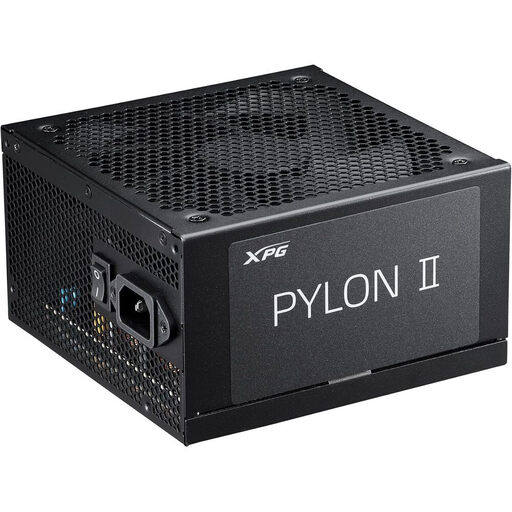
Why this choice suits this profile : With 650 W of power, this PSU is suitable for many office and gaming configurations without adding unnecessary complexity to the build.
Its ATX 3.1 and PCIe 5.1 compatibility, along with its native 12V-2x6 connector, reduces the need for adapters with certain newer graphics cards.
80 Plus Bronze certification, OVP, OCP, OPP, SCP and UVP protection, non-modular design.
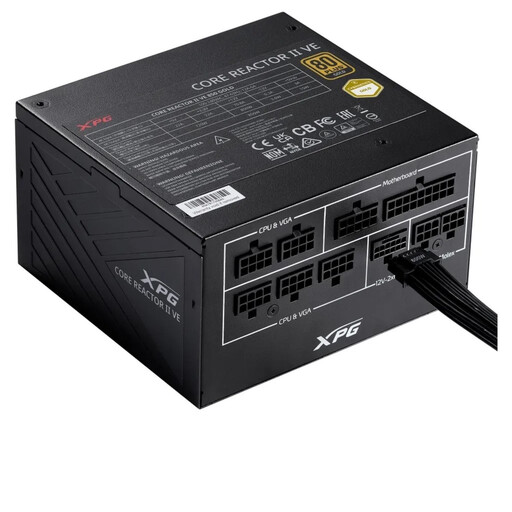
Why this choice suits this profile : Its 750 W output and fully modular cabling make it suitable for gaming PCs and video-editing workstations where tidy cable management really matters.
The product details mention a 12V-2x6 connector, ATX 3.1 design and a hold-up time of over 15 ms: three points to check before installing a recent graphics card.
80 Plus Gold, three PCIe 6+2 connectors, eight listed protection systems and a depth of 140 mm.
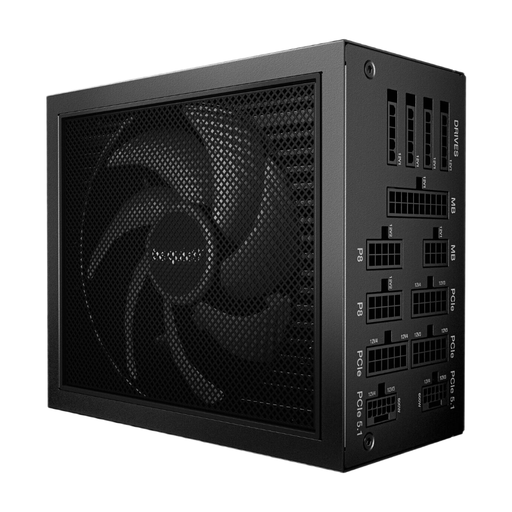
Why this choice suits this profile : With 1 200 W of power, this PSU is designed for workstations and highly power-hungry configurations fitted with high-end components.
The ATX 3.1 standard and native 12V-2x6 connector meet the requirements of PCIe 5.1 graphics cards without relying on an adapter that may not be supplied.
80 Plus Titanium, semi-passive cooling, fully modular design and four PCIe 6+2 connectors.
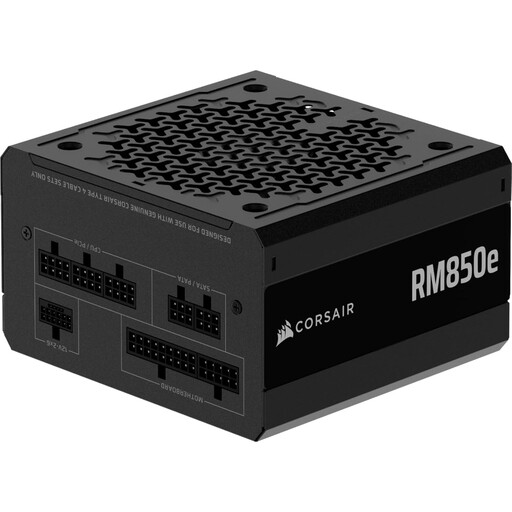
Why this choice suits this profile : Its 850 W output is suitable for long gaming sessions, video rendering and configurations equipped with a recent RTX graphics card.
The product details state that it is compatible with ATX 3.1 and PCIe 5.1, and that a 12V-2x6 cable is included. However, you will need to push the connector in until it clicks before switching on the PC.
80 Plus Gold and Cybenetics Gold, fully modular cabling, OVP, UVP, SCP, OTP and OPP protection, and a depth of 140 mm.
Before carrying out any work, switch off the computer, unplug the mains cable, then hold down the power button for a few seconds. Never open the power supply unit: its internal capacitors may remain charged even when the PC is unplugged.
Use only the modular cables supplied with the relevant model. Cables from another brand or product range may have a different pinout and damage the components. Check that the PSU fits correctly inside the case, ensure good airflow and carefully remove dust from the grilles.
Lifespan depends on the load, temperature, dust build-up and the quality of the mains electricity. An unusual smell, a new noise, repeated restarts or recurring shutdowns should prompt you to switch off the device and have it checked by a qualified professional.
It all depends on the exact graphics card model, processor and the rest of the configuration. A 650 W power supply may be suitable for some PCs, while a more power-hungry GPU may require 750 W, 850 W or more. Check the manufacturer’s recommendations and leave some headroom to handle power spikes.
At the same load, its higher efficiency can reduce losses compared with a lower certification level. The actual saving depends on the PC’s power consumption, how long it is used and the load level. The logo alone is therefore not enough to calculate the precise impact on your electricity bill.
No, not always. However, an ATX 3.1 power supply with a 12V-2x6 connector can simplify compatibility with certain PCIe 5.1 graphics cards. Always check the required connector, recommended wattage and supplied cables before placing your order.