
Livraison le jour même ou le lendemain

Qualité garantie

Débloquez vos offres de bienvenue: Livraison GRATUITE | Jusqu'à -80 % | 30 jours d'essai gratuits à JoyPlus
Téléchargez l'application
An AIO CPU water cooler can lower your CPU temperature while giving a gaming or creative workstation a cleaner finish. But choosing one is not simply a matter of counting the fans or checking for ARGB lighting. Compatibility, size, noise and maintenance are the real criteria to consider before buying a liquid CPU cooler.
A 360 mm water cooler radiator is generally between 394 and 400 mm long, without taking into account the space occupied by the fans and screws. Some cases do have room for a 360 mm radiator at the front, but not above the motherboard. A 240 mm water cooler is often easier to install, particularly in a mid-tower case.
Before placing your order, check the manufacturer's specifications for:
Technical specifications often state a maximum noise level. This figure does not necessarily reflect the noise produced during everyday use. Actual noise depends in particular on the PWM curve, ambient temperature, fan speed and pump speed.
A quiet CPU cooler should therefore offer genuinely usable PWM control. The be quiet! Pure Loop 3 240 mm and 280 mm models respectively specify noise levels of between 17.6 and 37.2 dB, and between 16.5 and 36.6 dB(A), depending on the load. These figures are still manufacturer data and should be compared under identical test conditions.
An LCD screen, ARGB water cooling lighting or customisation software may require additional connections. You may need to provide an internal USB 2.0 port, a SATA power connection, a 5 V ARGB connector and several PWM headers.
ARGB lighting is primarily an aesthetic feature: it says nothing about the kit's cooling capabilities. A screen can display statistics or animations, but it also adds cables and software to install.
For a recent platform, look specifically for the wording compatible with Intel LGA 1851 or compatible with AMD AM5. Compatibility with LGA 1700 or AM4 sockets does not automatically guarantee support for another socket.
The kits featured here support, among others, Intel LGA 1851 and AMD AM5 sockets, but the exact list varies by model. Always check the contents of the mounting kit and the manual before buying.
Radiator size alone is not enough to guarantee a particular temperature. The processor, its power limit, the case's overall airflow and the thermal paste also play a decisive role.
A PWM pump lets you adjust the flow rate according to the temperature. Also check the type of fans, their maximum speed, their static pressure and whether their cables can be daisy-chained.
An AIO kit is generally pre-filled and sealed. Do not open it unless the manufacturer provides a precise procedure. Some products, such as the Pure Loop and Silent Loop ranges, have a fill port and are supplied with a bottle of coolant. This operation must be carried out in accordance with the manual and by a competent person. In all cases, regularly dust the radiator and shut down the PC immediately at the first sign of a leak.
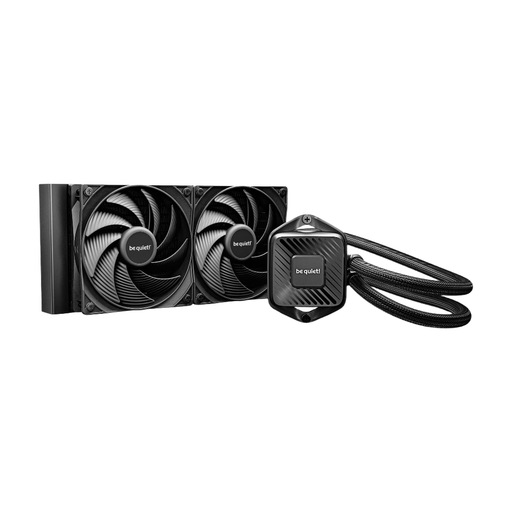
Why it suits this profile : Its 240 mm format, PWM-compatible fans and support for Intel LGA 1851/1700 and AMD AM5/AM4 sockets make it easier to install for the first time.
Its compact format reduces the risk of incompatibility with a mid-tower case, while the fans can be daisy-chained to prevent cable tangles.
Two 120 mm Pure Wings 3 fans, a PWM pump and a 3-year manufacturer's warranty.
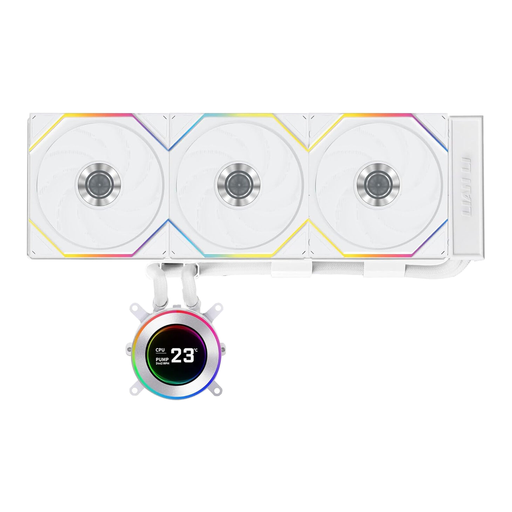
Why it suits this profile : This kit combines a 360 mm radiator, a 2.1-inch round IPS screen and several control modes for setups focused on customisation.
The product details clearly list the required USB and power connections, allowing you to check the available space and necessary connections before buying.
A 480 × 480 IPS LCD screen, a TL120 fan and compatibility with Intel LGA 1851/1700 and AMD AM5/AM4 sockets.
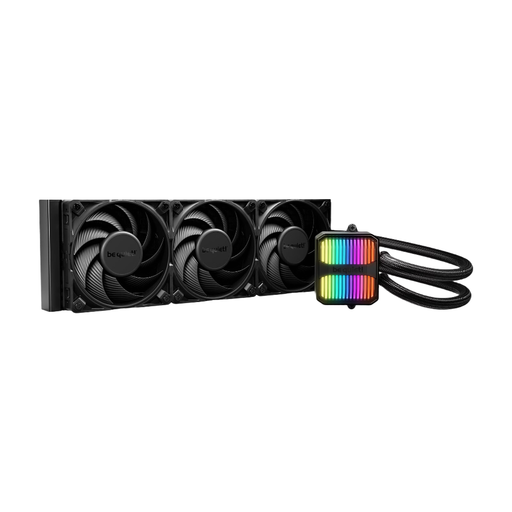
Why it suits this profile : Its three 120 mm fans and large radiator are suited to long gaming sessions, video rendering and sustained CPU loads, provided your case can accommodate them.
The accessible fill port and bottle of coolant are clearly listed, so you cannot mistake this closed-loop system for a completely maintenance-free product.
A three-chamber PWM pump, a cold plate specified at 1,800 mm² and three Silent Wings 4 fans.
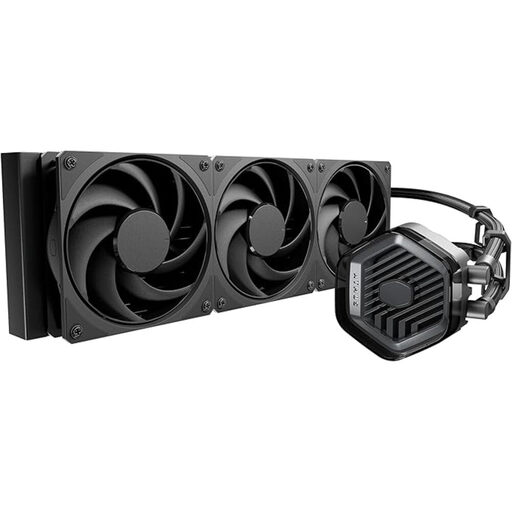
Why it suits this profile : Its understated black design, free from lighting, will appeal to those who prioritise a clean look, advertised performance and physical customisation of the cover.
The lack of LEDs means you do not pay for a decorative feature you will not use. The fans are pre-installed and tube clips are included.
A 394 × 119.2 × 27.2 mm radiator, three pre-installed Mobius 120 fans and a 5-year warranty.
We have selected a complete, real-time updated range of products that meet these demanding selection criteria and European safety standards.
Install the radiator according to the manual, without overtightening the screws or excessively bending the tubes. Secure the pump block by applying even pressure to the processor. Connect the pump to the appropriate header, usually AIO_PUMP or CPU_OPT, then configure its PWM curve in the UEFI or motherboard software.
An AIO kit requires less maintenance than a custom water-cooling loop, but that does not mean you can forget about it. Regularly dust the radiator, watch for unusual vibrations and inspect the connections. If you notice a leak, shut down and unplug the computer immediately.
It is suitable for many mainstream processors, provided the case is properly ventilated and the power limits are appropriate. For a highly power-hungry CPU or sustained workloads, a 280 or 360 mm model will provide a larger heat-dissipation surface.
Its service life depends on the pump, fans, usage and maintenance. The manufacturer's stated warranty period is a contractual reference, not a promise that the product will continue working beyond that period. Keep an eye out for pump noise, changes in temperatures and any signs of coolant.
No. ARGB only relates to the lighting on the fans or pump block. Thermal performance depends mainly on the radiator, pump, fans, contact with the CPU and airflow inside the case.