
Livraison le jour même ou le lendemain

Qualité garantie

Débloquez vos offres de bienvenue: Livraison GRATUITE | Jusqu'à -80 % | 30 jours d'essai gratuits à JoyPlus
Téléchargez l'application
A 360 mm AIO CPU cooler is designed for high-performance gaming rigs, workstations and PCs where space around the processor is tight. Its 360 mm radiator typically accommodates three 120 mm fans. However, this size alone doesn't guarantee quiet operation or perfect compatibility.
Before placing an order, three mistakes crop up time and again: trusting marketing figures without looking at real-world performance, forgetting to measure your case, and overlooking your motherboard's socket. Here are the points to check when choosing a 360 mm liquid CPU cooler that suits your build.
Fans rated at 2,500 RPM can move plenty of air, but they can also become noticeably louder at full speed. This figure needs to be weighed against airflow, static pressure, the fan curve and the motherboard's PWM settings.
The LE100 360, for example, claims an airflow of 81.8 CFM and a pressure of 3.2 mmH₂O, with PWM fans capable of reaching 2,500 RPM. These values describe the specifications provided by the manufacturer, but on their own they can't predict the noise level inside your case.
A 360 mm radiator generally requires a space that can accommodate three 120 mm fans. Depending on the case, it can be mounted at the front, on the top or, more rarely, on the side. Remember to check:
A 360 mm watercooling kit might be compatible with your processor on paper, but impossible to install in the case you've chosen.
The stated compatibility must match your motherboard. The models featured here support several recent platforms, including Intel LGA1851, Intel LGA1700, AMD AM5 and AMD AM4. Still, check that the correct mounting hardware is included and consult the manual before starting installation.
For a processor like the Ryzen 9 9950X3D, the spec sheet indicates an AM5 socket and recommends a cooling system capable of dissipating at least 240 W. This figure isn't a universal measure of temperature; it mainly serves as a reference point for sizing your build's cooling.
Start by identifying your motherboard's socket precisely. An AMD AM5 watercooler shouldn't be chosen simply because the processor name contains "Ryzen". The motherboard, the mounting mechanism and the space around the socket all play a decisive role.
For recent Intel platforms, look explicitly for support of LGA1851 or LGA1700 sockets. On the AMD side, mentions of AM5 and AM4 help distinguish between compatible generations.
A 360 mm radiator offers a large surface area for heat exchange, but its effectiveness also depends on the overall airflow in your case. In a poorly ventilated case, the benefits of liquid CPU cooling can be significantly reduced.
PWM fans automatically adjust their speed based on temperature. A gradual fan curve minimises noise fluctuations during web browsing or office work, while ramping up cooling during a gaming session or video render.
A pump block with a screen adds a nice visual touch, but also brings complexity and extra cost. Some models display system information or customisable visuals; others go for a more understated aesthetic.
An ARGB AIO usually requires a compatible header on the motherboard or the use of an included controller. Check the connector type, how lighting effects are managed, and whether you can turn the lighting off. Aesthetics shouldn't make you overlook installation constraints, dusting and access to other components.
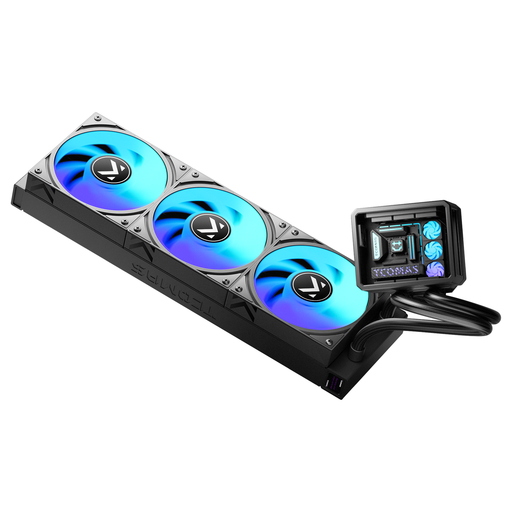
Why this choice suits this profile: This model focuses on easy integration, with a large-format pump block, ARGB fans and compatibility with Intel LGA1851/LGA1700 as well as AMD AM5/AM4.
Its spec sheet details the supported sockets, reducing the risk of buying an incompatible mounting system.
360 mm radiator, compact pump head and ARGB fans.
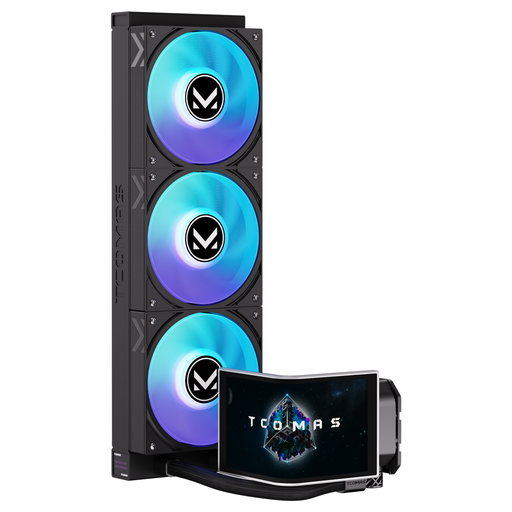
Why this choice suits this profile: Its 6.67-inch curved AMOLED screen and customisable visual effects fit particularly well in a glass-panelled case or a build where the display plays a key part in the overall look.
The spec sheet states the screen size and compatible sockets, so you can check its fit before buying.
6.67-inch curved AMOLED screen and ARGB lighting.
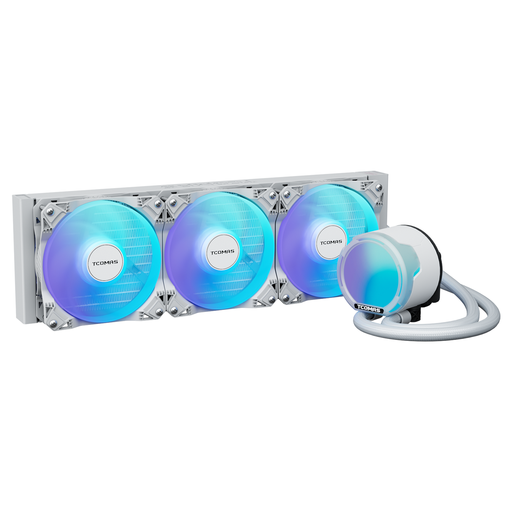
Why this choice suits this profile: Users of powerful processors, demanding games or creative software may be interested in this unit, which features a three-phase pump and PWM fans rated up to 2,500 RPM.
The spec sheet details the airflow and static pressure, rather than just making a general promise of power.
Three-phase pump, PWM fans up to 2,500 RPM, claimed airflow of 81.8 CFM and pressure of 3.2 mmH₂O.
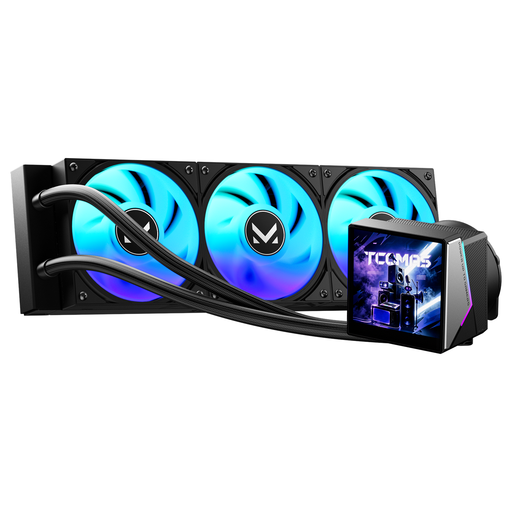
Why this choice suits this profile: Its pump block with a 3.95-inch IPS screen will appeal to content creators and enthusiasts who want to personalise the look of their cooling.
The presence of the screen is clearly stated in the product name, making it easy to compare with a model that lacks a display.
3.95-inch IPS screen, dynamic ARGB lighting and support for Intel LGA1851/LGA1700 and AMD AM5/AM4.
We've put together a comprehensive list, updated in real time, of products that meet these strict selection criteria and European safety requirements.
Install the radiator in line with the airflow direction intended by your case. At the front, it can serve as intake or exhaust depending on the setup; on the top, it's usually mounted as exhaust. Avoid putting the tubes under tension and check that the pump isn't positioned higher than the highest point of the radiator if the manual specifies a particular orientation.
To keep the system performing well over time:
Not necessarily. The Ryzen 9 9950X3D spec sheet indicates an AM5 socket and recommends a nominal dissipation capacity of at least 240 W. A 360 mm AIO can be perfectly suitable for a high-end build, but the choice also depends on the case, power limits, processor settings and the noise level you're aiming for.
The lifespan depends on the kit's design, build quality, dust accumulation and thermal conditions. A closed loop normally requires no user refilling. Still, keep an eye on the pump, fans and any signs of leakage, following the manufacturer's recommendations.
The power consumption comes mainly from the pump and the three fans. It's generally low compared to the processor and graphics card, but varies depending on operating speed, ARGB lighting and motherboard settings. Turning off lighting effects and adopting a suitable PWM curve can reduce this secondary consumption, while also keeping noise down.