
Livraison le jour même ou le lendemain

Qualité garantie

Débloquez vos offres de bienvenue: Livraison GRATUITE | Jusqu'à -80 % | 30 jours d'essai gratuits à JoyPlus
Téléchargez l'application
A suitable CPU cooler helps keep temperatures under control, reduce noise and preserve the stability of a gaming or work PC. However, choosing one is not simply about the number of fans or whether it has an LCD screen. The socket, dimensions, airflow and quality of installation are all just as important.
Here are the most common pitfalls and the criteria to check before buying an air CPU cooler or an AIO liquid cooler.
A 360 mm radiator requires a compatible mounting position in the case, usually at the front or top, and sometimes at the side. Its dimensions can reach approximately 395 × 120 mm, without taking the fan thickness into account. So, a case advertised as compatible with a 360 mm radiator does not necessarily guarantee an easy installation, particularly when you factor in the motherboard and RAM modules.
A 240 mm model is often easier to fit. In a compact case, an air CPU cooler measuring 152 to 159 mm in height may also be suitable, provided you check the case’s detailed specifications.
The decibel rating refers to specific measurement conditions. The noise you actually hear also depends on the PWM curve, ambient temperature, case ventilation and processor load. A fan running at full speed will naturally be more noticeable than during everyday office work.
It is therefore better to examine the speed range, PWM control, number of fans and bearing type. These details are generally more informative than a vague promise of quiet operation.
Recent processors use sockets such as Intel LGA 1851 and AMD AM5. Stated compatibility is not the whole story: you must also check the maximum height of the air cooler, the space available around the socket, tube length and the position of the ARGB or USB connectors.
Before placing your order, also make sure that your motherboard has a 5 V three-pin ARGB connector, rather than a 12 V four-pin RGB connector. Connecting them incorrectly can damage the lighting.
The models featured here support several modern platforms, including Intel LGA 1851/1700 and AMD AM5/AM4. However, it is still essential to confirm that the appropriate mounting kit is included and to follow the manufacturer’s instructions.
When installing the cooler, shut down the computer completely, unplug the mains cable and do not force the screws or brackets. The base should apply even pressure across the processor. Pre-applied thermal paste makes installation easier, but you should still check that the base is making proper contact with the processor.
A 240 mm radiator generally accommodates two 120 mm fans. A 360 mm radiator uses three. The latter provides a larger heat-exchange surface, but requires more space and can make it harder to access other components.
For an air cooler, check the maximum height supported by the case. The Cooler Master Hyper 212 Black is 152 mm high, while some dual-tower models reach 159 mm or more. Width can also be an issue with RAM modules fitted with large heatsinks.
During gaming, content creation or compilation work, the processor may remain under heavy load for several hours. A CPU cooler for a gaming PC should therefore have PWM control and be installed in a case with adequate airflow.
A sealed AIO liquid cooling system must not be taken apart. Inspect the fans, radiator fins and tubes regularly. In the event of a leak, switch off the power immediately and unplug the PC. With an air cooler, regularly removing dust with dry air helps preserve efficient airflow.
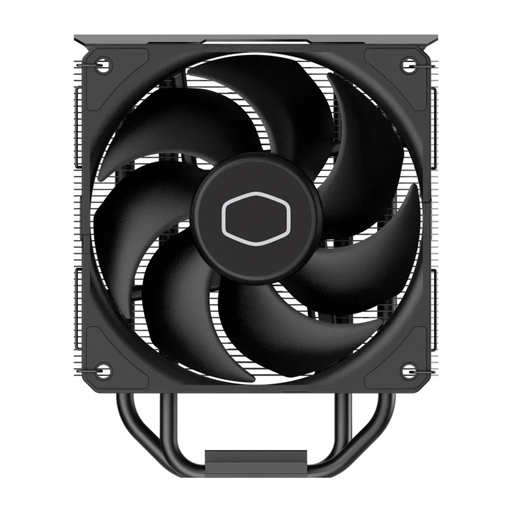
Why this choice suits this profile : This single-fan air CPU cooler is easy to install and supports Intel LGA 1851/1700 as well as AMD AM5/AM4. Measuring 125 × 74 × 152 mm, it is easy to check whether it will fit a mid-tower case.
The product details mention four direct-contact heat pipes, included thermal paste and a PWM connector. That helps avoid an unnecessarily complex installation for a first build.
Four heat pipes, a 120 mm fan, ARGB lighting and broad compatibility.
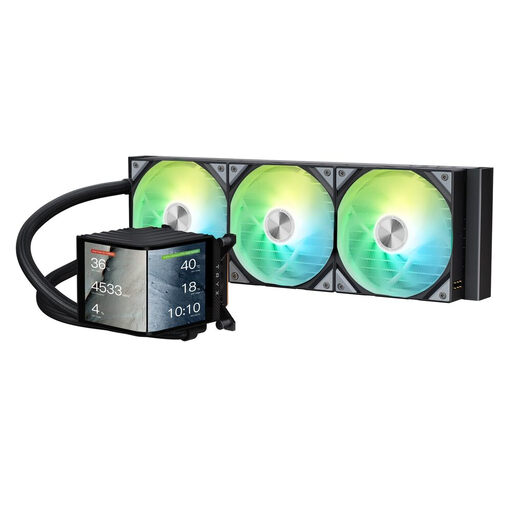
Why this choice suits this profile : This AIO liquid cooler is aimed at builds where cooling performance matters just as much as appearance, with a 360 mm radiator. Its curved L-shaped display can be customised using the KANALI software.
The radiator dimensions, its thickness with the fans installed and the tube length are all specified. This makes it easier to compare the product with your case’s space constraints before buying.
360 mm radiator, three ARGB PWM fans, customisable display and support for LGA 1851/1700 and AM5/AM4 sockets.
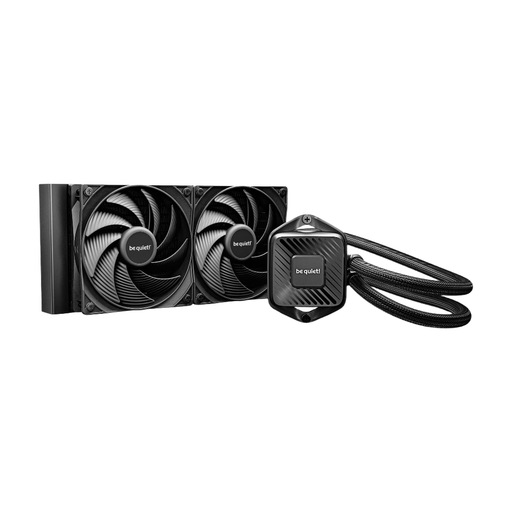
Why this choice suits this profile : Its 240 mm format is a practical solution for a heavily used build that cannot accommodate a 360 mm radiator. The product details specify two 120 mm PWM fans and a pump with a six-pole motor.
The stated noise level, from 17,6 to 37,2 dB, is given as a range rather than being reduced to a single figure. Daisy-chainable fans also simplify cable management.
240 mm radiator, two PWM fans, LGA 1851/1700 and AM5/AM4 compatibility, plus a stated three-year manufacturer’s warranty.
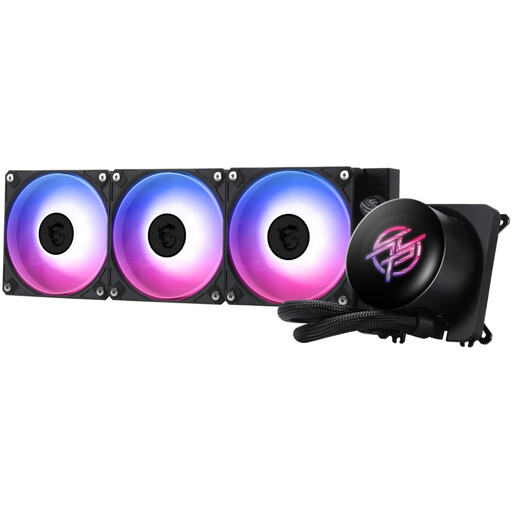
Why this choice suits this profile : This liquid cooling system combines a 360 mm radiator with a 2.1-inch LCD screen that can display information or customised animations.
The fans are pre-installed and the integrated cable system reduces the number of visible connections. The product details also specify compatibility with LGA 1851/1700 and AM4/AM5.
480 × 480 LCD screen, pump rated at up to 3 400 rpm, PWM fans and a copper base.
We have brought together a complete, real-time updated selection of products that meet these demanding criteria and European safety standards.
It is suitable for many mainstream processors, provided the case is well ventilated and the processor’s power consumption remains reasonable. For sustained workloads, a 360 mm model offers a larger radiator surface, but requires a compatible case.
Yes, in most cases. An air cooler contains neither a pump nor a sealed liquid circuit. You mainly need to remove accumulated dust from the fins and fan. An AIO requires less day-to-day maintenance, but its tubes and fittings should be inspected visually; never open the circuit.
No. ARGB only relates to lighting and does not directly improve cooling capacity. Start by checking the socket, dimensions, number of fans, PWM control and compatibility with the case. Lighting comes afterwards, as a purely aesthetic consideration.