
Livraison le jour même ou le lendemain

Qualité garantie

Débloquez vos offres de bienvenue: Livraison GRATUITE | Jusqu'à -80 % | 30 jours d'essai gratuits à JoyPlus
Téléchargez l'application
An overheating processor can turn your entire gaming or video editing session into a nightmare, causing slowdowns, framerate drops, and dwindling performance. Choosing a good CPU cooler is therefore a crucial step, whether you're building a new PC or looking to perform a PC cooling upgrade. But between traditional air coolers and water cooling kits, it's easy to get lost.
This guide is here to help you understand the key criteria and choose the ideal solution to maintain your CPU's temperature, ensuring stability and long-lasting performance.
Before you take the plunge, there are three criteria to consider to make the right choice.
The choice often comes down to budget, expected performance, and, of course, the aesthetic you're aiming for with your build.
Be careful, compatibility is twofold: the cooler must match both your processor's socket and your case's dimensions.
Achieving silent PC cooling is the holy grail for many builders. The problem is that performance often means higher fan speeds, and therefore, more noise. The solution? Opt for models equipped with PWM (Pulse Width Modulation) fans. They allow the motherboard to regulate their speed in real-time based on the CPU's temperature. The result: near-total silence at idle and a powerful blast only when needed.
Here are a few models that caught our eye, for different uses and budgets.
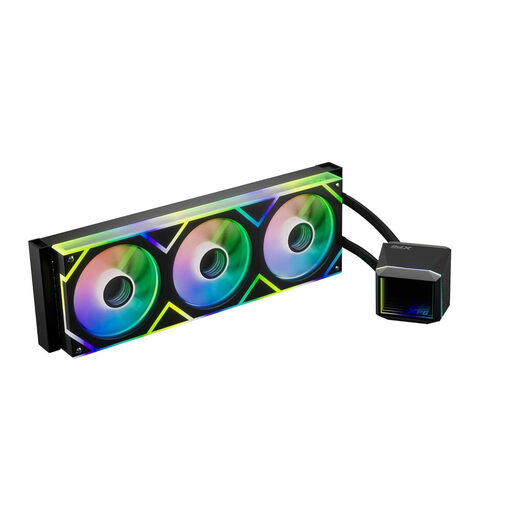
Why it stands out: The XPG LEVANTE II 360 is a liquid cooling system engineered to tame the most powerful processors. Capable of handling a TDP (Thermal Design Power) of up to 340W according to the manufacturer, it's the perfect partner for overclocking setups and latest-generation CPUs. Its infinity mirror pump design, with customisable RGB lighting, brings a unique aesthetic touch to any build.
Pros:
Who is it for?: Gamers, content creators, and hardware enthusiasts with high-end processors who demand cutting-edge cooling and a stunning look.
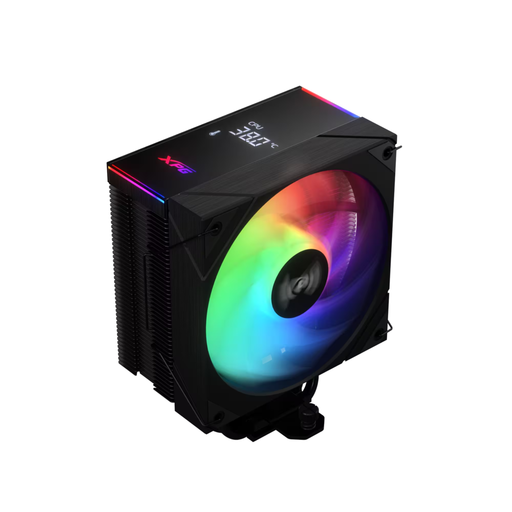
Why it stands out: The XPG MAESTRO PLUS is a high-performance CPU air cooler that focuses on reliability and silence. It's an excellent alternative to watercooling for those who prefer the simplicity and robustness of air cooling. Its optimised design, with its heat pipes and aluminium fins, ensures efficient heat transfer to keep the processor at a good temperature, even under full load.
Pros:
Who is it for?: Users looking for an effective, quiet, and easy-to-install cooling solution for a PC cooling upgrade or a new machine, without the added complexity of a liquid system.
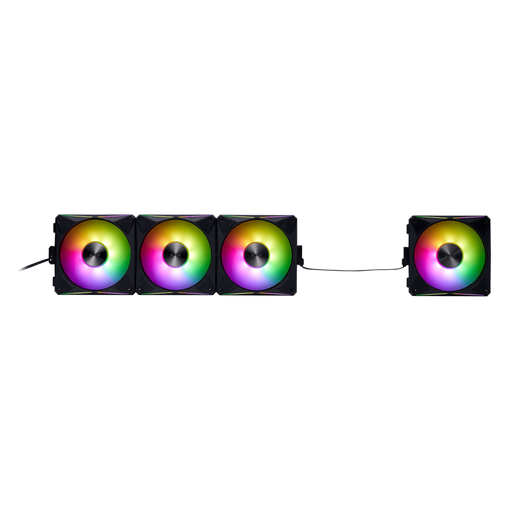
Why it stands out: This isn't a CPU cooler, but a case fan that can make all the difference. The XPG HURRICANE MAG 120 is the ideal complement to any cooling system. Its secret weapon? A magnetic daisy-chain connection system. This innovation revolutionises cable management: you can connect multiple fans together with a minimum of wires. The result: a flawless build and optimised airflow.
Pros:
Who is it for?: PC building enthusiasts who are aiming for pristine cable management, a custom ARGB aesthetic, and optimised airflow within their tower.
Your setup is ready to tackle the most intense tasks. For a completely different kind of comfort, take a look at our other selections, like our range of shoes.
Discover our selection of men's casual winter shoes
The fundamental difference lies in the heat dissipation method. An air cooler uses air to cool a heatsink in direct contact with the processor. An AIO water cooler, on the other hand, uses a liquid to transport heat to a radiator, where fans take over. Generally, water cooling offers better cooling performance, while an air cooler shines with its simplicity and reliability.
Start by checking the technical specifications of the cooler and your motherboard for socket compatibility (e.g., AM5, LGA1700). Then, check the dimensions. For an air cooler, make sure the maximum height allowed by your case is sufficient. For a water cooler, verify that the case has the necessary mounting points for the radiator (e.g., 240mm, 360mm).
No, ARGB (Addressable RGB) lighting is purely aesthetic. The LEDs consume a negligible amount of power and generate no heat that could affect the cooling system's performance. Their sole purpose is to allow you to customise and enhance the look of your machine.