
Livraison le jour même ou le lendemain

Qualité garantie

Débloquez vos offres de bienvenue: Livraison GRATUITE | Jusqu'à -80 % | 30 jours d'essai gratuits à JoyPlus
Téléchargez l'application
Modernising a car, van or SUV without replacing the original stereo may seem straightforward. However, choosing a portable CarPlay screen with a reversing camera involves more than simply looking at its size or a “4K” label. Compatibility with your phone, cable routing and display quality in real-world conditions can make all the difference between a great idea and a purchase that proves impractical.
Here are the main points to check before comparing the available models.
A wireless CarPlay screen for cars generally works with an iPhone that supports Apple CarPlay. For Android devices, you need to check that wireless Android Auto is supported. Some devices also offer MirrorLink, but this feature does not necessarily replace CarPlay or Android Auto, and compatibility varies from one phone to another.
You should also distinguish between a screen that mirrors your smartphone’s apps and a standalone Android screen. The latter may include video or music apps, but it often requires a Wi-Fi connection or mobile hotspot.
A 4K dash camera can provide more detail in certain conditions. However, the final quality also depends on the sensor, optics, compression and lighting. For a car reversing camera, the visibility of parking lines, viewing angle and weather resistance are just as important as resolution.
Night vision deserves particular attention. The term “night vision” does not guarantee an image that is as sharp as it is in daylight. Instead, consider whether the rear camera is genuinely suitable for a vehicle parked on a poorly lit street or in an underground car park.
A portable car touchscreen should be positioned without obstructing visibility or access to the controls. Depending on the vehicle, power may be supplied through a 12 V socket or via wiring. A wired reversing camera will generally require a cable to be routed to the rear of the vehicle and connected to the reversing light.
Before ordering, check the cable length, mounting system, whether an audio adapter is included and whether you can keep the original stereo. Poorly planned installation can result in visible cables, interruptions or limited audio integration.
For navigation, Apple CarPlay and Android Auto generally display compatible smartphone apps: maps, calls, messages and music. An integrated car GPS is therefore not always essential if you already use your phone’s navigation. A standalone Android screen can, however, offer additional features, provided that an internet connection is available.
Check the following:
A 7-inch screen takes up less space on the dashboard. A 10- to 11.4-inch format makes maps easier to read, but requires a stable mount and a sufficiently clear position. Brightness, contrast and touchscreen responsiveness become particularly important when sunlight shines directly through the windscreen.
Never place the device where it blocks essential information or reduces your field of vision. The camera and screen are parking aids, not a substitute for looking around you directly.
For a front-and-rear dashcam, check the resolution of each camera: a 4K front camera paired with a 1080p rear camera does not offer the same resolution from both angles. microSD card capacity, loop recording and parking mode also affect everyday use.
ADAS and BSD features may display alerts or assistance indicators, depending on the product configuration. They should not be regarded as autonomous driving systems. For parking, focus particularly on the camera angle, whether guide lines are included and whether the camera activates automatically when reverse gear is selected.
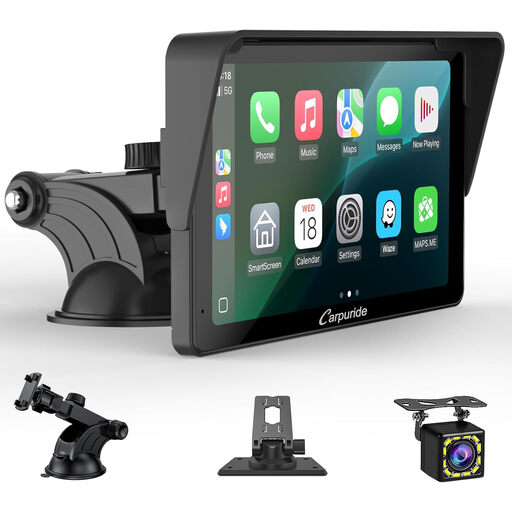
Why this choice suits this profile: Its 7-inch 1080p screen is ideal for drivers who want to add CarPlay and Android Auto without installing a bulky display.
Its compact format keeps dashboard clutter to a minimum. The 720p reversing camera and Bluetooth 5.0 connectivity are clearly specified, without presenting the device as an autonomous driving system.
Wireless CarPlay and Android Auto, 1080p screen, 720p rear camera and MirrorLink support.
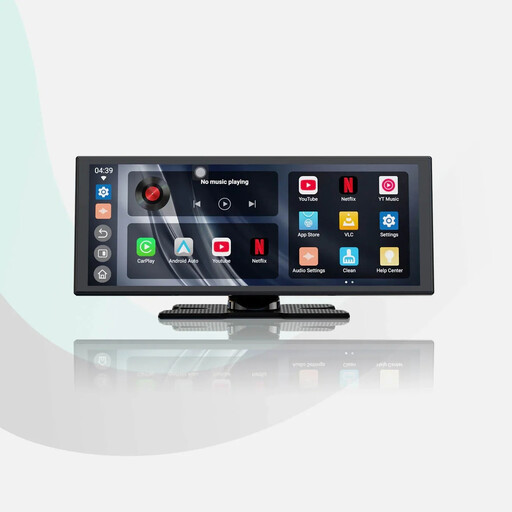
Why this choice suits this profile: Its large 1920 × 720 display is designed for drivers who prioritise comfortable navigation viewing and a generous multimedia interface.
The product details specify both the screen resolution and the 1080p rear camera resolution. You should still check the available space before deciding where and how to mount it.
Wireless CarPlay and Android Auto, built-in apps, dual Wi-Fi and dual Bluetooth, plus an adjustable, waterproof rear camera.
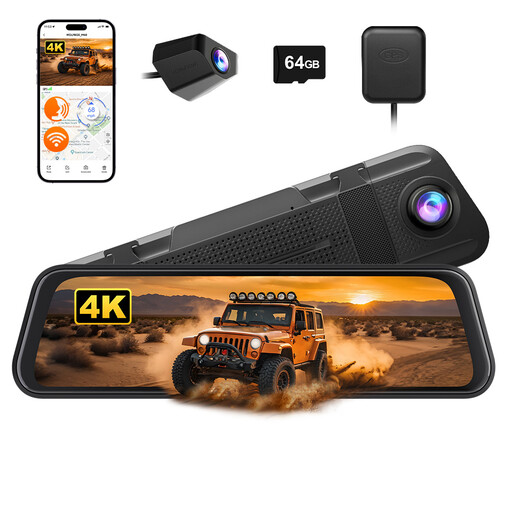
Why this choice suits this profile: The mirror-camera format is suitable for drivers of cars, SUVs, vans and lorries looking for front-and-rear recording.
The product details clearly distinguish between the 4K front camera and the 1080p rear camera. They also specify the mounting methods and connection to a 12 V power supply.
4K front and 1080p rear cameras, ADAS and BSD features, voice control, Wi-Fi, GPS and an included 64 GB microSD card.
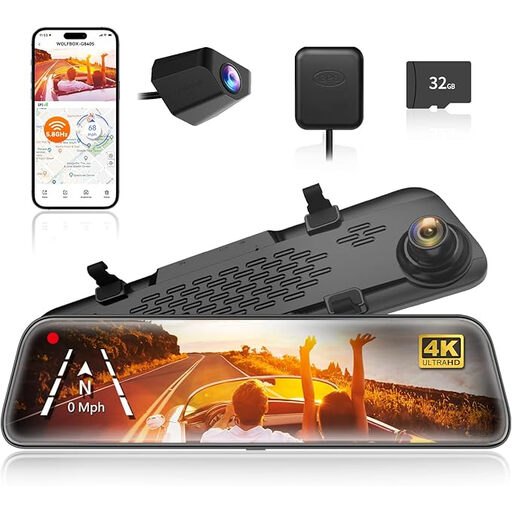
Why this choice suits this profile: Its 12-inch screen and dual-camera setup may suit vehicles where rear visibility and parking assistance are priorities.
The product details confirm the presence of front and rear cameras, 5.8 GHz Wi-Fi, GPS and an included 32 GB card—all factors to consider when planning the installation.
12-inch screen, advertised 4K front-and-rear recording, night vision, parking assistance and GPS.
We have put together a complete, real-time updated list of products that fully meet these strict selection criteria and European safety regulations.
It can be installed in many vehicles, but compatibility depends on the available space, power supply, audio system and cable routing to the rear. Also check the type of 12 V socket and mounting method before buying.
CarPlay and Android Auto generally use your phone’s connection. Depending on the app, downloaded maps may work offline, while live traffic information requires a data connection. A standalone Android screen may also rely on mobile hotspot or Wi-Fi.
Operating time depends on the quality of the microSD card, the temperature inside the vehicle, parking mode and the stability of the power supply. A card suitable for loop recording, together with regular checks of the files, can help prevent interruptions. Recorded footage must be used in accordance with the applicable privacy and data protection rules.