
Livraison le jour même ou le lendemain

Qualité garantie

Débloquez vos offres de bienvenue: Livraison GRATUITE | Jusqu'à -80 % | 30 jours d'essai gratuits à JoyPlus
Téléchargez l'application
Your car may be a trusted companion, but its factory-installed stereo is starting to feel seriously outdated. No Waze, no way to listen to Spotify, and managing calls while driving is a real hassle. Think replacing the entire audio system is a costly and complicated procedure? Rest assured, there's a simple and remarkably effective solution: the portable CarPlay screen.
This clever accessory mounts to your dashboard in minutes, without any permanent installation. It's a universal CarPlay solution that brings everything you're missing to a large touchscreen: GPS navigation, your music apps, and hands-free calling. Follow our guide to find the perfect model for your vehicle and your budget.
Before you take the plunge, let's review the key criteria for finding the device that will perfectly suit your car and your habits.
The screen's diagonal size is crucial for user comfort. A 9-inch screen often represents the sweet spot, balancing good GPS readability with a reasonable footprint on the dashboard. In terms of resolution, a display of 1024?x?600 pixels is the minimum to ensure sharp maps and legible text under all conditions.
The main appeal of these screens is, of course, the integration of CarPlay and Android Auto.
Nearly all models are plug and play. They simply attach with a suction cup to the windshield or an adhesive mount to the dashboard, then plug into the cigarette lighter socket (12V-24V). This versatility makes them compatible with most vehicles, including as a screen for trucks and RVs.
To stream audio to your car's speakers, several options are available:
To help you make your choice, we've reviewed several leading models on the market. Here is our selection of standout devices for every need and budget.
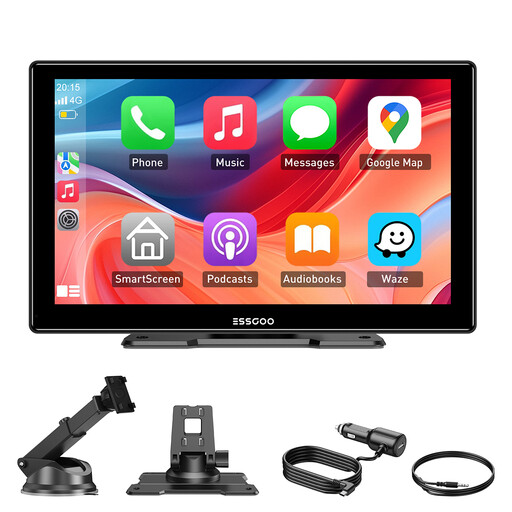
Why It Stands Out The ESSGOO immediately distinguishes itself with its large, highly responsive 9-inch screen (60?Hz) and flawless wireless connectivity. It's an all-in-one solution, designed for quick installation and compatible with almost all vehicles (cars, commercial vehicles, trucks) thanks to its 12V-24V power supply. The added bonus? Over-the-air (OTA) software updates happen wirelessly, keeping your device up-to-date effortlessly.
Pros
Who Is It For? For drivers of cars, trucks, or RVs looking for a comprehensive solution and a large, comfortable screen for navigation and multimedia, without getting into a complex installation.
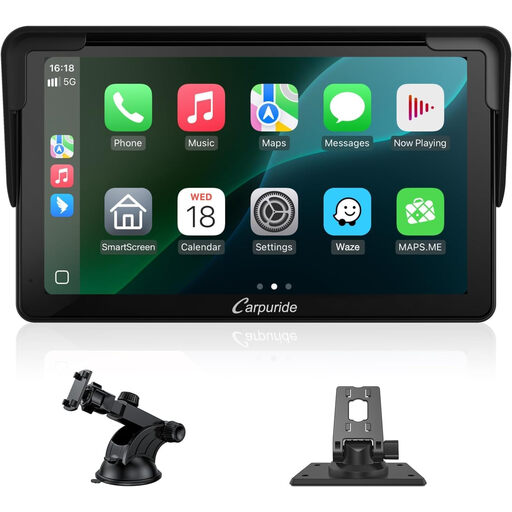
Why It Stands Out This Carpuride model focuses on a compact design with its 7-inch format, ideal for smaller interiors where every inch counts. Despite its compact size, it makes no compromises on the essentials: wireless CarPlay and Android Auto are included, as is Bluetooth 5.0. Its HD touchscreen promises a sharp, detailed picture, while the Mirror Link function lets you duplicate your smartphone's screen for even more versatility.
Pros
Who Is It For? For drivers of city cars or vehicles with a small dashboard who prefer a discreet yet functional solution to safely access their smartphone apps.
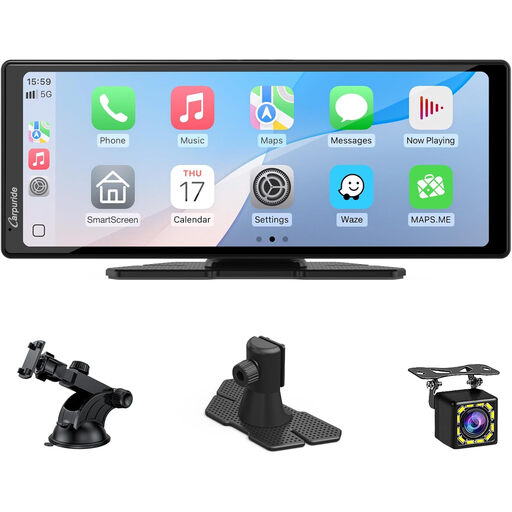
Why It Stands Out This model is a step up, featuring a very large 10.26-inch widescreen display and, most importantly, an integrated backup camera. It literally transforms your driving station into a modern cockpit, combining the best of infotainment with a valuable driving aid for enhanced safety.
Pros
Who Is It For? For owners of large vehicles (SUVs, vans, RVs) or for those who want to add a backup camera at the same time as a modern infotainment system, all in one easy-to-install package.
Did none of these models catch your eye? If you're looking for different sizes or features, feel free to explore our full catalog.
? Explore our complete collection of portable car displays to find the model that perfectly matches your needs.
Yes, in 99% of cases. The compatibility of these devices is nearly universal because their only prerequisite is a cigarette lighter socket (12V or 24V) for power. They work independently of your vehicle's make, model, or age.
Absolutely. That's the whole point of plug and play CarPlay. The installation boils down to three steps:
You have several options for routing audio from the screen to your vehicle's sound system: