
Livraison le jour même ou le lendemain

Qualité garantie

Débloquez vos offres de bienvenue: Livraison GRATUITE | Jusqu'à -80 % | 30 jours d'essai gratuits à JoyPlus
Téléchargez l'application
An older car can still be enjoyable to drive without a modern infotainment screen. Installing a portable CarPlay screen for your car lets you enjoy navigation, hands-free calls and music without replacing the original car stereo. However, you still need to choose a model suited to both your vehicle and your smartphone.
Some models are marketed as universal even though they require a recent phone or a specific connection method. Others include a reversing camera but require extensive wiring, offer limited audio output or rely on a mount that may not hold up in high temperatures. Here are the key points to check before buying, followed by a selection suited to different types of drivers.
A portable Android Auto screen or CarPlay screen adds an interface to the cabin, but it does not automatically replace the car stereo. Depending on the model, sound may come from the built-in speaker, pass through an auxiliary input, use Bluetooth or be transmitted via an FM transmitter.
Before ordering, check which audio outputs are available and whether they are compatible with your car. A vehicle without an AUX input, for example, will need to use Bluetooth or FM transmission.
Wireless CarPlay is designed for compatible iPhones. Wireless Android Auto, meanwhile, depends on the smartphone model, the system version and, in some cases, Wi-Fi connectivity. The term ‘wireless’ therefore does not guarantee that every phone will work in the same way.
You should also check compatibility with MirrorLink, AirPlay or Super Link in the product listing. The first pairing may require a few steps, even if everyday use becomes much simpler afterwards.
A reversing camera may require a cable running to the rear of the vehicle, as well as a dedicated power supply. It is sometimes included, but in other cases must be purchased separately. In all cases, it does not replace checking your surroundings visually before starting a manoeuvre.
The installation must comply with road safety regulations and must not reduce the driver’s field of vision. Videos and entertainment apps should be used when the vehicle is stationary, in a place where this is permitted.
A 7-inch car screen takes up very little space on the dashboard. It is particularly suitable for small city cars, second vehicles and drivers who want to minimise clutter. The 10.26-inch and 11.4-inch formats provide a more comfortable viewing area for checking a car GPS map or following navigation instructions.
Resolution should always be considered alongside screen size. An 11.4-inch screen displaying 1 920 × 720 pixels and a 10.26-inch model with 1 600 × 600 pixels do not offer exactly the same level of sharpness. Adjustable brightness and a day/night mode are also valuable for reducing glare and maintaining good visibility.
Look for, at a minimum:
Bluetooth 5.0 or 5.3 indicates the generation of the connection, but does not by itself guarantee that there will be no dropouts. Pairing quality also depends on the phone, the radio environment and the vehicle’s configuration.
A CarPlay AI Box adapter will generally only work if the car stereo already has activated wired CarPlay. It is therefore not the ideal solution for an older car without built-in CarPlay.
An AI Box can, however, be suitable for a newer vehicle equipped with a compatible original screen. The OTTOCAST P3, for example, requires wired CarPlay installed at the factory. Its product listing also states that it is not compatible with BMW or Tesla models and is not suitable for car stereos fitted after the vehicle was purchased. A portable screen, by contrast, sits on the dashboard and works as an independent interface.
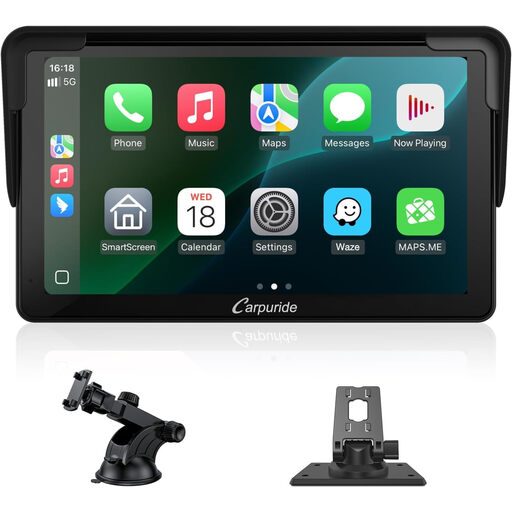
Why this choice suits this profile : Its compact format is well suited to a first installation in a city car, a second vehicle or a car with a shallow dashboard.
With its 7-inch diagonal, it takes up very little space. The product listing also states that it offers 1080p resolution and supports wireless CarPlay and Android Auto.
1080p touchscreen, Bluetooth 5.0 and MirrorLink support, according to the supplied description.
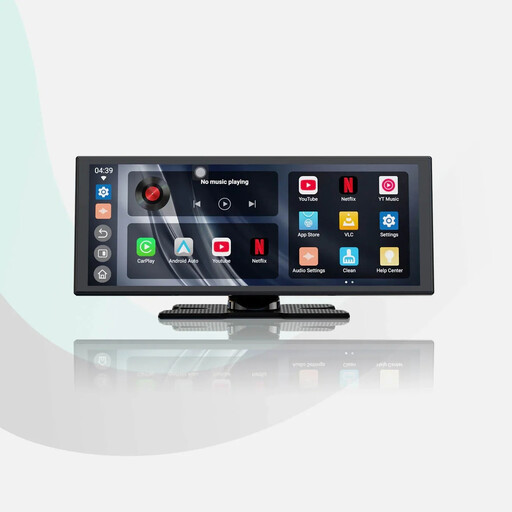
Why this choice suits this profile : Its large display area improves readability on long journeys and is ideal for families who regularly use navigation.
The listing distinguishes between the first start-up, stated as taking around 20 seconds, and the quick restart when the built-in battery is charged.
1 920 × 720 screen, 1080p reversing camera stated as included, and built-in apps requiring a Wi-Fi connection or hotspot.
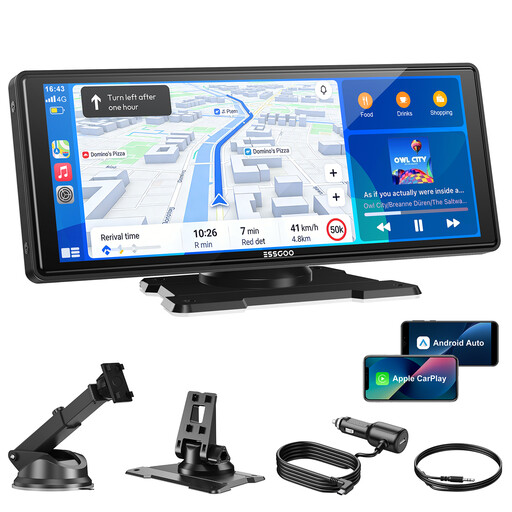
Why this choice suits this profile : It is suitable for drivers looking for several audio output options, a removable installation and stated compatibility with 12 to 24 V vehicles.
The reversing camera is not supplied and must be purchased separately. It is best to know this in advance so you can plan your budget and wiring before installation.
Dual-band Wi-Fi, Bluetooth 5.3, AUX and FM outputs, built-in speaker and manual brightness adjustment.
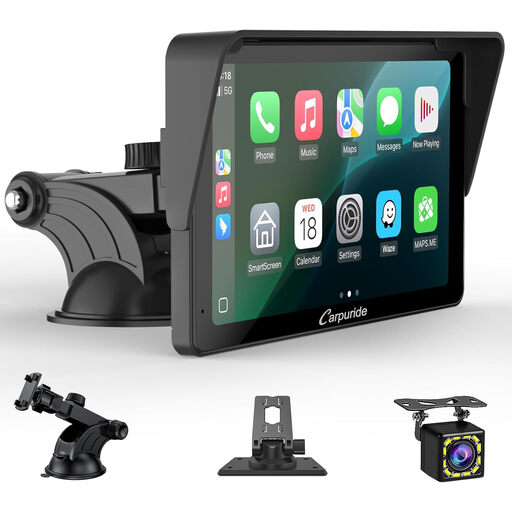
Why this choice suits this profile : Its compact format and reversing camera can be particularly useful in a small car, for urban parking or for keeping the installation discreet.
The listing clearly distinguishes the 7-inch screen from the included 720p reversing camera, making it easier to compare with models sold without an accessory.
1080p touchscreen, wireless CarPlay and Android Auto, Bluetooth 5.0 and stated MirrorLink compatibility.
We have put together a complete, real-time updated selection of products that meet these demanding criteria, as well as European safety requirements.
For a straightforward installation, position the screen so that it does not obstruct the road or essential controls. Secure it to the dashboard or windscreen, depending on the supplied mount, then connect its power supply to the 12 V socket.
Next, complete the initial pairing while stationary:
Clean the screen with a slightly damp soft cloth and avoid abrasive products. In very hot or freezing conditions, remove the device if the instructions advise against leaving it in the cabin.
Yes. A portable screen adds an independent interface, provided that your smartphone is compatible and the vehicle has a suitable audio output method. However, it will not necessarily turn the original car stereo into a CarPlay stereo.
The 7-inch format is preferable when space is limited or a discreet installation is required. A 10.26-inch car screen displays maps and menus more comfortably, but needs more room and must be positioned securely.
Not always. An AI Box such as the OTTOCAST P3 requires wired CarPlay activated at the factory. For an older car without this function, a portable Android Auto screen or portable CarPlay screen is generally a more suitable solution.