
Livraison le jour même ou le lendemain

Qualité garantie

Débloquez vos offres de bienvenue: Livraison GRATUITE | Jusqu'à -80 % | 30 jours d'essai gratuits à JoyPlus
Téléchargez l'application
Your car may still be running perfectly, but its stereo may lack modern navigation, hands-free calling, wireless CarPlay or wireless Android Auto. Adding a dashboard screen can modernise your equipment without replacing the entire original system. However, you still need to choose a model suited to the way you use your car and the layout of its interior.
A portable CarPlay screen is usually mounted on the dashboard or windscreen and powered via the 12 V socket. It works alongside the original car stereo rather than replacing it. Depending on the model, sound may come through the built-in speaker, Bluetooth, an FM transmitter or an AUX cable.
By contrast, installing a 2 DIN car stereo requires you to check the console dimensions, wiring harness, steering-wheel controls and, in some cases, compatibility with the original sensors or amplifier. The integration is neater, but installation requires more care.
A 10.26-inch car screen provides a comfortable display area, but it also takes up more space in your field of vision. Check the position of the mount, the viewing angle and access to the vehicle controls. In a city car or a vehicle with a compact dashboard, a 7-inch CarPlay screen may be less intrusive and easier to integrate.
Resolution is not everything. Adjustable brightness, day/night mode and touchscreen responsiveness all have a direct impact on everyday comfort.
The term ‘wireless’ mainly refers to the connection to your smartphone. It does not necessarily mean that sound will automatically come through the car’s speakers. Before placing your order, check the available options: Bluetooth, AUX, FM transmitter or built-in speaker.
For Android Auto, the mobile operating system version can also make a difference. Some models state compatibility from Android 11 onwards, while CarPlay depends on the iOS version and the iPhone model being used.
For quick installation, choose a suction-cup mount or a stable base that can be adjusted for height and angle. The power cable must not interfere with the gear lever, steering wheel or essential controls. Position the screen so that it does not block your view of the road, signs or vehicle instruments.
Most portable screens plug into the cigarette-lighter socket. Check the stated voltage, particularly if you drive a company vehicle or a van. The ESSGOO model featured here accepts a 12 to 24 V power supply, with an internal operating voltage of 5 V.
A portable Android Auto or portable CarPlay screen may offer several functions:
Connection stability also depends on the radio environment, smartphone and apps being used. For GPS navigation, check whether the device relies on your phone’s data or has standalone maps. A dedicated car GPS, such as a Garmin model, may suit drivers who want to navigate without opening an app on their phone.
A compatible reversing camera can give an older car a serious upgrade, but it is often sold separately. Check the accepted signal type, power supply, wiring and whether it activates automatically when reverse gear is selected.
So do not interpret the simple phrase ‘camera compatible’ as a promise that a complete kit is included. The screen, camera and vehicle must also be connected correctly.
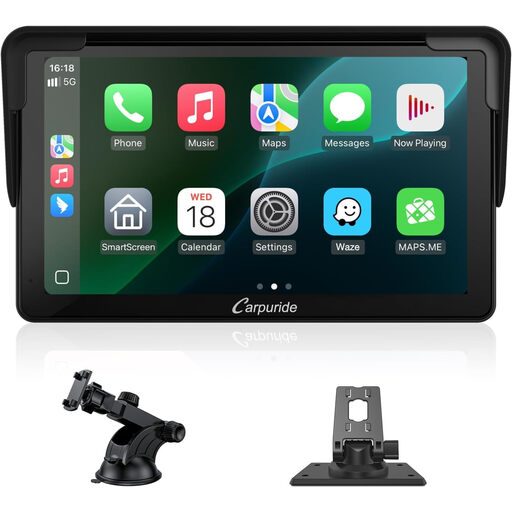
Why this choice suits this profile : Its 7-inch format is ideal for drivers who want to add navigation and hands-free calling without replacing the original car stereo.
Its compact format keeps clutter to a minimum, while the wireless connection avoids the complexity of replacing the centre console.
7-inch 1080p touchscreen, wireless CarPlay and Android Auto, Bluetooth 5.0 and MirrorLink.
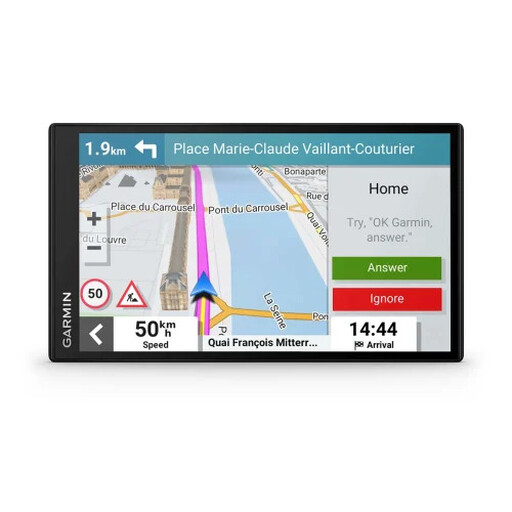
Why this choice suits this profile : This model is aimed at motorists who prioritise a standalone GPS with preloaded European maps and dedicated navigation features.
Navigation does not rely solely on CarPlay or Android Auto. European maps are preloaded and updates are carried out over Wi-Fi.
6.95-inch screen, maps covering 46 European countries, Bluetooth, voice control and stated compatibility with the Garmin BC 40 camera, sold separately.
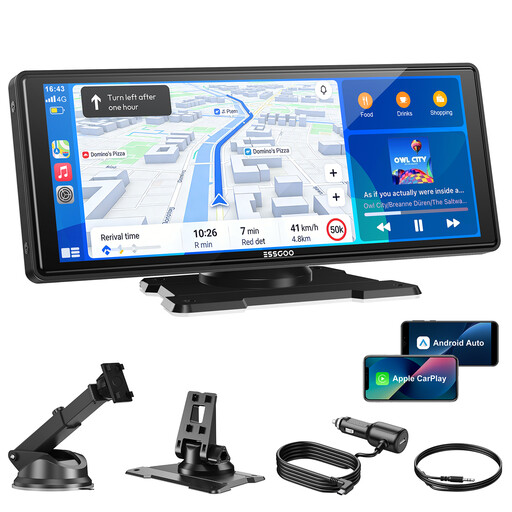
Why this choice suits this profile : Its large display and four audio modes are ideal for drivers who regularly use navigation, music and calls.
You are not limited to a single audio output: the device offers a built-in speaker, Bluetooth 5.3, an FM transmitter and an AUX input.
10.26-inch screen with 1 600 × 600-pixel resolution, dual-band Wi-Fi, Bluetooth 5.3, OTA updates and support for a reversing camera sold separately.
Choose a portable screen if you want to keep the original car stereo, minimise installation work and be able to remove the device when the car is parked. This option is also practical for vehicles shared by several drivers.
A 2 DIN car stereo offers a more discreet integration, but you need to check the dimensions, connectors and which functions will remain available after installation. The Junsun 8163 Series 2DIN 7-Inch, for example, states that it has 2 GB of RAM and 32 GB of storage, a 7-inch IPS screen with 1 024 × 600-pixel resolution, and support for wired or wireless CarPlay. Check the compatibility information carefully before making any changes to the dashboard.
Whichever solution you choose, a portable GPS is still a driving aid. Plan your route while stationary, follow road signs and install the screen in a position that does not reduce your visibility.
We have put together a complete, real-time updated list of products that meet these demanding selection criteria and European safety regulations.
Yes. These devices are generally mounted on the windscreen or dashboard and plugged into the 12 V socket. To play sound through the car’s speakers, you then need to use the method supported by the model: Bluetooth, AUX, FM or a connection to the existing car stereo.
CarPlay and Android Auto generally rely on your smartphone for apps, music and navigation. Offline operation therefore depends on the app being used and the maps downloaded to your phone. A Garmin GPS with preloaded maps provides more autonomous navigation, while certain connected features require a smartphone and a data connection.
The screen itself does not generally require a specific subscription. Any additional costs come from the mobile plan used for live traffic information, streaming or online maps. Depending on the model, you may also need to purchase a reversing camera, AUX cable or adapter suitable for your vehicle separately.