
Livraison le jour même ou le lendemain

Qualité garantie

Débloquez vos offres de bienvenue: Livraison GRATUITE | Jusqu'à -80 % | 30 jours d'essai gratuits à JoyPlus
Téléchargez l'application
An printer that suddenly starts producing pale text, incomplete lines or a message indicating that a cartridge is incompatible can quickly make working from home, studying or printing official documents more difficult. For owners of an HP ENVY Photo 6200, 7100, 7800 or an HP TANGO, the original HP 303 black ink cartridge is a reference worth checking before placing an order.
The issue is often caused by HP cartridges that look very similar but are designed for different product ranges. Here are the key points to check to avoid an unnecessary expense and choose a model that is genuinely suitable for your printer.
The HP 301, HP 302, HP 305 and HP 303 references have similar formats and may appear in the same search results. However, they are not interchangeable. An HP 303 black cartridge carries the manufacturer reference T6N02AE, also listed as HP 303 black T6N02AE.
An HP 301 cartridge, for example, is suitable for certain different DeskJet, ENVY and OfficeJet printers. The HP 302 colour cartridge, meanwhile, is intended for other models. Always check the exact reference shown on the front of the printer or in its maintenance menu.
A lower price does not necessarily mean a lower cost per page. A compatible cartridge may offer a different capacity, require more printhead cleaning cycles or be recognised less consistently depending on the printer. If you are looking for an authentic HP cartridge, check the reference, packaging and the words “original HP” in the product listing.
For professional documents, homework and forms, reliable recognition by the printer can matter just as much as the purchase price.
The number of printable pages depends on the content of the documents, text density, print settings and cleaning cycles. The stated yield for the HP 303 black is approximately 200 pages according to ISO/IEC 24711. This figure makes it possible to compare products under standardised conditions, but it does not guarantee the same number of pages in every home.
The original HP 303 black ink cartridge T6N02AE is listed as compatible with the following ranges:
This check comes before everything else. The words “ENVY Photo” alone are not enough: the printer’s complete model number must appear in the list of compatible models. If your device belongs to a different range, check the reference shown on the old cartridge instead.
The product listing specifies HP pigment black ink. This is pigment-based ink, generally valued for producing sharp characters on everyday documents. According to the information provided for this cartridge, printed text is described as resistant to water and fading.
This describes the product’s technical characteristics; it is not a guarantee that applies to all paper types, print settings or storage conditions. For consistent results, choose paper suitable for inkjet printers and avoid touching the surface immediately after printing.
The stated yield is approximately 200 pages, according to the ISO/IEC 24711 standard. The packaging contains one black cartridge and the complete item weighs approximately 0,05 kg, based on the available information.
Do not remove the sealed packaging until you are ready to replace the cartridge. Store the cartridge upright, with the nozzle facing down, in a cool, dry place away from sunlight and extreme temperatures. Do not touch the copper-coloured electronic contacts or the metal nozzle: you could cause print defects or prevent the cartridge from being recognised.
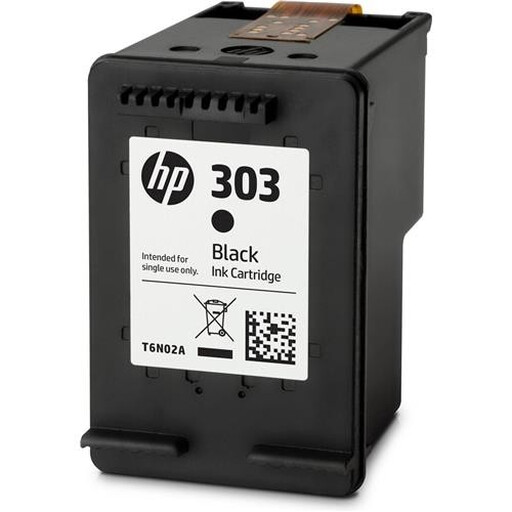
Why this choice suits this profile : This cartridge is suitable for owners of an HP ENVY Photo 6200, 7100, 7800 or an HP TANGO who want to replace their black cartridge without choosing the wrong reference.
The T6N02AE reference and list of compatible printers reduce the risk of confusing the HP 303 with the 301, 302 or 305 series.
Pigment black ink, an approximate yield of 200 pages according to ISO/IEC 24711, and one cartridge per pack.
Why this choice suits this profile : This authentic HP cartridge is aimed at users who value a clearly identified manufacturer reference and installation in line with HP’s recommendations.
The HP 303 black designation lets you check the reference before payment, rather than relying solely on the cartridge’s appearance.
T6N02AE reference, pigment black ink and stated compatibility with four HP printer families.
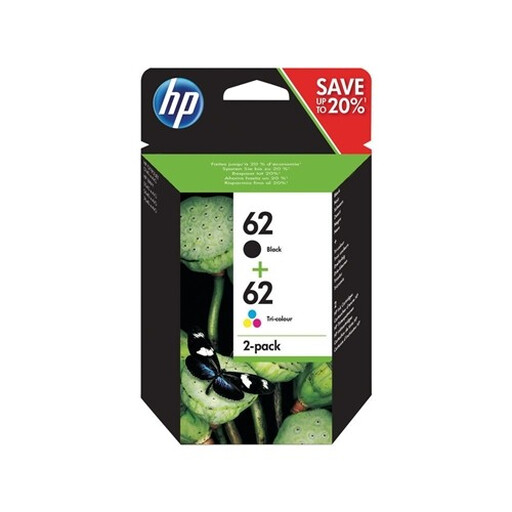
Why this choice suits this profile : This option is intended for users of HP ENVY or OfficeJet printers compatible with the 62 series, not for ENVY Photo 6200, 7100 or 7800 models.
The explicit mention of the 62 series is a reminder that a different yield or pack size never removes the need to check compatibility.
Two cartridges, offering approximately 200 black-and-white pages and 165 colour pages according to ISO/IEC 24711, for the relevant printers.
If your prints show streaks, start by using the printhead cleaning function provided in the HP software. Avoid removing and reinserting the cartridge repeatedly: each cycle may use a small amount of ink.
No. It is listed as compatible with the HP ENVY Photo 6200, 7100 and 7800, as well as the HP TANGO series. You must check the exact model before ordering.
The stated yield is approximately 200 pages according to the ISO/IEC 24711 standard. The actual result varies depending on text density, page coverage and cleaning operations.
For internal documents, use draft mode. Also remember to preview your documents before printing and combine pages whenever possible. For important documents, choose a standard setting and keep the cartridge in the recommended conditions until installation.