
Livraison le jour même ou le lendemain

Qualité garantie

Débloquez vos offres de bienvenue: Livraison GRATUITE | Jusqu'à -80 % | 30 jours d'essai gratuits à JoyPlus
Téléchargez l'application
A wrong reference can render a cartridge unusable, even if its packaging displays the HP logo. For a DeskJet, ENVY, OfficeJet, OfficeJet Pro, Photosmart or Tango printer, the cartridge number depends on the exact model, the region and sometimes the format you choose. Before buying original HP ink cartridges, a few checks are all it takes to avoid unnecessary expense.
HP 301, HP 302, HP 303, HP 304, HP 305, HP 308, HP 364, HP 903, HP 912, HP 937 and HP 62 cartridges are not interchangeable. Two printers from the same family can use different references.
The printer's commercial name is therefore not always enough. Check the reference printed on your old cartridge, in the printer menu or in the manual. The consumable model number, such as CH561EE, C2P04AE or 6ZC74AE, provides additional confirmation.
Some printers use a separate black cartridge and a tri-colour cartridge combining cyan, magenta and yellow. Others work with four individual cartridges. An HP cartridge pack can be convenient, provided its contents match your printer and your needs.
Check precisely whether the product contains an HP black cartridge, an HP colour cartridge, three separate cartridges or a black + CMYK set.
A standard-capacity cartridge may cost less to buy, but it will need replacing more often. Conversely, an HP XL cartridge generally offers better yield, without always being more economical in every case. To work out the right calculation, compare the price per page yield according to the ISO/IEC 24711 standard, when this data is available.
Compatibility is the only non-negotiable criterion. A cartridge compatible with an HP printer must be linked to a precise list of models. For example, the HP 912 6ZC74AE pack is specified for the HP OfficeJet 8010, 8012, 8014 and 8015 series, as well as for HP OfficeJet Pro 8020 to 8025 models. You should not deduce this simply because your printer belongs to the OfficeJet range.
The same caution applies to HP 301, HP 302 or HP 62 cartridges. Compare your printer's full name with the list of models mentioned on the product page.
Black ink is often pigment-based, while colour inks can be dye-based. In the product sheets presented here, pigment-based black ink is described as suitable for printing sharp text, whereas dye-based inks are intended for graphics and photos.
This distinction is not a medical or professional guarantee: it simply helps you better understand the consumable's stated behaviour. Also check whether the pack contains a three-in-one colour cartridge or separate cyan, magenta and yellow cartridges.
The ISO/IEC 24711 yield corresponds to a standardised method for estimating the number of pages printed under defined conditions. The actual result varies depending on coverage rate, the presence of images, print settings and print head cleaning cycles.
As a guide:
These figures are useful for comparing similar references, but they do not replace observing your actual usage.
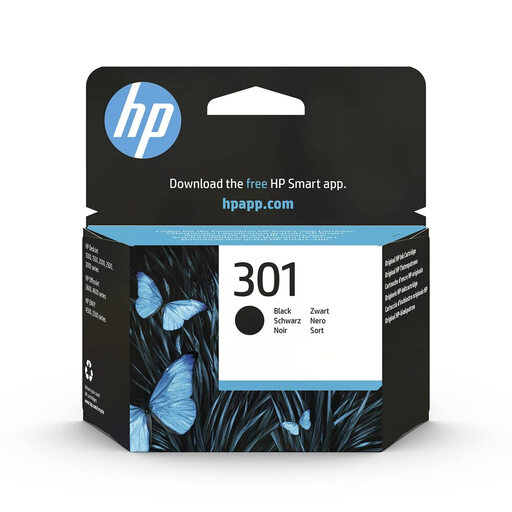
Why this choice suits this profile: this HP black cartridge is ideal for users who mainly print text on certain DeskJet, ENVY and OfficeJet models.
The CH561EE reference and the stated yield of approximately 190 pages allow you to verify the product before purchase, rather than relying solely on the range name.
Pigment-based black ink and thermal technology with integrated print head, according to the product sheet.
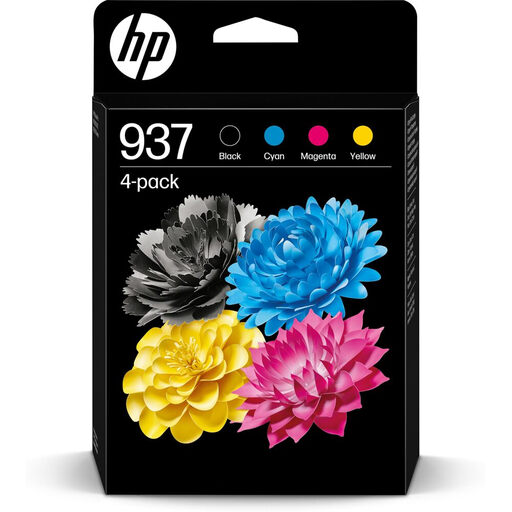
Why this choice suits this profile: this four-cartridge HP pack is aimed at OfficeJet Pro users who want to manage black, cyan, magenta and yellow separately.
The four colours are clearly identified and compatibility is stated for HP OfficeJet Pro 9110b, 9120e, 9130e, 9720 and 9730.
Pigment-based ink for all four colours and a stated yield of 1,450 pages in black and 800 pages per colour.
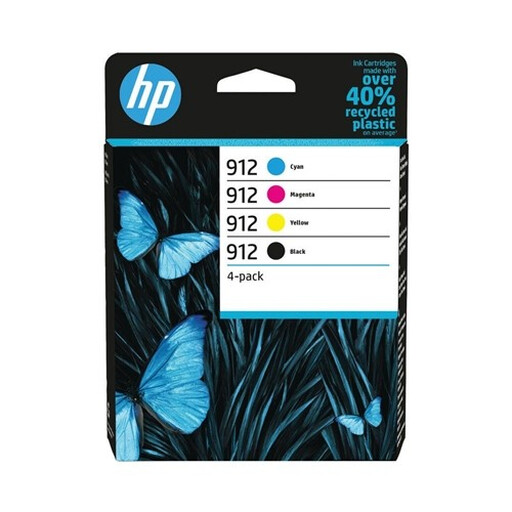
Why this choice suits this profile: this pack is suitable for remote working, small businesses and households that regularly print documents in black and colour.
The product page clearly links the pack to OfficeJet 8010 and OfficeJet Pro 8020, with a separate capacity for black and each colour.
Pigment-based ink stated for all four cartridges, with a yield of approximately 300 pages in black and 315 pages per colour according to the ISO/IEC 24711 standard.
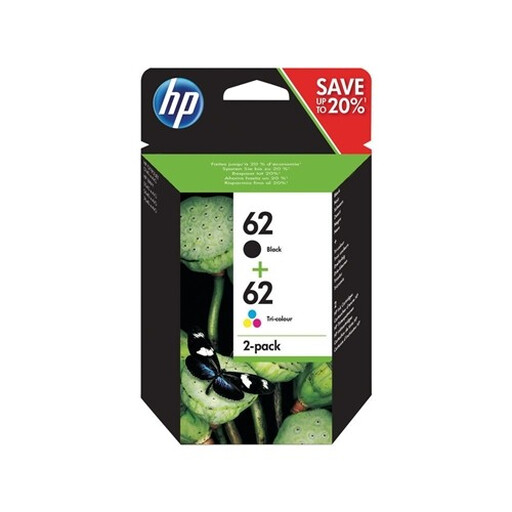
Why this choice suits this profile: the black + tri-colour duo meets the everyday needs of ENVY and OfficeJet users who switch between documents and colour printing.
The pack contents are explicit: one black cartridge and one tri-colour cartridge, compatible with several ENVY 5540, 5640 and 7640 models.
Stated yield of approximately 200 pages in black and 165 pages in colour, with pigment-based black ink.
We have compiled a comprehensive list, updated in real time, of products that meet these strict selection criteria and European safety regulations.
Store cartridges in their sealed packaging until you are ready to replace them. After opening, remove the protective tape without touching the copper-coloured electronic contacts or the metal nozzles. Insert the cartridge into the corresponding slot until you hear a click, then run a test page.
Store cartridges upright, in a cool, dry place away from sunlight and extreme temperatures. Keep them out of reach of children. A cartridge compatible with an HP printer should never be forced into a slot that does not match its shape or reference.
Check the label on your old cartridge, the printer's maintenance menu or its manual. Then note the full reference, particularly the final letters such as AE, EE or the associated model numbers.
Not necessarily. The XL format can be worthwhile for regular use, since its stated yield is higher than that of a standard cartridge. For occasional use, compare the total price, the ISO/IEC 24711 yield and the risk of keeping an opened cartridge for a long time.
The alert may indicate a poorly inserted cartridge, a dirty contact or an unsuitable reference. Remove it only if necessary, check its positioning without touching the contacts, then consult the printer's instructions. An alert alone is not enough to conclude that the product is faulty.