
Livraison le jour même ou le lendemain

Qualité garantie

Débloquez vos offres de bienvenue: Livraison GRATUITE | Jusqu'à -80 % | 30 jours d'essai gratuits à JoyPlus
Téléchargez l'application
Remote work has become a permanent fixture in our lives, often turning our homes into makeshift workspaces. However, creating a dedicated office nook that is both productive and comfortable remains a challenge. All too often, an impulse buy—driven by a slick photo or a tempting promotion—ends in costly disappointment and, worse, very real physical pain. Before you pull out your credit card, it's crucial to know the common pitfalls to avoid in order to equip yourself intelligently.
Here are the 3 most common mistakes when buying home office furniture, and our advice on how to avoid them.
To create a successful home office, the goal isn't to collect gadgets but to choose equipment that meets specific needs. Here are the technical points to check to make an informed and lasting choice.
A comfortable office chair is, above all, a chair that adapts to you, not the other way around. The key element? Dynamic lumbar support. Unlike a simple static cushion, a dynamic mechanism follows the micro-movements of your back throughout the day. It provides constant support, whether you're leaning over a document or leaning back to think. Also, check for multiple adjustments: seat height and depth, backrest tilt, and ideally, armrests that are adjustable in height, depth, and angle (known as 3D, 4D, etc.).
Here, size matters. The work surface is non-negotiable. For a complete setup (one or two monitors, a computer, and writing space), a 160 cm wide tabletop is a solid foundation. Depth is just as crucial: 80 cm allows you to position the screen at a comfortable distance for your eyes while leaving enough room for your keyboard and wrists. Stability is another non-negotiable point. A steel frame and sturdy legs ensure your desk won't wobble at the slightest movement, even when loaded with multiple devices.
A tidy desk fosters a clear mind. Organisation is a cornerstone of concentration. Instead of fixed shelves that gather dust, a mobile pedestal file cabinet offers unparalleled flexibility. It can slide under the desk to maximize space or be placed alongside it to serve as an extra surface. Ensure the drawers are deep enough to accommodate hanging files (A4 format) and that a lock is included to secure sensitive documents. Its mobility allows you to reconfigure your space as your needs change.
Because every remote worker is unique, we've selected products that meet specific needs, always keeping functionality and durability in mind.
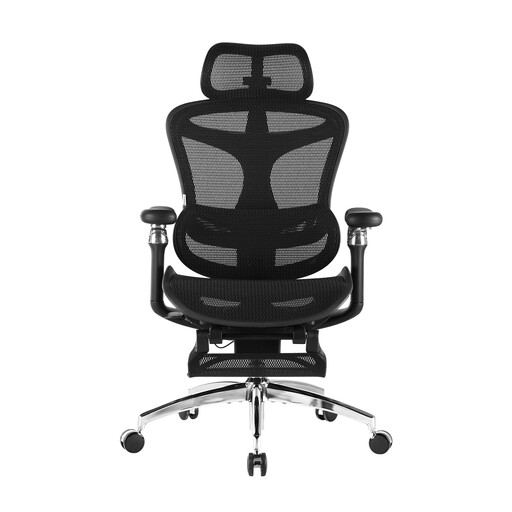
Why this pick ? Ideal for those who spend over 8 hours a day at their screen. It offers advanced postural support, designed to prevent the pain associated with prolonged sitting.
It beats the "fake ergonomics" trap with its dynamic lumbar support, which adapts in real-time to your back's movements, and its ultra-adjustable 6D armrests that ensure perfect arm and shoulder alignment.
Its countless adjustments (lumbar support, seat depth, 6D armrests...) allow you to tailor your posture for a custom fit.

Why this pick ? Perfect for professionals who juggle multiple monitors, bulky peripherals, or need a large surface for creative work (drawing, reviewing blueprints...).
It directly solves the "postage-stamp desk" syndrome. Its generous 160 x 80 cm surface lets you build a complete setup without ever feeling cramped.
Its robust steel frame supports up to 400 kg, guaranteeing rock-solid stability. The adjustable feet compensate for uneven floors, ensuring a perfectly level surface.
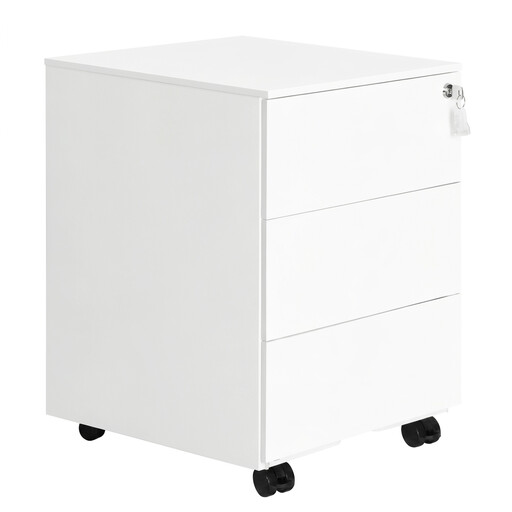
Why this pick ? Essential for anyone who wants a tidy and secure workspace. It centralizes documents, stationery, and supplies for immediate access and a consistently clean desk.
It tackles the "forgotten storage" trap head-on. Its 3 spacious drawers and central lock provide a mobile, secure, and highly functional filing solution.
It arrives almost fully assembled (only the casters need to be attached), making it operational in minutes. Its casters, two of which have brakes, ensure perfect mobility and stability.
The ideal office setup is a highly personal matter. If our suggestions don't check all your boxes, plenty of other solutions are available.
The golden rule is the 90-degree angle posture. Sit down, then adjust your chair height so your feet rest flat on the floor and your knees form a 90-degree angle. Next, adjust your chair height so that when you place your forearms on the desk, your elbows also form a 90-degree angle. Your armrests, if adjustable, should slide just under your forearms without forcing them up.
The longevity of an ergonomic office chair primarily depends on the quality of its materials and mechanisms. A good model with a steel frame, a Class 3 or 4 gas lift, and a technical mesh or durable fabric cover can easily last 7 to 10 years with daily use. In contrast, entry-level models often show signs of weakness (sagging foam, creaky mechanisms) after only 2 or 3 years.
Not necessarily. If chosen wisely, a large 160 cm desk can actually optimize your space. Placed against a wall, it provides a vast work surface without obstructing traffic flow. Paired with a mobile cabinet that slides underneath, it allows you to centralize everything into a single workstation, freeing up the rest of the room for other uses.