
Livraison le jour même ou le lendemain

Qualité garantie

Débloquez vos offres de bienvenue: Livraison GRATUITE | Jusqu'à -80 % | 30 jours d'essai gratuits à JoyPlus
Téléchargez l'application
Remote work, marathon days at the office... Long hours spent sitting take a toll on our bodies. Back tension, neck pain, and general fatigue are often the price of poor posture. An ergonomic office chair isn't a luxury; it's a crucial investment in your well-being and productivity.
Faced with an overwhelming number of options and sometimes opaque marketing jargon, it can be difficult to navigate the market. As a Product Expert at Joybuy, my role is to provide you with clear information and objective criteria to help you make an informed choice. This guide breaks down the essential elements to consider and presents a selection of models that have caught our eye.
Before diving into our selection, let's review the fundamental criteria for finding the model that's truly right for you.
The primary consequence of poor sitting posture? Back pain. A good office chair with lumbar support is therefore non-negotiable. There are two main types of support:
An adjustable office chair is essential for adapting to your body type. Beyond the standard height adjustment, check for the following features:
The upholstery has a direct impact on your comfort, especially after several hours. The mesh office chair is a particularly popular choice for its breathability. It ensures excellent air circulation, which prevents heat and moisture build-up. Make sure the mesh is high quality: both flexible for comfort and taut enough for firm support. Certifications like BIFMA or T?V are good guarantees of durability and safety.
Here are three models that stand out for their features and cater to different user profiles, whether you're looking for a chair for intensive remote work or a model for more moderate use.
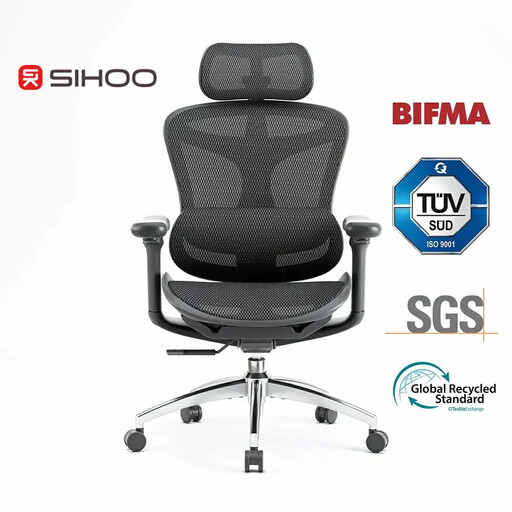
Why it stands out: The SIHOO Doro C300 is designed around a "dynamic flow" concept. Its standout feature? A self-adaptive lumbar support system that follows your body's movements in real time. Paired with a full breathable mesh structure, this model is engineered for optimal comfort during long workdays.
Key features:
Who is it for? Ideal for remote professionals and heavy users seeking active support and excellent ventilation to stay focused and productive, even after several hours.
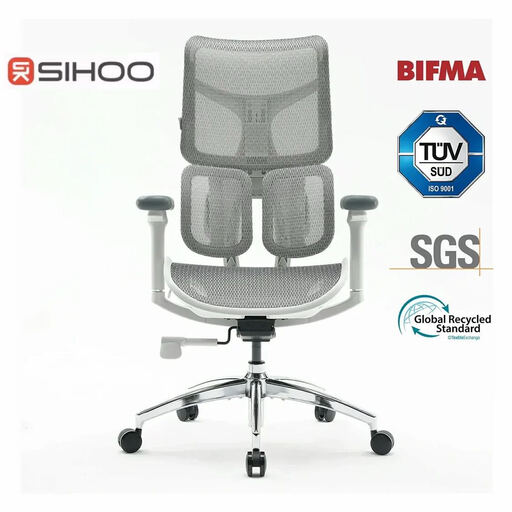
Why it stands out: The SIHOO Doro S100 takes customisation even further. It features a dual dynamic lumbar support for wrap-around support, as well as coordinated 4D armrests that follow the backrest's recline. Its 5-level adjustable backrest makes it compatible with a wide range of body types (from 150 cm to 190 cm, according to the manufacturer).
Key features:
Who is it for? Perfect for demanding users who want a surgical level of adjustment to find their ideal posture. Its high adaptability makes it an excellent alternative for those who can't find a good fit with standard models.
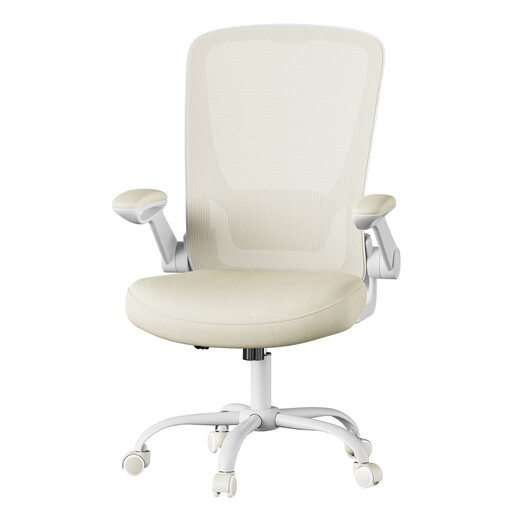
Why it stands out: This Ochama model focuses on the essentials of ergonomics with a healthy dose of practicality. Its standout feature: flip-up armrests, which allow the chair to slide completely under the desk. This is a welcome space-saving feature in smaller spaces.
Key features:
Who is it for? An excellent option for those with limited workspace or who are looking for a functional ergonomic chair for daily use, without necessarily needing the most advanced adjustments.
Our selection highlights three key models, but the world of ergonomic seating is vast. If you want to explore other styles, materials, or price ranges, feel free to browse our complete collection.
? Discover all our office chairs
1. What is the difference between a standard office chair and an ergonomic one? A standard chair simply provides a place to sit, whereas an ergonomic chair is designed to actively support the body in a healthy posture. It has multiple adjustments (height, depth, lumbar support, armrests) to adapt to your body type, which significantly reduces the risk of musculoskeletal disorders (MSDs) and back pain.
2. How do I properly adjust my ergonomic office chair? Here are a few simple guidelines:
3. What is the lifespan of a good office chair? The lifespan depends on the quality of the materials and the intensity of use. An entry-level model might last 2 to 3 years, while a quality ergonomic chair with a metal frame and certifications like BIFMA can easily last 5 to 10 years or more with proper care. It's a long-term investment in your health.