
Livraison le jour même ou le lendemain

Qualité garantie

Débloquez vos offres de bienvenue: Livraison GRATUITE | Jusqu'à -80 % | 30 jours d'essai gratuits à JoyPlus
Téléchargez l'application
Remote work, whether full-time or hybrid, has turned our homes into new offices. The result? Entire days spent in front of a screen, often at the expense of our comfort. This leads to back pain, neck tension, and general fatigue that saps both productivity and well-being.
Investing in an ergonomic office chair is not a luxury, but an investment in your health and efficiency. This guide is here to break down the essential features and introduce you to specific models, without the marketing jargon.
Before you commit to a model, let's review the criteria that separate a simple seat from a true ally for your back.
The basic principle of an ergonomic chair? It adapts to your body, not the other way around. Adjustments are therefore the crucial element.
The upholstery isn't just about looks; it plays a crucial role in everyday comfort.
A good chair must be stable and built to last. Take a look at the base (the 5-star base), the castors, and the maximum supported weight. A metal or aluminium alloy base is a sure sign of quality.
Enough theory, let's get practical! Here is our selection of ergonomic chairs that caught our eye.

What we liked: This model checks all the boxes for a good, modern ergonomic chair. With its breathable mesh backrest and numerous adjustments, it stands out as a versatile and effective choice for heavy daily use.
Key Features:
Who is it for? The ideal companion for intensive remote workers (more than 8 hours a day) looking for a comfortable office chair that is, above all, highly breathable.
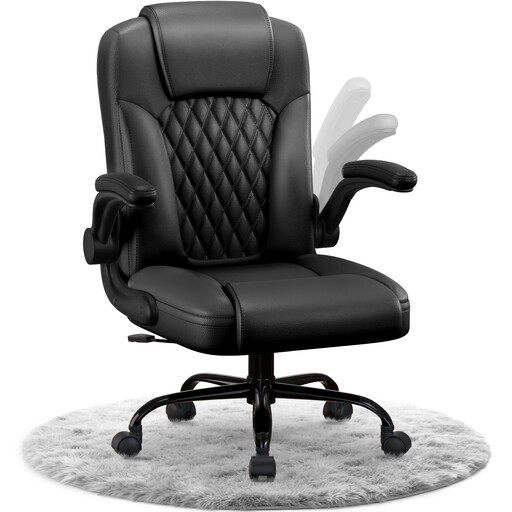
Its standout feature: This chair focuses on practicality with its 90° flip-up armrests. A brilliant feature for sliding it completely under the desk to optimise space. Its faux leather upholstery adds a touch of elegance.
Key Features:
Who is it for? For those short on space or who like a tidy desk. It's also the perfect choice for fans of the look and feel of faux leather.
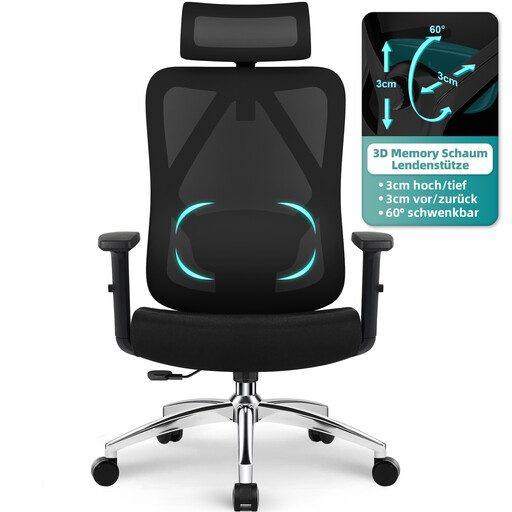
The Promise: Here, the focus is on back support with a fully adjustable 3D memory foam lumbar support. Add to that an extra-large weight capacity and a generous recline, and you get a chair designed for customised comfort and robustness.
Key Features:
Who is it for? Recommended for those with sensitive backs, larger frames, and anyone who dreams of being able to lie back (almost) for a power nap between tasks.
Our selection is just a taste. Your needs, body type, and budget are unique. If you haven't found the perfect one yet, don't worry.
Explore our complete collection of indoor chairs with support to find the model that will blend into your office and take care of your back.
To put it simply, a standard chair offers the bare minimum (often just height adjustment). An ergonomic office chair, on the other hand, is a true wellness tool: lumbar support, adjustable armrests, seat depth, recline... Everything is designed to adapt to you and reduce strain on your body.
The 4-point adjustment basics:
Don't be surprised if you feel a little discomfort at first. Your body needs to unlearn its bad habits! Give it a few days, or even a week, to adapt to this new, healthier posture. Use this time to fine-tune your settings.
By the Joybuy editorial team