
Livraison le jour même ou le lendemain

Qualité garantie

Débloquez vos offres de bienvenue: Livraison GRATUITE | Jusqu'à -80 % | 30 jours d'essai gratuits à JoyPlus
Téléchargez l'application
Want to personalise wood, leather or acrylic, but find that laser engraver specifications all start to look the same? High power, record speeds or a mobile app aren’t enough to guarantee that a machine will be right for your workshop.
DIY creators, makers, craftspeople and small businesses in France often fall into three common traps:
A diode laser engraver is generally chosen for wood, leather, some opaque acrylics and coated metals. Lower-powered models, such as 3 W machines, are mainly suited to marking and small decorative projects. A 5.5 W to 10 W machine offers more options for cutting thin materials, depending on the settings used.
Machines rated at 20 W, 33 W or more are intended for more demanding projects. But power shouldn’t be your only point of comparison: also look at the laser spot size, focusing system, air assist and the limits specified by the manufacturer.
An acrylic laser engraver requires particular care. Not all acrylics behave in the same way, especially clear sheets. Some products need surface preparation, while others simply aren’t compatible with a diode laser. Avoid PVC and materials with an unknown composition because they can release potentially hazardous fumes.
For miniature creations, an area of 80 × 80 mm or 150 × 150 mm may be enough. For signs, panels or prototypes, a 300 × 300 mm working area gives you more room to work. Machines with areas of 410 × 400 mm, 418 × 418 mm or 600 × 600 mm are better suited to batches, larger pieces and intensive use.
Remember to measure the space available in your home or workshop, too. An open-frame machine needs enough clearance all around it. An enclosed model can better contain the working area, but it still takes up space and also needs suitable fume extraction.
Before ordering, check for a protective screen or enclosure, an emergency stop button, a flame or tilt sensor, and compatibility with the accessories supplied. Safety glasses must be suitable for the wavelength of the laser being used; they are no substitute for a safe working environment.
A laser engraver and cutter can be controlled from a computer, TF card, over Wi-Fi or through an app. Smartphone control is handy for quickly starting a design, while offline operation means you don’t have to rely on a constant connection. Before you buy, check compatibility with LightBurn, LaserGRBL or the manufacturer’s own software, particularly if you use Windows, macOS or Linux.
The models below suit different uses. The specifications listed are based on the information provided for each product; actual results vary depending on the material, settings and maintenance.
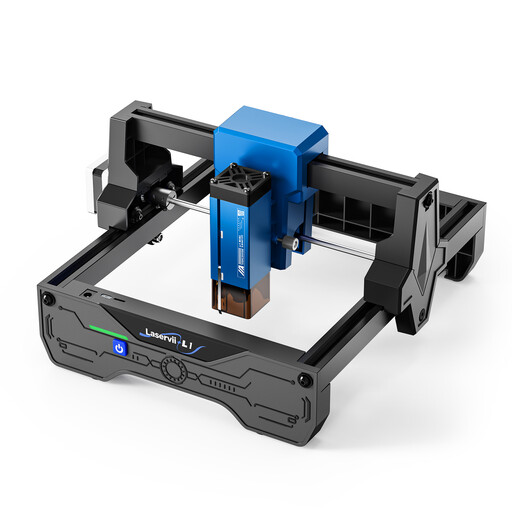
Why it’s a good fit: Its compact design and 150 × 150 mm working area make it well suited to small workshops, personalised gifts and first projects in wood or leather. Smartphone connectivity makes it easy to get designs started.
The specifications clearly state the 3 W power rating and working area, so you won’t pay for cutting capability you don’t need.
Desktop design, smartphone app and stated compatibility with wood, leather, acrylic and coated metals.
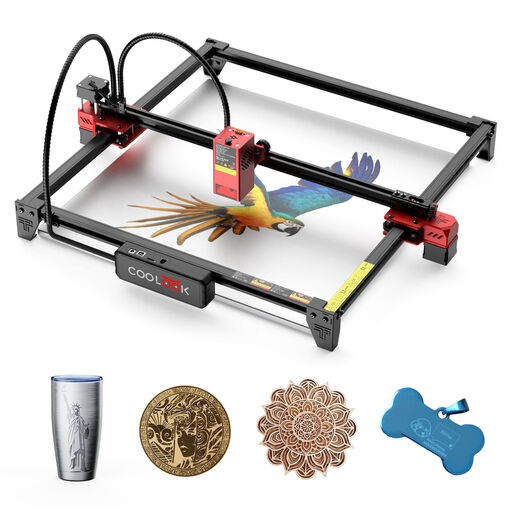
Why it’s a good fit: Its 418 × 418 mm working area gives you more room for panels, prototypes and batches of parts, while the app and offline operation make it easier to organise your workshop.
The working area is clearly stated, so you can check it’s suitable for your project sizes before ordering.
20 W power, a 418 × 418 mm working area and project storage for working without a computer running continuously.
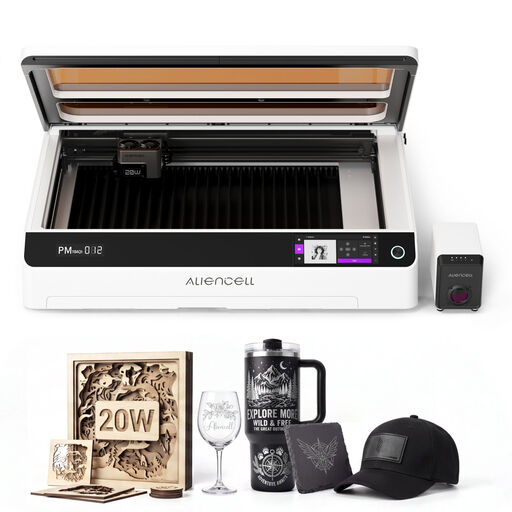
Why it’s a good fit: This enclosed machine is designed for workshops looking for a more organised setup. It has a large 660 × 535 mm working area, air assist and two 8 MP cameras.
The enclosure, flame sensors and built-in emergency stop help meet the control needs of a well-equipped workshop, but you must still follow all safety guidelines.
660 × 535 mm working area, 6.86-inch touchscreen, built-in camera and stated compatibility with LightBurn.
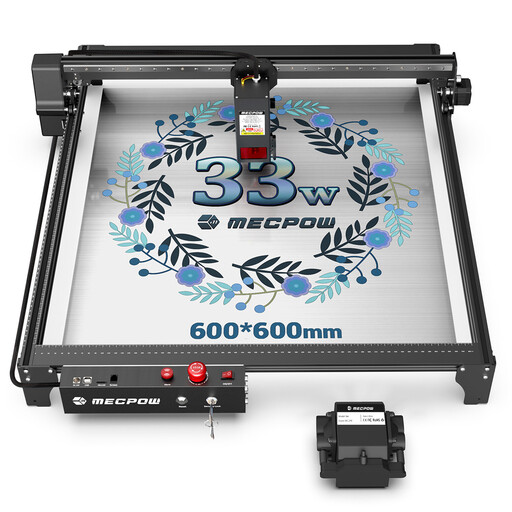
Why it’s a good fit: If you produce large pieces or batches, you can make the most of its 600 × 600 mm working area, automatic air assist and Wi-Fi or TF card operation.
The air assist, sensors and emergency stop are clearly listed, so you can check that the features you need for regular use are included.
33 W power, a 600 × 600 mm working area, a stated laser spot size of 0.08 × 0.1 mm and a stated maximum speed of 28 000 mm/min.
Set up your laser engraver on a stable, non-flammable surface with plenty of clear space around it. Arrange for fume extraction to the outside or use a suitable filtration system. Clean the lens regularly, following the manufacturer’s instructions, and check the cables, rails and focus.
Running costs include electricity, test materials, lenses, fans and, sometimes, air assist. If you use the machine regularly, also check that a compatible replacement laser module is available. The 20 W, 40 W and 60 W Aliencell modules are designed for certain X1 versions. Check the power rating and model before ordering, as modules aren’t universal.
We’ve put together a complete, regularly updated list of products that meet these strict selection criteria and European safety requirements.
Only if you have a suitable setup, well-managed ventilation and a workspace that children and pets can’t access, away from flammable materials. Treated wood, some plastics and materials with an unknown composition can produce hazardous fumes. Always check the manufacturer’s list of approved materials.
For small designs and marking, 3 W may be enough. A 5.5 W to 10 W machine gives you more flexibility for different projects. Models rated at 20 W or more are generally better suited to cutting and demanding formats. However, the thickness you can actually process depends on the type of wood, its moisture content, the number of passes and the air assist.
Its lifespan depends on how intensively it’s used, cooling, lens cleanliness and mechanical maintenance. Before buying, check that spare parts, software and a compatible laser module are available. A well-maintained machine can keep working for longer than a model chosen solely for its maximum power.