
Same-day & Next-day Delivery

Quality Guaranteed

Unlock Your Welcome Offers: FREE Delivery | Up to 80% OFF | Free 30-day JoyPlus trial
Download the APP
A honeycomb bed for a laser engraver can transform the way you organise your cutting workspace. It helps disperse smoke and heat, reduces direct contact between your material and the work surface, and can produce cleaner cuts. But not every honeycomb bed is compatible with every machine.
The most common mistake is choosing a model based solely on the laser’s power or a stated measurement, without checking its actual footprint. To find a laser honeycomb bed that’s right for you, start by checking its external dimensions, materials and build quality.
A bed advertised as “300 × 300 mm” may refer to the entire frame, rather than the area actually available for your material. Edges and side guards can sometimes reduce the usable space.
Before ordering, measure:
Sizes of 300 × 300 mm, 400 × 400 mm, 430 × 400 mm and 500 × 500 mm suit a wide range of needs, but they’re not interchangeable.
A metal honeycomb bed reduces contact between your material and the surface beneath it. However, the beam can still reach the table if there’s no protective backing. Placing an aluminium plate for laser engraving beneath the bed provides an extra barrier.
This protection doesn’t replace the usual precautions: set up your machine on a stable, non-flammable surface and supervise it throughout the cutting process.
A bed that’s too thin or poorly supported can warp under the weight of materials. For repeated use, a sturdy design with a central support, strong rivets or anti-slip feet will be more stable.
The honeycomb openings help air circulate beneath the material. This can help reduce burn marks on the underside, but the result also depends on the material, focus, speed, power and air assist.
Choose a laser cutting bed to suit the work area actually available, rather than the stated external size of the engraver. A bed that’s too large can obstruct the laser head, while one that’s too small leaves some areas unprotected.
Available sizes include 300 × 300 mm, 400 × 400 mm, 430 × 400 mm and 500 × 500 mm. They may suit many diode laser machines and some CO₂ machines, provided you check the available space and mechanical compatibility.
For regular use, look for a heat-resistant metal design with a rigid frame and well-spaced support points. In particular, check for:
An aluminium plate isn’t designed to make up for incorrect settings or prevent every consequence of poorly controlled cutting. Its main purpose is to provide extra protection.
A laser honeycomb bed helps air and smoke pass beneath the material. However, it’s no substitute for a proper extraction system. If your workshop is indoors, make sure you have suitable ventilation and follow the machine manufacturer’s instructions.
Never cut a material if you don’t know what it’s made of. Some plastics can release corrosive or dangerous fumes. Wear suitable protective glasses, supervise the cutting process and keep the emergency stop within easy reach.
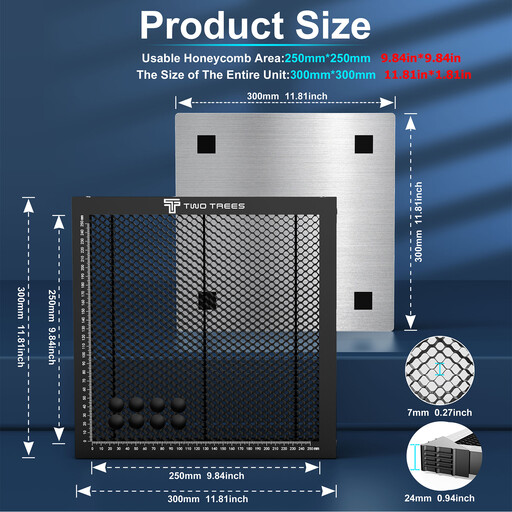
Why it’s a good fit for this user: Its compact size suits many desktop engravers with a 300 × 300 mm working area, without taking up unnecessary space on your workbench.
The product information confirms that the measurements include the frame. This is useful to know when measuring up before you buy.
Metal construction, aluminium protective plate, four edge covers and eight anti-slip feet.
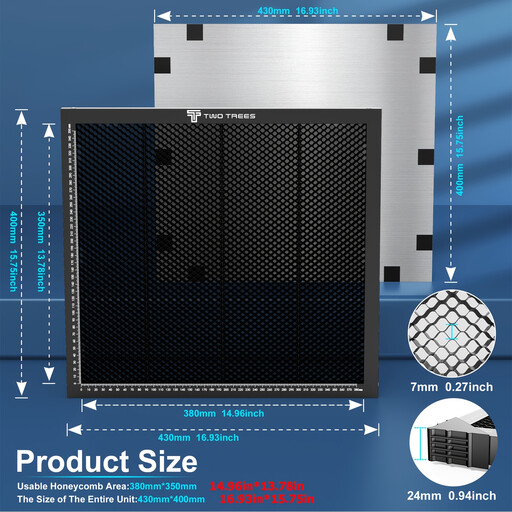
Why it’s a good fit for this user: This size gives you more room to work on panels, signs and projects that need extra space around the material.
The description gives the overall frame size and available dimensions. You can compare these with your worktable before ordering.
Heat-resistant iron, central support, securing rivets and an aluminium plate included.
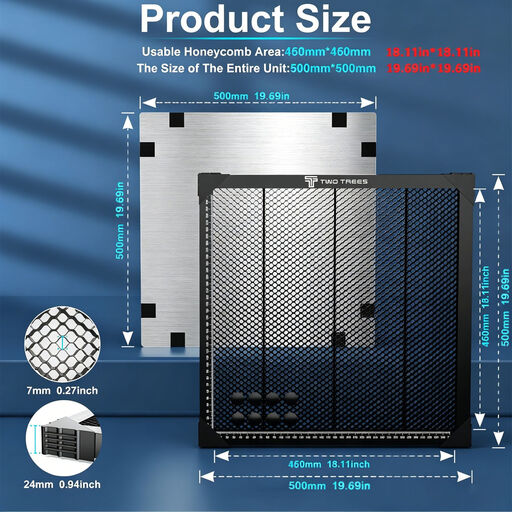
Why it’s a good fit for this user: Its large surface suits workshops that regularly handle bulky materials, provided your machine and table can accommodate it.
Don’t choose this size just to get more surface area: be sure to check both the usable area and the overall footprint.
500 × 500 mm size, open construction to encourage airflow and protective components included.
Place the honeycomb bed on a stable surface, then check that it won’t slide when the laser head moves. Anti-slip feet can improve stability, but they can’t compensate for an uneven table.
After several uses:
Its lifespan depends on the material being cut, how often you use it, the power and the settings. Regular cleaning doesn’t by itself guarantee a longer service life, but it helps you spot early signs of wear.
Start by measuring the space actually available inside the machine: the stated size may include the frame. A 300 × 300 mm bed will only fit if its external dimensions don’t interfere with the machine’s rails or uprights.
Compatibility depends on the machine’s working area and design, not just the type of laser. The available sizes are described as suitable for many diode and CO₂ engravers, but always check the dimensions, available clearance and manufacturer’s recommendations.
An aluminium plate can provide extra protection for your work surface and reduce the risk of beam marks. It’s no substitute for effective ventilation, the machine’s safety features or supervision during cutting.