
Livraison le jour même ou le lendemain

Qualité garantie

Débloquez vos offres de bienvenue: Livraison GRATUITE | Jusqu'à -80 % | 30 jours d'essai gratuits à JoyPlus
Téléchargez l'application
The world of custom mechanical keyboards is vast and exciting, but it's also filled with confusing technical jargon and marketing promises. For a gamer, developer, or content creator, choosing the right keyboard isn't just a purchase: it's an investment in a primary tool for work and play. Unfortunately, it's easy to fall for common pitfalls that lead to bitter disappointment.
As a Product Expert at Joybuy, my role is to help you cut through the noise. Let's break down the pitfalls to avoid and the essential criteria for making an informed decision.
Before diving into technical specs, it's crucial to know how to spot marketing claims that often hide disappointing quality.
To ensure you make the right choice, focus on these three fundamental aspects that define the quality and experience of a modern mechanical keyboard.
The mounting style is how the plate (where the switches are mounted) is secured inside the case. It is a determining factor for both the sound and the typing feel.
A modern wireless mechanical keyboard must offer maximum flexibility. Tri-Mode connectivity has become the standard for high-end models:
Also, check the battery capacity. A 4000 mAh battery is the bare minimum for comfortable use, but premium models often aim for 8000 mAh to last for weeks.
A truly customizable keyboard isn't just about hardware. The ability to completely remap every key, create complex macros, and manage multiple function layers is essential. Compatibility with open-source software like VIA or QMK is a guarantee of longevity and deep customization, freeing you from often limited and unintuitive proprietary software.
Here are a few options that meet specific needs, taking into account the quality criteria we've just discussed.
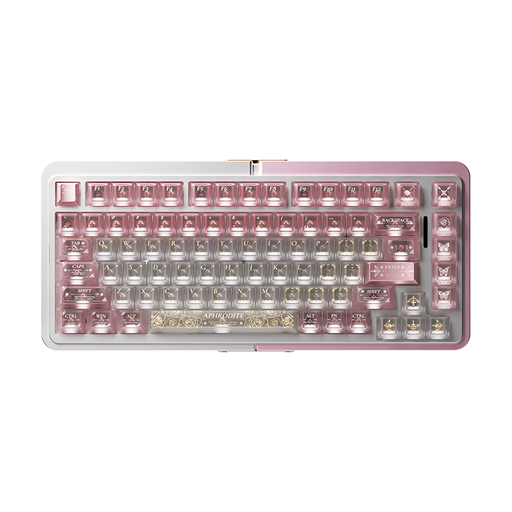
Why we chose it: Designed for pure performance, this keyboard is aimed at FPS players (Valorant, CS2) who demand maximum responsiveness. Its compact 75% layout frees up space for the mouse.
It doesn't just settle for being "hot-swappable." It features Hall Effect magnetic switches, a superior technology that allows for millimeter-precise actuation point adjustment and a "Rapid Trigger" function—a decisive in-game advantage.
Adjustable actuation point (0.1mm to 4.0mm) and Rapid Trigger function for instant responsiveness. CNC aluminum case for perfect stability.
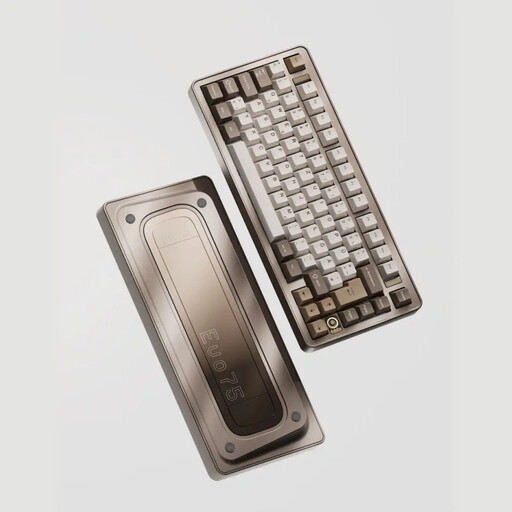
Why we chose it: For those who prioritize typing feel and acoustics. This keyboard is as much an object as it is a tool, with a premium build and an attention to acoustic detail.
There's no generic "gasket mount" here. The keyboard uses a Leaf Spring mount, a more sophisticated engineering solution that provides a noticeable and highly sought-after typing flex. This is paired with a solid aluminum case that dampens any hollowness.
Leaf Spring mount for a flexible typing experience, VIA compatibility for total customization, and an 8000mAh battery for exceptional battery life.

Why we chose it: Ideal for developers, creators, or anyone who needs a number pad without the large footprint of a 100% keyboard. Its unique features are designed to enhance productivity and ergonomics.
It justifies its CNC aluminum case with innovative and tangible features: a motorized lift for millimeter-precise ergonomic adjustment and a customizable IPS screen. This goes far beyond simple marketing claims.
Compact 96% layout with a number pad, Tri-Mode connectivity, and unique features like the motorized lift and IPS screen for an optimized workstation.
We have compiled a comprehensive list of products that meet our selection criteria and quality standards.
For an enthusiast who loves to experiment with different switch types (linear, tactile, clicky) and fine-tune their keyboard's sound, it's an essential feature. It allows for deep customization without needing to master soldering. For a user who is simply looking for a great keyboard and doesn't plan to modify it, it's not a priority.
Generally, a machined (CNC) aluminum case tends to produce a clearer, sharper, and often higher-pitched sound (known as a "clacky" sound). A high-quality plastic case can offer a deeper, more muted, and dampened sound (the famous "thocky" sound). However, the case material is only part of the equation: the mounting style, plate, switches, keycaps, and the addition of dampening foams have an equally significant impact on the final acoustic profile.
Yes, the vast majority of modern custom mechanical keyboards, especially those offering tri-mode connectivity (wired, 2.4GHz, Bluetooth), are fully compatible with macOS. Most have a physical switch or a key combination to toggle between Windows and Mac layouts, ensuring that modifier keys (Command, Option) are mapped correctly. Compatibility with VIA software also works on both operating systems.