
Livraison le jour même ou le lendemain

Qualité garantie

Débloquez vos offres de bienvenue: Livraison GRATUITE | Jusqu'à -80 % | 30 jours d'essai gratuits à JoyPlus
Téléchargez l'application
A magnetic gaming keyboard appeals to Valorant, CS2 and Apex Legends players thanks to its adjustable actuation point and Rapid Trigger function. However, product specifications can sometimes blur the distinction between conventional mechanical switches, Hall Effect technology, polling rate and claims of reduced latency. To avoid a disappointing purchase, it is better to separate genuinely useful features from simple marketing claims.
A traditional mechanical keyboard relies on physical contact inside each switch. By contrast, a Hall Effect mechanical keyboard measures the key’s position using a magnetic field. This technology generally makes it possible to adjust the actuation point and adapt the key’s behaviour as it rises.
The term ‘magnetic gaming’ does not, however, guarantee that Hall Effect switches are present. Before placing your order, check the specifications and the supported software carefully. RGB backlighting or a metal case is certainly not enough to confirm which technology is being used.
A polling rate of 1,000 Hz means that the keyboard can theoretically transmit information up to 1,000 times per second. Some models reach 8,000 Hz, corresponding to a theoretical interval of 0.125 ms between two reports. This figure may be of interest to competitive players, but it does not by itself reflect total latency: the system, game, monitor, connection and settings also play a part.
To assess the performance of a low-latency gaming keyboard, you therefore need to consider its connectivity as a whole. A USB cable is often still the simplest and most reliable solution for tournaments as well as a permanent desktop setup.
Many specialist keyboards are offered in US ANSI, with a QWERTY layout, whereas French users more often look for an AZERTY keyboard. Printed legends and the position of certain keys can disrupt familiar typing habits, even though Windows allows you to change the keyboard language.
If you switch between gaming, working from home and writing, check the format carefully: AZERTY, European ISO or American ANSI. Some wireless keyboards come with additional keycaps, but this does not necessarily change their physical layout.
To genuinely benefit from a Rapid Trigger keyboard, look specifically for the following:
A highly sensitive actuation setting can make rapid movement easier, but it also increases the risk of accidental key presses. Start with an intermediate setting, then fine-tune it according to the way you play.
The right format depends on both your desk and how you use the keyboard:
For FPS games, a compact keyboard often makes large mouse movements easier. On the other hand, a number pad may remain essential for office work, accounting or everyday shortcuts.
An aluminium keyboard generally provides a more rigid base, but the material alone is not enough to guarantee greater comfort. Also check its stability, weight, feet and key quality. Double-shot PBT keycaps are designed to keep their legends for longer than some ABS keycaps, although lifespan also depends on manufacturing quality and usage.
For wireless models, make sure you distinguish between a 2.4 GHz receiver, Bluetooth and USB-C connectivity. 2.4 GHz is generally aimed at gaming, while Bluetooth makes it easier to connect to several devices. Also check the stated battery life: it can vary significantly when RGB backlighting is switched on.
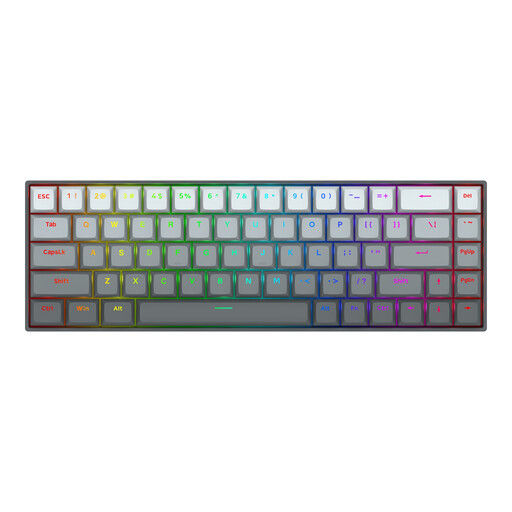
Why this choice suits this profile : With 68 keys and a detachable USB-C cable, it fits easily on a small desk and makes an appealing first setup for FPS games.
The specifications state that it has magnetic switches, an adjustable actuation range of 0.2 to 4.0 mm and Rapid Trigger functionality. It is therefore much more than a simple ‘gaming’ label.
Aluminium top plate, stated polling rate of up to 8,000 Hz, RGB backlighting and Windows/macOS compatibility.
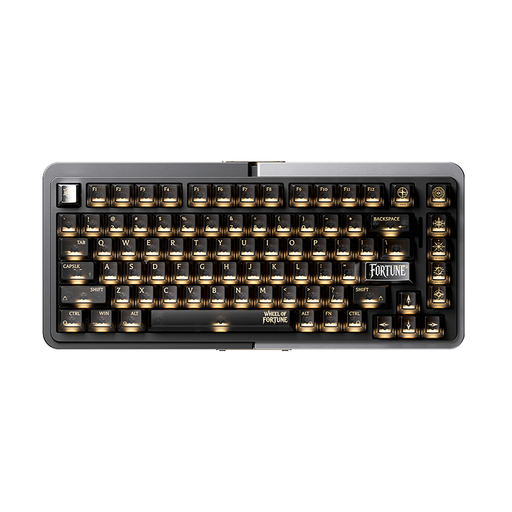
Why this choice suits this profile : The 75% format retains the keys you need for work while giving your mouse more room to move.
The specifications distinguish between adjustable actuation, Rapid Trigger functionality and SOCD. Nevertheless, check the US ANSI layout before buying.
Full CNC-machined aluminium case, TTC magnetic switches, RGB lighting and settings tailored to FPS games.
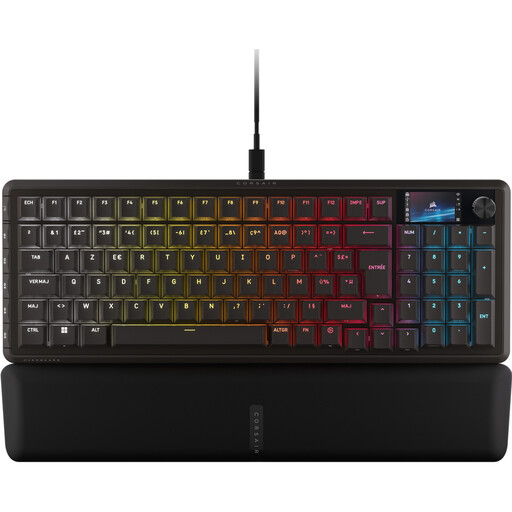
Why this choice suits this profile : Its AZERTY layout and number pad make it suitable for French users who game and work at the same desk.
The specifications identify the 96% format, wired USB connection, magnetic switches and the settings available in iCUE.
Six programmable G keys, built-in LCD screen, control dial, double-shot PBT keycaps and per-key RGB lighting.
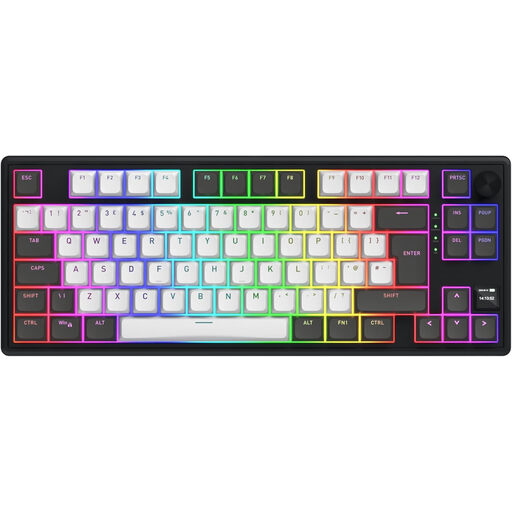
Why this choice suits this profile : It combines 2.4 GHz, Bluetooth 5.3 and USB-C connections. The additional keycaps supplied also allow you to adapt it to an AZERTY layout.
The specifications detail the three connection modes, the stated battery life with RGB enabled and the presence of quiet linear switches. It should therefore not automatically be considered a Hall Effect keyboard.
83-key TKL format, TFT screen, multimedia dial, 8,000 mAh battery and stated polling rate of up to 1,000 Hz.
We have compiled a complete, real-time updated selection of products that meet these demanding criteria while also taking European safety regulations into account.
It can be particularly useful for movements that require rapid changes of direction, especially counter-strafing. However, its benefits depend on your settings, skill level and ability to avoid accidental activations. It will never replace practice or a well-balanced computer setup.
Start with an intermediate value in the keyboard software, then test the movement keys and action keys separately. A shorter actuation distance can speed up the registration of a key press, but it also requires greater precision when your fingers are resting on the keys. If the software allows it, create one profile for gaming and another for office work.
Lifespan depends on the switches, keycaps, humidity, dust and intensity of use. Magnetic switches reduce the wear associated with traditional electrical contact, but the stabilisers, cable, battery and keycaps remain components to keep an eye on. Regular dry cleaning and keeping liquids away from the keyboard will help preserve it.