
Livraison le jour même ou le lendemain

Qualité garantie

Débloquez vos offres de bienvenue: Livraison GRATUITE | Jusqu'à -80 % | 30 jours d'essai gratuits à JoyPlus
Téléchargez l'application
A cartridge that looks compatible can still turn out to be unusable with your Canon PIXMA printer. An almost identical reference, a different capacity or a missing colour – this kind of mistake can lead to unnecessary expense and crop up at the worst possible moment, just when you need to print an important document.
Original Canon ink cartridges make the choice easier thanks to a clearly defined reference. You still need to know where to find it and how to check it. This guide helps you compare references, formats, yields and pack contents before placing your order.
The different Canon series can sometimes look very similar: PG-540, PG-545, PG-560 and PG-585 are all different black cartridges. The same goes for the colour cartridges CL-541, CL-546, CL-561 and CL-586.
A cartridge designed for a PIXMA TS3350i will not necessarily work with a PIXMA TS5350 or an older PIXMA MG. The shape of the reservoir, the electronic chip and the integrated print head can change from one series to another.
A Canon XL cartridge generally contains more ink than the standard version of the same series. However, the number of printable pages varies depending on document coverage, the type of printing and the measurement standard used. In product descriptions, yields are often given according to the ISO/IEC 24711 standard.
If you only print occasionally, the standard format can prevent a partly used cartridge from gathering dust. Conversely, for remote working, a family or a small business that prints regularly, a Canon high-capacity cartridge can space out replacements.
A Canon cartridge pack may contain one black and one colour cartridge, or several separate cartridges. The difference is far from trivial. With a separate system, you only replace the colour that has run out. With a tri-colour cartridge, cyan, magenta and yellow share the same reservoir: as soon as one colour runs out, you may need to replace the whole cartridge.
Check the label on your printer, its settings screen or its manual. Note the full reference, for example PIXMA MG2450, TS3350i, TS5350, TS7450i or MG6350. Then compare this model with the compatibility list shown for the cartridge.
The references PG-540 / CL-541, PG-545 / CL-546, PG-560 / CL-561 and PG-585 / CL-586 are not interchangeable by default. The PGI-550 / CLI-551, BCI-350 / BCI-351 and BCI-370 / BCI-371 series are also reserved for specific families of PIXMA printers.
A Canon black cartridge may contain pigment ink, which is particularly well suited to text and documents. Colour inks generally use dyes, which are preferred for graphics and photos. Some printers use several black cartridges: the PGI-550XL / CLI-551XL series, for example, combines a pigment black for documents with a black intended for photo printing.
For photos, also check the number of colours used. The PGI-530 / CLI-531 pack shown below includes six individual cartridges, including a grey one, for compatible PIXMA PRO printers.
Compare the ink volume in millilitres, the stated page count and the cartridge technology. Models with an integrated FINE head, such as certain PG-540, CL-541, PG-545 and CL-546 series, replace the associated print head at the same time. Other references, notably the separate PGI/CLI systems, use an independent print head built into the printer.
Store cartridges in their packaging, away from light and extreme temperatures. Avoid touching the electronic contacts and do not attempt to refill or dismantle a cartridge. If ink gets into your eyes, rinse thoroughly with water. If irritation persists, consult a healthcare professional.
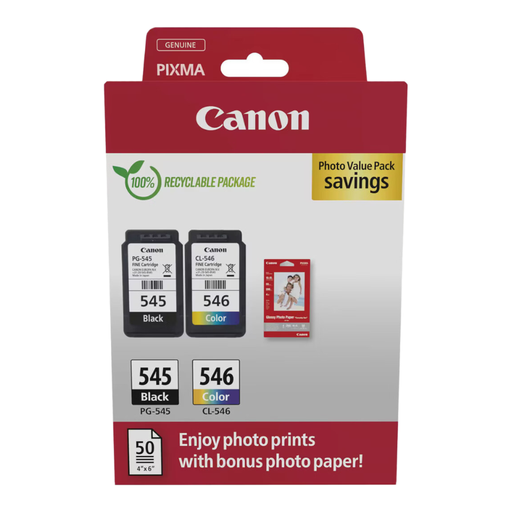
Why this choice suits this profile: This pack brings together a black cartridge, a colour cartridge and 50 sheets of 10 × 15 cm photo paper. It is ideal for a household that wants to replenish its consumables and print a few photos without placing multiple orders.
The PG-545L / CL-546 reference is clearly stated, while the included paper saves you from having to buy an unsuitable medium separately.
A pack of two original cartridges accompanied by 50 sheets of 10 × 15 cm photo paper.
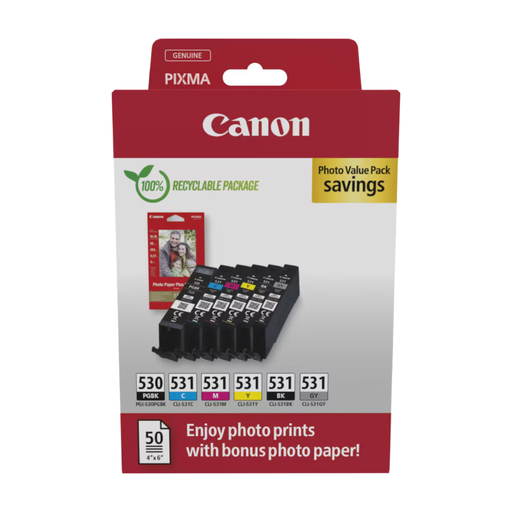
Why this choice suits this profile: Photographers and users of compatible PIXMA PRO printers benefit from six separate cartridges, with a pigment black, photo blacks, colours and a grey.
The detailed contents prevent you from confusing a four-colour pack with a six-ink photo system.
Six individual references, including grey, with Canon photo paper included depending on the stated contents.
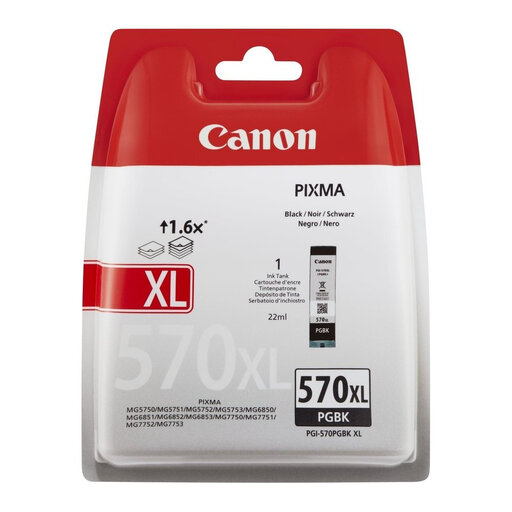
Why this choice suits this profile: This option is aimed at users of PIXMA MG6350, MG7150, MG7550 and associated models who print documents and photos regularly.
The volumes stated separately allow you to compare the yield of the pigment black and the photo black, rather than relying solely on the XL label.
An XL format, separate cartridges and stated yields of approximately 500 pages for PGBK and 1,100 pages for BK.
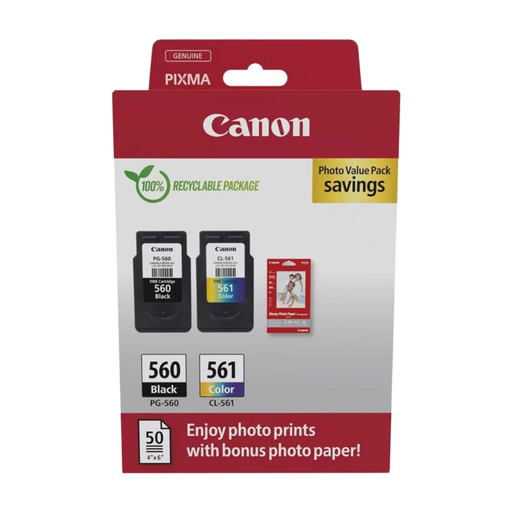
Why this choice suits this profile: This black and colour pack is suitable for PIXMA TS5350, TS5351 and TS5352 printers used for homework, invoices, emails and everyday photos.
Compatibility is linked to a specific printer series and the cartridges are clearly identified before installation.
Approximately 180 pages stated for black and colour according to the ISO/IEC 24711 standard, with integrated FINE heads.
We have put together a comprehensive, real-time updated selection of products that meet these demanding criteria, in compliance with European safety regulations.
Note the exact model of your PIXMA printer, then compare it with the compatibility list shown on the product page. Do not rely solely on the colour or shape of the cartridge. A PG-545 and a PG-560 can both be black, yet belong to different series.
The XL format can be worthwhile if you print often, as it reduces the frequency of replacements. However, take the time to compare the stated yield according to the ISO/IEC 24711 standard with your monthly print volume. For just a few pages a week, a standard format may be more suitable and prevent you from keeping a partly used cartridge for too long.
Store it in its original packaging, in a dry place at a stable temperature and away from sunlight. After opening, follow the manufacturer's recommendations and install it without delay. A poorly stored cartridge may dry out or be less well recognised by the printer.