
Livraison le jour même ou le lendemain

Qualité garantie

Débloquez vos offres de bienvenue: Livraison GRATUITE | Jusqu'à -80 % | 30 jours d'essai gratuits à JoyPlus
Téléchargez l'application
An additional Nintendo Switch controller can transform multiplayer gaming, make long sessions more comfortable or simply replace a worn-out controller. But between Joy-Con, the Pro Controller, wireless models and wired Switch controllers, the differences go far beyond design.
Some features highlighted in product listings are worth checking before placing your order. A Turbo function does not replace motion sensors, a long battery life does not guarantee a comfortable grip, and a controller advertised as compatible with several consoles may have limited functionality depending on the model used.
A controller may work with a Nintendo Switch, Nintendo Switch OLED or Switch Lite without offering all the features of the Joy-Con. In particular, check for vibration, a gyroscope, an accelerometer, NFC or a dedicated button for certain Switch 2 functions.
The Switch Lite does not have an integrated dock. A wired Switch controller designed to be connected to the dock will therefore not be suitable for every use. If you want to play on an external screen, also check the equipment being used and the connection method specified by the manufacturer.
Battery life varies depending on the intensity of the vibration, use of the sensors and volume level when a headset is connected. As a guide, the Nintendo Joy-Con mentioned here offer around 20 hours, while some wireless controllers state between 8 and 40 hours, depending on the model.
An integrated battery is convenient, but it is generally not user-replaceable. For a Switch gaming controller used every day, the ability to play with a cable or recharge it easily quickly becomes a key consideration.
Joy-Con are compact and versatile, but their design may become less comfortable during a long gaming session. A Pro-style controller offers a more traditional grip, with wider handles that are better suited to larger hands.
With a wired model, the cable length should suit your setup. The models featured here have cables measuring 2.43 m to 3 m. This length allows you to play from a sofa, provided you keep the cable clear to prevent tension and trips.
A wireless Switch controller generally communicates via Bluetooth. It offers greater freedom of movement, but requires a sufficiently charged battery and a pairing procedure. For the first connection, the console will generally use the ‘Controllers’ menu, followed by ‘Change Grip/Order’.
A wired controller connects directly to the dock or a compatible USB adapter. It does not rely on a battery and may suit players who prioritise a stable connection. On the other hand, the cable restricts your playing position, and some models omit vibration or motion control.
For games that use tilting or gestures, look for a gyroscope and an accelerometer. Depending on the model, Nintendo Joy-Con also offer HD rumble, an infrared camera on the right Joy-Con and amiibo functionality through NFC.
Nintendo Switch Pro Controllers focus on a traditional grip. The model designed for Switch offers features including HD rumble, motion sensors and amiibo functionality, with a stated battery life of up to 40 hours. According to its product listing, the Pro Controller Switch 2 adds a C button for GameChat, customisable GL/GR rear buttons, a 3.5 mm headphone jack and HD rumble 2.
A pair of Joy-Con can be used by two players in compatible games, with each controller used separately. They can also be combined in a grip to form a more conventional controller. However, check that the grip is actually included: some packs contain only the two controllers and wrist straps.
To replace a lost or faulty controller, buying a single Joy-Con may be sufficient. For getting started with local multiplayer, a pair is generally more practical.
The models below are grouped according to specific uses and the features stated in their product listings. Prices, stock availability and delivery terms may change.
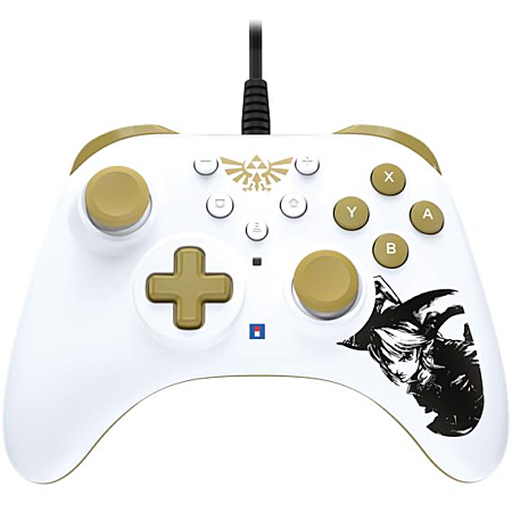
Why this choice suits this profile : its 3 m cable and USB connection let you play without having to recharge a battery. It is suitable for playing at home on Nintendo Switch and for players looking for a classic grip.
The listing specifies the wired connection, cable length and lack of vibration and motion sensors. You therefore know which features you are giving up before buying.
Offset analogue sticks, adjustable Turbo function, quick-action triggers and a stated weight of 218 g.
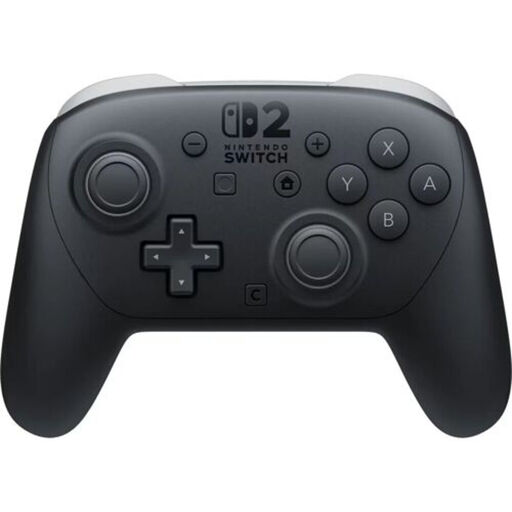
Why this choice suits this profile : this wireless controller is aimed at Switch 2 users who regularly play on a television and want integrated features for both gaming and communication.
Compatibility with Switch 2 is clearly stated. The listing also details the stated battery life, headphone jack and customisable GL/GR buttons.
Bluetooth, HD rumble 2, motion control, 3.5 mm audio jack and a stated battery life of up to 40 hours.
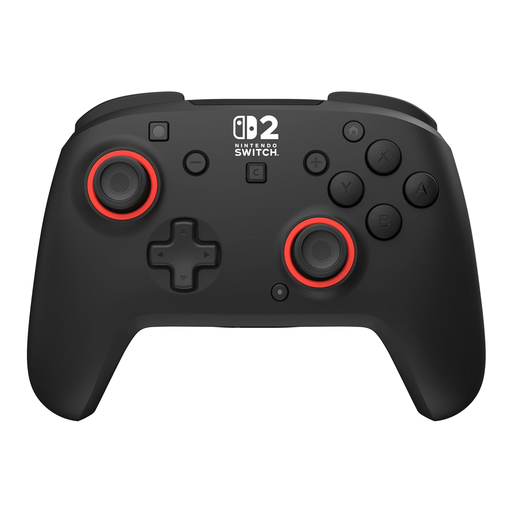
Why this choice suits this profile : this model is aimed at regular players who want additional controls, a wireless connection and stated compatibility with Switch 2, Switch, Switch Lite and Switch OLED.
The listing distinguishes between battery life, wireless range and programmable functions. It also mentions a headphone jack and USB-C charging.
Stated TMR sticks, two assignable rear buttons, gyroscope, C button for GameChat and a stated battery life of up to 40 hours.
We have put together a complete, real-time updated selection of products that meet these strict selection criteria as well as European safety requirements.
A pair of Joy-Con allows two players to share a controller in compatible games. It is also suitable for tabletop mode and games that make use of motion controls. For two conventional grips, two Pro-style controllers or two compatible controllers will generally be more comfortable.
It depends entirely on the product listing. The Joy-Con 2 are stated to be exclusively compatible with Nintendo Switch 2, while some third-party controllers advertise compatibility with several console generations. Always check the exact list of supported devices before ordering.
Avoid liquids, high temperatures and impacts. Recharge wireless models with a suitable cable, do not put excessive pressure on the joysticks and store the controller away from moisture. When playing games that use motion controls, use the wrist straps supplied with the Joy-Con. For wired models, avoid sharply bending the cable and inspect the USB connector regularly.