
Livraison le jour même ou le lendemain

Qualité garantie

Débloquez vos offres de bienvenue: Livraison GRATUITE | Jusqu'à -80 % | 30 jours d'essai gratuits à JoyPlus
Téléchargez l'application
Whether you're a casual gamer on Xbox Series S, a hardcore competitor on Series X, or a PC gaming enthusiast, your choice of controller is crucial for both comfort and performance. A worn-out controller, a drifting stick ("?stick drift?"), or poor ergonomics can quickly ruin your gaming sessions. This guide is here to help you make sense of it all and find the perfect Xbox controller for your playstyle and budget.
Before diving into our selection, here are the key criteria to consider to make the right choice.
The choice between a wired connection and an Xbox wireless controller is primarily a matter of priorities. Wireless offers absolute freedom of movement, ideal for couch gaming sessions. Today's Xbox Wireless and Bluetooth technologies ensure a stable, responsive connection. Conversely, competitive players often prefer a wired USB-C connection to eliminate every microsecond of latency and never have to worry about running out of battery.
A pro Xbox controller stands out with advanced features designed for performance. The most well-known feature is the controller with paddles, which adds programmable buttons on the back to execute complex actions without ever taking your thumbs off the sticks. You'll also find interchangeable or adjustable sticks and triggers. These models, like those in the Elite controller range, are naturally more expensive and are aimed at gamers who want to fine-tune their control to the extreme.
“?Stick drift,?” the plague that causes your character or camera to move without you touching the stick, is the nightmare of many gamers. It's caused by the wear and tear of internal components. To combat this, some controllers incorporate Hall effect sticks. This technology uses magnets to detect movement without any physical contact, which eliminates wear from friction and makes these models an exceptionally durable anti-drift controller option.
Here is a selection of three controllers for every type of gamer and budget, all compatible with Xbox Series X|S, Xbox One, and PC.
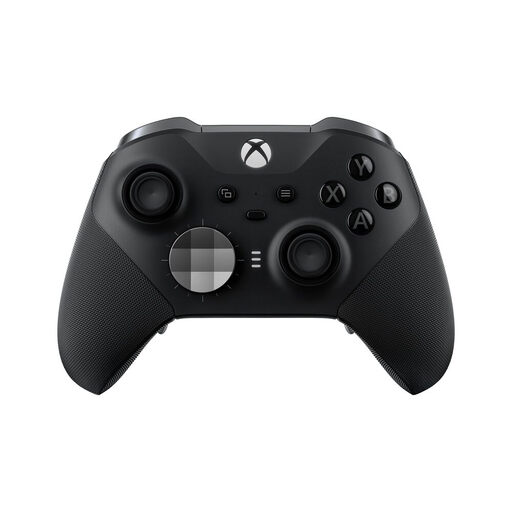
What sets it apart?: The Elite Series 2 is THE benchmark for customisation. Designed for gamers who love to fine-tune their gear down to the smallest detail for every game, it offers modular components and in-depth software adjustments.
Pros?:
Who is it for?? For competitors and enthusiasts who demand absolute control over their equipment. Its versatility makes it the ideal weapon for those who juggle very different genres, from FPS to racing games.
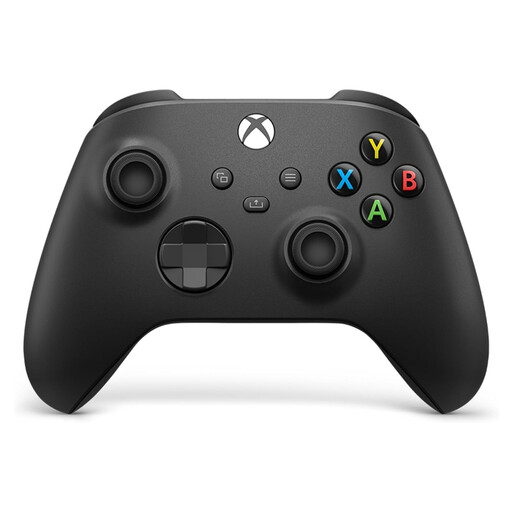
What sets it apart?: This is the gold standard. Renowned for its unbeatable value, widely acclaimed ergonomics, and rock-solid reliability. Its design has been subtly improved for the Xbox Series X|S generation, with the addition of textured surfaces and the famous Share button.
Pros?:
Who is it for?? For the vast majority of gamers. It's the sensible choice, whether as a main controller, for inviting a friend to play, or for replacing an old pad. Its excellent compatibility also makes it a benchmark PC controller.
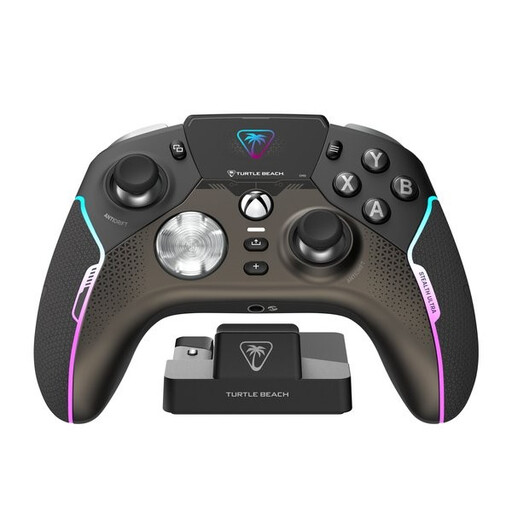
What sets it apart?: The Stealth Ultra tackles the premium segment with a major innovation?: Hall effect sticks to say goodbye to drift. Its integrated control display, a feature still unique on the market, sets it apart even further.
Pros?:
Who is it for?? For demanding gamers who prioritise durability and innovation. If you've ever raged because of stick drift or you're a fan of high-tech gadgets, this anti-drift controller is an option to seriously consider.
Our selection is just a glimpse, and the controller market is full of hidden gems. To discover other models, original colours, or limited editions, feel free to browse our full catalogue.
? Discover all our Wireless Series 2 Controllers
Absolutely. Almost all modern Xbox controllers are compatible with PCs running Windows 10 and 11. You can connect in three ways?: via a USB-C cable, via Bluetooth (on compatible models), or with the Xbox Wireless Adapter for PC, which guarantees an ultra-low latency connection.
“?Stick drift?” is the annoying phenomenon where the controller detects movement even when the thumbsticks are stationary. The cause is often wear and tear on the potentiometers, the components that measure the stick's position through physical contact. An anti-drift controller bypasses this problem by using Hall effect sticks. This technology replaces physical contact with a magnetic field, which eliminates friction, prevents wear, and therefore ensures much greater longevity.
The main difference lies in customisation and advanced features. An Elite controller offers programmable rear paddles, interchangeable thumbsticks and D-pads, adjustable-travel triggers, and the ability to save multiple configuration profiles. The standard controller, on the other hand, focuses on the essentials, banking on its universally praised ergonomics. The choice therefore depends on your budget and whether you want to invest in options designed for pure performance.