
Livraison le jour même ou le lendemain

Qualité garantie

Débloquez vos offres de bienvenue: Livraison GRATUITE | Jusqu'à -80 % | 30 jours d'essai gratuits à JoyPlus
Téléchargez l'application
A wireless mouse can clear up your desk, slip into a laptop bag or make long gaming sessions more comfortable. But specification sheets are packed with figures that do not always say much about the day-to-day experience.
Before placing an order, focus on what really matters: connectivity, power, shape and sensor accuracy. Here are the most common pitfalls, followed by a selection of models designed for different types of users in France.
DPI refers to cursor sensitivity: it determines how far the pointer travels on screen when you move the mouse. A 4,800 DPI mouse or a 24,000 DPI model offers a wider adjustment range, but that does not automatically make it more comfortable for everyday office work.
For checking email, working on documents or browsing the web, sensitivity between 800 and 1,600 DPI is generally sufficient. Gamers and graphics professionals may need higher settings, but sensor quality, the work surface and connection stability remain far more important.
A Bluetooth mouse works without a USB receiver. This makes it particularly convenient with a laptop, tablet or certain Macs. However, the pairing process and compatibility can vary depending on the operating system.
A 2.4 GHz mouse generally communicates through a nano USB receiver. Setup is straightforward, but the receiver occupies a USB-A port. If your computer only has USB-C ports, you will need an adapter or may prefer a Bluetooth model.
Mice that support both Bluetooth and 2.4 GHz make it easy to switch between devices. However, remember to check how many devices can actually be stored in memory: this limit varies from one model to another.
A rechargeable mouse eliminates the need for disposable batteries, but battery life varies considerably depending on the model, lighting and your usage habits. A wireless gaming mouse with RGB lighting will often last less time than an office mouse powered by a single battery.
Check the included cable, whether the mouse has a USB-C port and whether it can still be used while charging. For a battery-powered model, review the stated battery life and make sure the compartment is easy to access.
For use with both PC and Mac, prioritise models whose compatibility with Windows and macOS is clearly stated. ChromeOS, Linux, Android and gaming consoles are not always supported.
A USB receiver remains the simplest solution for immediate setup. Bluetooth is better suited to laptops and setups where ports are at a premium. Dual connectivity can also be useful when working from home, especially if you use two devices.
An ergonomic mouse should first and foremost suit your hand and the way you hold it. Vertical models are generally designed for either right- or left-handed users: they are not interchangeable.
An ambidextrous mouse has a symmetrical shape and can suit both users. However, bear in mind that side buttons are not always available on both sides. For travel, a weight below 80 g and compact dimensions make carrying the mouse considerably more comfortable.
Three buttons are enough for typical use: left click, right click and scroll wheel. Six-button models often add two side controls, which are useful for moving forward or returning to the previous page.
A silent mouse is a natural fit for a shared office, library or video conference where clicks should remain discreet. However, the noise reduction claimed by the manufacturer should be viewed in context: it is a product feature, not a promise of absolute silence.
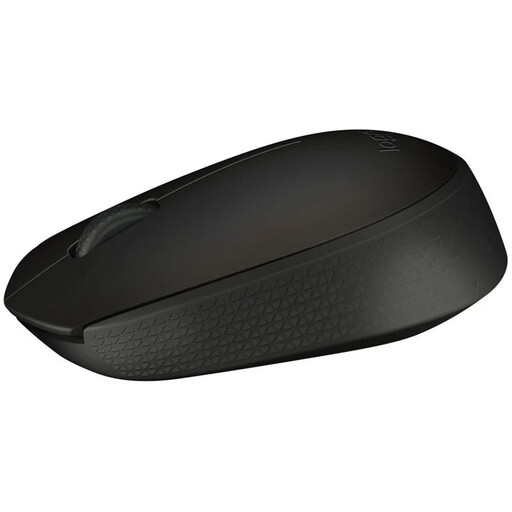
Why this model may suit you: A straightforward solution for the family computer, studying or everyday work, with setup via a USB receiver.
The product listing specifies a 2.4 GHz connection, a nano USB receiver and three buttons. The essentials are clearly stated, without emphasising DPI settings that are unnecessary for most users.
Optical sensor, ambidextrous design, stated range of up to 10 m and stated battery life of up to 12 months with one AA battery.
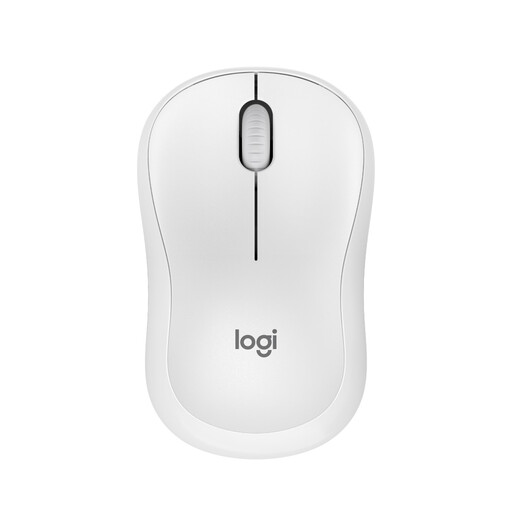
Why this model may suit you: Its dongle-free Bluetooth operation is well suited to laptops, remote work and environments where clicks need to remain discreet.
The product listing specifies compatibility with Windows, macOS and ChromeOS, as well as the absence of a USB receiver. You therefore know what to expect during setup.
Three buttons, stated resolution of 1,000 DPI, clicks claimed to reduce noise by 90% and stated battery life of up to 18 months with one battery.
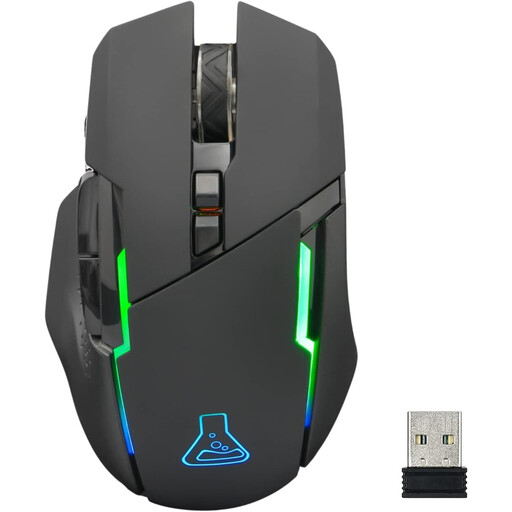
Why this model may suit you: A wireless gaming mouse for users who want adjustable sensitivity, additional buttons and compatibility with PC, Mac or selected consoles.
The specifications distinguish between battery life with RGB lighting, stated at up to 10 hours, and battery life without lighting, stated at up to 32 hours. This is useful information for avoiding unwelcome surprises.
2.4 GHz connection, five settings from 400 to 7,200 DPI, six buttons, stated two-hour charging time and a two-year manufacturer’s warranty.
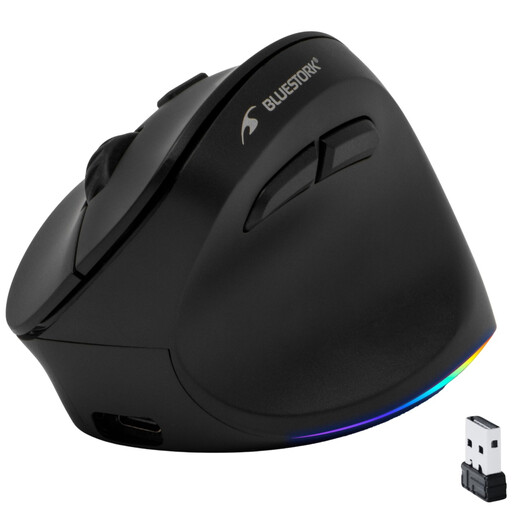
Why this model may suit you: Its vertical shape is designed for right-handed users seeking a different grip for long working days, without relying on disposable batteries.
The product listing specifies right-handed orientation, an 800–2,400 DPI range, USB-C charging and silent clicks. This allows you to check whether it meets your needs before buying.
Bluetooth and 2.4 GHz connectivity, six buttons, integrated lithium-ion battery, USB-C charging and RGB backlighting.
We have brought together an up-to-date selection of products that meet these criteria, along with the requirements applicable in France and the European Union.
Yes, provided that the computer has Bluetooth and its operating system is compatible with the model. Check the technical specifications before buying. On a PC without Bluetooth, a mouse with a USB receiver may be easier to set up, provided that a compatible port is available.
This depends on the quality of the switches, the battery or batteries, how often the mouse is used and how well it is maintained. Avoid liquids, clean the mouse with a soft cloth and store the USB receiver in its compartment when one is provided. If the device uses a lithium-ion battery, stop using it if it swells or overheats.
It can reduce spending on batteries, but you should also consider the battery’s service life and the charging cable. Battery-powered models sometimes claim 12 to 18 months of battery life. Regardless of the model, dispose of batteries and electrical equipment at collection points provided under French regulations, in accordance with the principles of the WEEE recycling scheme.