
Livraison le jour même ou le lendemain

Qualité garantie

Débloquez vos offres de bienvenue: Livraison GRATUITE | Jusqu'à -80 % | 30 jours d'essai gratuits à JoyPlus
Téléchargez l'application
A wireless mouse frees up your desk, makes it easier to work on the go and avoids cables getting caught on everything. But not every model meets the same needs. A feature-packed wireless gaming mouse can quickly become cumbersome for everyday use, while a compact Bluetooth model may lack the responsiveness required for certain games.
Before buying, it is particularly important to avoid three common pitfalls:
A Bluetooth mouse connects directly to a laptop, tablet or certain compatible smartphones. It does not take up a USB port, which is particularly useful when travelling. However, pairing may require a few steps, and compatibility depends on the operating system being used.
The 2.4 GHz connection usually works via a USB nano receiver. It is suitable for desktop computers and gaming when you want a dedicated connection. However, check how many USB ports are available, particularly on a laptop equipped solely with USB-C ports.
Triple-connection models generally offer Bluetooth, 2.4 GHz and wired USB-C. This versatility makes it easy to switch between a work computer and a personal computer without having to use multiple peripherals.
DPI refers to movement sensitivity. A setting between 800 and 1 600 DPI is common for office work. Gamers may prefer higher settings or several profiles depending on the type of game.
A sensor rated at 26 000, 30 000 or 35 000 DPI offers a broad configuration range, but these figures are not essential for everyone. To assess a high-precision mouse, also consider:
A rate of 1 000 Hz is already suitable for many uses. Rates of 4 000 or 8 000 Hz are more suited to competitive gaming and may require a specific receiver, compatible software and a sufficiently recent setup.
A rechargeable wireless mouse means you do not have to keep buying batteries, but its built-in battery will eventually lose capacity over time. Compare the quoted battery life for each connection mode and with the lighting switched on. Some models allow you to continue working while charging via the USB-C cable.
Weight directly affects how the mouse feels as you move it. An ultra-light mouse can feel comfortable during fast movements, while a heavier model may sometimes provide a more stable feel. Shape is just as important: the length, width, thumb rest and right-handed or ambidextrous design should suit your hand.
Finally, the number of buttons is only useful if you actually use them. A programmable mouse with five to nine controls can speed up navigation, editing or certain games. Models with even more functions can provide numerous shortcuts, but customisation often depends on proprietary software.
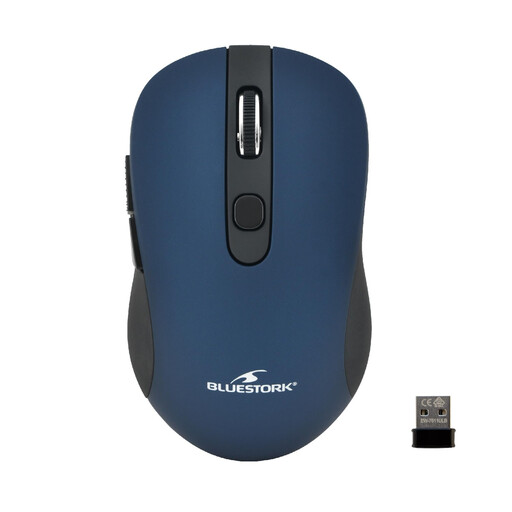
Why this choice suits this profile : this wireless PC mouse keeps things simple for studying, browsing and office work, whether you use Windows or Mac.
The three DPI levels are clearly indicated, and the 2.4 GHz connection with nano receiver works straight away, with no driver required according to the listing.
Six buttons, laser tracking and AA battery power. A straightforward solution for a desktop setup or a family computer.
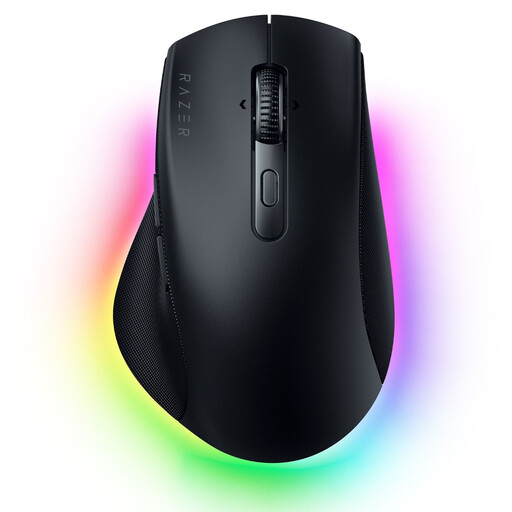
Why this choice suits this profile : its right-handed design and various connection options are ideal for users who switch between working from home, creative work and gaming.
The quoted battery life can reach 3.5 months under standard conditions, while Bluetooth, 2.4 GHz and USB-C let you choose the most suitable mode.
Nine buttons, a sensor rated up to 30 000 DPI, tilting scroll wheel and 14 Chroma RGB lighting zones.
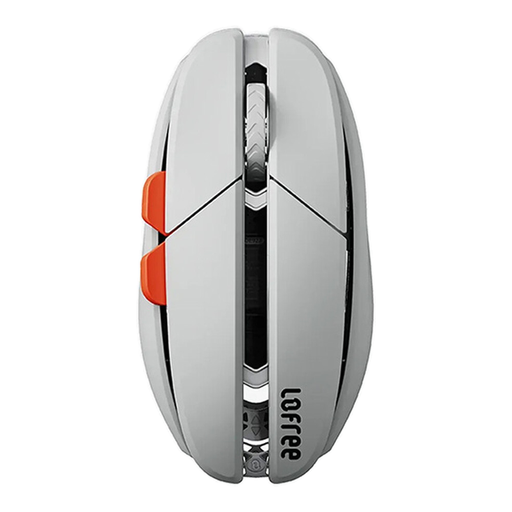
Why this choice suits this profile : its lightweight design and triple connectivity are ideal for mobile users who regularly switch between devices.
The listing states a weight of approximately 47 g and battery life of up to 100 hours over Bluetooth. Wired mode remains available when the battery needs recharging.
Magnesium-alloy chassis, PAW3950 sensor rated up to 40 000 DPI, and compatibility with Windows, macOS, iOS, iPadOS and Android.
We have put together a complete, real-time updated list of products that fully meet these strict selection criteria and European safety regulations.
For a mouse with a receiver, plug the nano receiver directly into the computer whenever possible. Avoid placing it behind a metal case or too close to numerous wireless devices. With Bluetooth, check that the operating system is compatible and disable unused connections if pairing becomes unstable.
Clean the shell and scroll wheel regularly with a dry cloth. Never pour liquid onto the peripheral and do not attempt to open a built-in battery. Electrical products and their batteries must be taken to the appropriate collection points in France.
It can be suitable for casual gaming and office work. For competitive gaming, a dedicated 2.4 GHz connection or wired mode is often preferable to reduce the risks associated with pairing and interference.
Battery life depends on the battery capacity, how often it is recharged, the lighting and how it is used. Check the quoted battery life for each mode, then choose a model that can be used while charging to avoid interrupting your work or gaming.
Not necessarily. Six buttons may be enough for navigation and a few shortcuts. Players of strategy or role-playing games, as well as professionals who use macros, can benefit from additional controls, provided the configuration software is compatible with their system.