
Livraison le jour même ou le lendemain

Qualité garantie

Débloquez vos offres de bienvenue: Livraison GRATUITE | Jusqu'à -80 % | 30 jours d'essai gratuits à JoyPlus
Téléchargez l'application
A wireless keyboard helps declutter your desk, make working from home more comfortable and switch easily between a laptop and a tablet. However, an impressive specification sheet does not always tell you whether a model genuinely suits your habits. The key layout, connection type, battery life and size can make the difference between a practical purchase and an accessory that is quickly relegated to a drawer.
Before you decide, here are the main pitfalls to avoid, along with a selection of models suited to different uses in France.
A compact keyboard may seem particularly practical while using a US QWERTY layout. To write in French, enter accented characters easily and find your way around the keys, choose a wireless AZERTY keyboard whose French version is clearly specified.
QWERTY remains a sensible choice for users who are accustomed to it, developers and people who regularly work with international shortcuts. Also remember to check which keys are retained when moving from a 100% format to a 75%, 65% or 60% model.
The stated battery life generally varies depending on the backlighting, connection type and intensity of use. An RGB keyboard consumes more power than a model without lighting or one with simple white backlighting. A rechargeable battery is convenient, but also check how long it takes to recharge, which cable is supplied and whether you can continue using the keyboard while it is charging.
For everyday professional use, the battery capacity in mAh is not enough on its own. The most useful figure is the estimated battery life, provided you know whether it was measured with or without the lighting switched on.
RGB lighting, macros and mechanical switches can be genuinely useful for gaming or customisation. For a student taking notes or a shared workstation, they are not necessarily essential. In an open-plan office, a quiet, comfortable keyboard will often be more pleasant than a model where every keypress produces a clearly audible click.
A Bluetooth keyboard connects directly to many laptops, tablets and smartphones without taking up a USB port. The 2.4 GHz receiver provides a dedicated connection, which is often appreciated with a desktop computer or for gaming. A tri-mode keyboard generally combines Bluetooth, 2.4 GHz and a wired USB-C connection.
This versatility is particularly useful if you switch between a work PC and a personal tablet. However, check how many devices can be saved and how easy it is to switch from one connection to another.
A 100% keyboard retains the numeric keypad as well as the rows of function keys. The 75% and 65% formats take up less space while retaining some of the arrow keys. A compact keyboard leaves more room for your mouse, but some functions then require combinations involving the Fn key.
For long typing sessions, examine the angle, key height, any wrist rest and the stability of the chassis. The term ergonomic keyboard offers no medical guarantee: the important thing is to check whether its shape suits your posture and the width of your desk.
A wireless mechanical keyboard uses individual switches. The feel varies according to their type: linear, tactile or clicky. Clicky switches can be fairly loud and are not always suitable for a shared room. Models compatible with « hot-swap » switches allow you to replace the switches without soldering, but check compatibility between 3-pin and 5-pin formats.
For everyday care, keep the keyboard away from liquids, clean it with a dry or barely damp cloth and follow the recommendations for lithium batteries. The CE and RoHS markings indicate that the product has a declaration of conformity with the applicable requirements. They do not remove the need to check the warranty terms and the quality of the after-sales service.
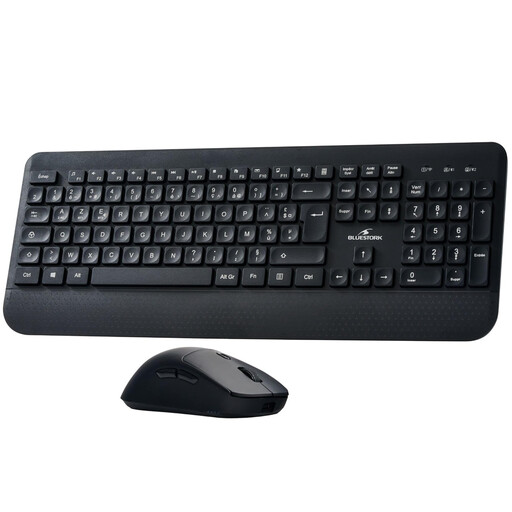
Why this model suits this user profile : This wireless keyboard and mouse set uses an AZERTY layout and works via Bluetooth or with a Nano USB receiver. A straightforward solution for equipping a PC, tablet or smartphone.
The French layout is clearly stated, and the keyboard runs on alkaline batteries. This means there is no risk of confusing the stated battery life with that of a rechargeable battery.
AZERTY layout, dual 2.4 GHz and Bluetooth connection, with switching between three devices.
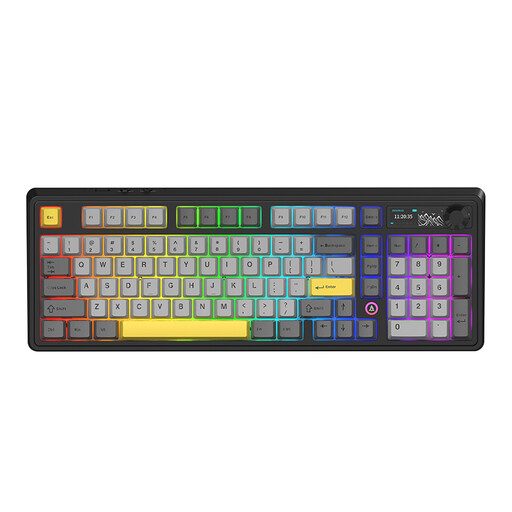
Why this model suits this user profile : This wireless mechanical keyboard is designed for those who want to customise their typing experience and switch easily between connection modes.
The product details distinguish between versions with and without a screen, while also specifying different battery capacities. This helps you avoid relying solely on the figure highlighted in the product name.
97 keys, metal dial, wired, Bluetooth and 2.4 GHz connections, hot-swappable PCB and RGB lighting.
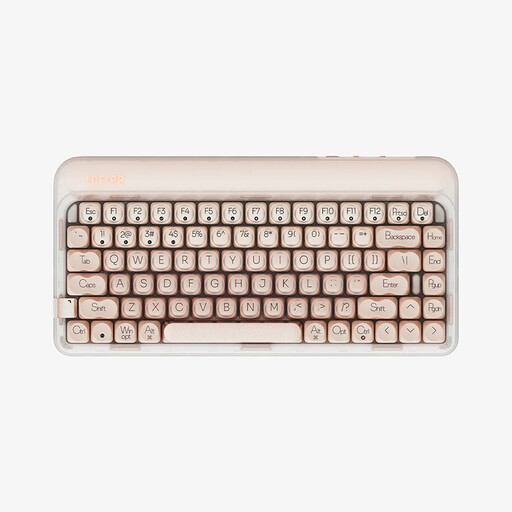
Why this model suits this user profile : With its 84 keys, this keyboard is aimed at people working from home, students and gamers who want to save space without sacrificing the main arrow keys.
The product details state an estimated battery life of one to two weeks and a charging time of around five hours. The backlighting is monochrome rather than RGB, making the balance between lighting and power consumption clear.
USB-C, Bluetooth 5.3 and 2.4 GHz, hot-swappable linear switches and a stated polling rate of 1,000 Hz.
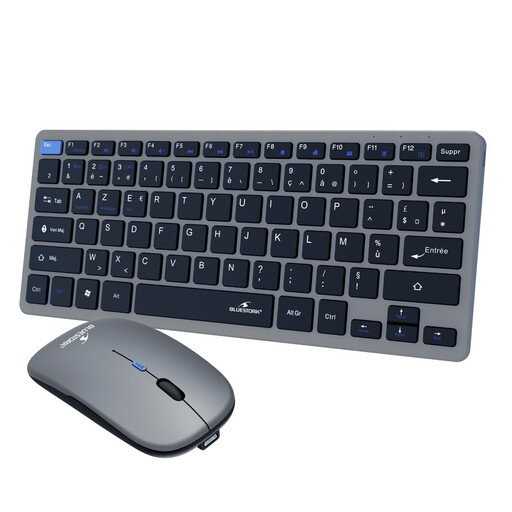
Why this model suits this user profile : This duo, comprising a compact keyboard and a slim mouse, slips easily into a bag. It is suitable for travel, small desks and use with a laptop, tablet or smart TV.
The compact size, AZERTY layout and built-in rechargeable battery are clearly stated. This lets you assess the space it will take up and its power source before placing your order.
Rechargeable set, Bluetooth and 2.4 GHz connections, Nano USB receiver and slim mouse that is easy to carry.
We have brought together a complete, real-time updated selection of products that meet these demanding criteria and European safety standards.
Yes, provided the model supports Bluetooth and the device’s operating system is compatible. Keyboards fitted with a 2.4 GHz receiver generally require a USB port or a suitable adapter. Always check the compatibility list provided on the product page.
A rechargeable keyboard avoids the need to buy batteries regularly and recharges via the supplied USB-C or USB cable. However, a battery-powered model may be more convenient if you want to be able to replace its power source immediately. In both cases, follow the safety instructions. If the keyboard uses non-rechargeable batteries, remove them before storing it for an extended period.
It all depends on the build quality, frequency of use, switches and maintenance. The stated lifespan for the keys is a manufacturer specification, not a guarantee of the keyboard’s overall lifespan. To help preserve it, keep it away from liquids, clean it without corrosive products and never leave a damaged battery charging.