
Livraison le jour même ou le lendemain

Qualité garantie

Débloquez vos offres de bienvenue: Livraison GRATUITE | Jusqu'à -80 % | 30 jours d'essai gratuits à JoyPlus
Téléchargez l'application
A wireless keyboard helps declutter your desk, simplify working from home or turn a tablet into a fully functional typing station. However, some purchases can quickly disappoint: keys that are poorly suited to French, overstated battery life, partial compatibility or a format that is too compact for everyday use.
Here are the criteria to consider before choosing between a Bluetooth keyboard, wireless mechanical keyboard, gaming keyboard or compact model.
In France, an AZERTY keyboard makes it easier to type accents, symbols and common shortcuts. A QWERTY keyboard may be suitable for coding, gaming or working with an international layout, but it takes some getting used to and may require you to change your system settings.
Always check:
À, É, È keys and characters commonly used in French;Battery life varies depending on the backlighting, connection mode and frequency of use. A rechargeable keyboard with RGB lighting will generally need charging more often than a model without lighting. Conversely, some battery-powered keyboards claim a very long operating time, but you will need to remember to keep spare batteries to hand.
Look for precise information: battery capacity, battery life with or without lighting, charging time and cable type. An integrated battery also means following the manufacturer’s charging recommendations, as well as guidance on recycling electrical and electronic equipment.
RGB lighting, macros, an integrated display or hot-swappable switches can be useful for gaming and keyboard customisation. However, they do not make up for an unsuitable layout, uncomfortable typing experience or unstable connection.
In a living room, a keyboard with touchpad can save you from buying a mouse. In a shared office, quiet keys will often be more useful than multicoloured lighting.
A Bluetooth keyboard connects directly to a compatible laptop, Mac, iPad or phone. It does not require a USB receiver, which is particularly useful for devices with few ports.
A 2.4 GHz connection generally uses a USB receiver. It is a simple solution for a PC or console, but it occupies a port and means keeping the receiver within range.
A tri-mode keyboard combines Bluetooth, 2.4 GHz and wired USB-C connectivity. This is a practical setup for anyone who regularly switches between devices or wants to keep using their keyboard while it charges. Check the number of Bluetooth profiles, whether the receiver is included and whether it is fully compatible with your system.
A full-size keyboard retains the numeric keypad, which is particularly useful for accounting or spreadsheets. 80%, 75%, 65% and 60% formats take up less space, but some keys are removed or accessed using a key combination.
A membrane keyboard is often quiet and affordable. Scissor mechanisms, commonly found on slim keyboards, offer short key travel. A wireless mechanical keyboard lets you choose between linear, tactile or clicky switches.
Clicky switches produce a clearly audible sound, which can quickly become distracting in a shared space. Linear models generally offer a smoother keystroke, while tactile models provide noticeable feedback without a pronounced click. Also check the key height, tilt, whether a wrist rest is included and the stated noise level.
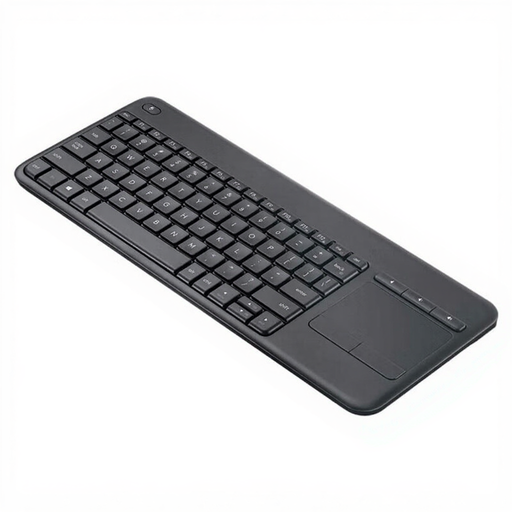
Why this choice suits this user profile : Its integrated 3.5-inch touchpad is handy for controlling a PC connected to a television, set-top box or Android device from the sofa.
The USB receiver is included and the stated range reaches 10 metres. However, you will need to make do with its US QWERTY layout, which is less convenient for intensive French typing.
Integrated touchpad, multimedia keys, spill-resistant design and AA battery power with a stated battery life of up to 18 months.
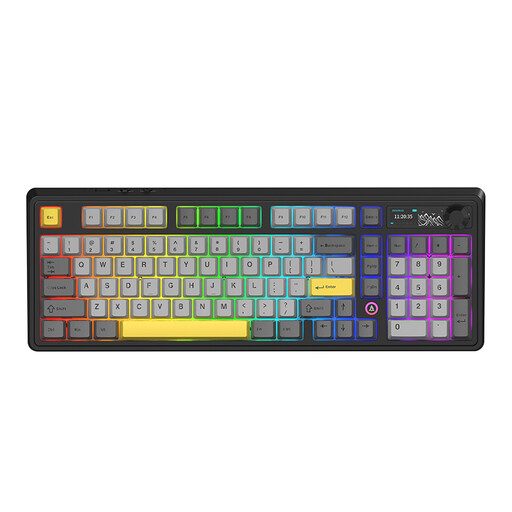
Why this choice suits this user profile : Users who enjoy customising their typing experience benefit from a 98% format, a metal knob and electronics that support switch replacement.
The three modes — Bluetooth, 2.4 GHz and wired — mean you are not dependent on a single connection type. However, check the battery variant and QWERTY layout before ordering.
97 keys, gasket mount, volume wheel, RGB lighting and rechargeable battery, with capacity depending on the version.
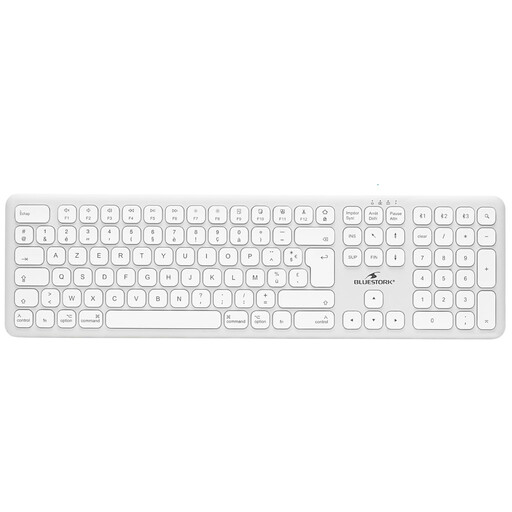
Why this choice suits this user profile : This Mac keyboard is aimed at remote workers, students and users who regularly switch between a Mac, iPad and iPhone.
The French AZERTY layout is clearly indicated, and Bluetooth 5.1 allows pairing with several devices. However, the stated battery life of 80 to 90 hours should be treated with some caution depending on usage.
Quiet scissor-mechanism keys, integrated 280 to 300 mAh lithium battery and USB-C charging.
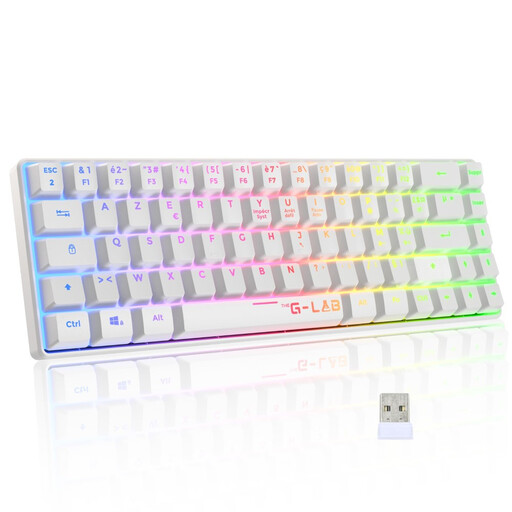
Why this choice suits this user profile : Its TKL format leaves more room for the mouse while retaining a French AZERTY layout and a detachable wrist rest.
The 2.4 GHz connection and stated 10-metre range are well suited to cable-free use. The membrane keys are also quieter than clicky switches.
TKL format, RGB backlighting, 10 multimedia keys and stated compatibility with Windows, Xbox One and PlayStation 4.
We have put together a complete, real-time updated list of products that meet these strict selection criteria and European safety regulations.
When using a wireless model for the first time, charge it with a certified charger that complies with the manufacturer’s recommendations. For a Bluetooth keyboard, activate pairing mode, then select its name in the device settings. With a 2.4 GHz receiver, plug it directly into an available USB port.
To extend its service life:
Yes, provided that the iPad supports Bluetooth keyboards and the model is compatible with iPadOS. However, multimedia shortcuts and some function keys may vary from one keyboard to another.
It depends on the mechanism, number of keystrokes, battery and conditions of use. Some manufacturers claim a theoretical lifespan of several million keystrokes, but this figure alone is not enough to predict the product’s overall longevity.
It avoids the need to buy batteries regularly, but its integrated battery will eventually lose capacity. Before choosing, compare the keyboard price, charging type, whether it can be used in wired mode and the quality of the after-sales service.