
Livraison le jour même ou le lendemain

Qualité garantie

Débloquez vos offres de bienvenue: Livraison GRATUITE | Jusqu'à -80 % | 30 jours d'essai gratuits à JoyPlus
Téléchargez l'application
While the Joy-Cons are perfect for on-the-go gaming, their ergonomics quickly fall short during long sessions in the living room. Nintendo's official Pro Controller is a premium alternative, but its high price can be a deterrent. Fortunately, the market is flooded with alternative controllers that promise similar performance at a much more accessible price point. The problem? Navigating this crowded market can quickly become a daunting task, and the pitfalls are numerous.
As the Head of Product Recommendations at Joybuy, my mission is to guide you. Together, we'll break down the essential criteria for finding a high-performance, reliable wireless Switch controller and cut through the marketing noise.
The accessories market is filled with products that look great but deliver disappointing performance. Here are the three most common traps to avoid so you don't regret your purchase.
A rock-bottom price often hides a subpar Bluetooth chip. The result? A very real latency (or input lag) between your action and its appearance on screen. In a fast-paced game, a few milliseconds of delay are enough to ruin a match. Worse, these controllers are prone to random disconnections—the absolute nightmare in the middle of an online match.
To drive prices down, some manufacturers omit sensors that are essential to the Switch experience. A controller with a gyroscope for Switch is indispensable for aiming your bow in Zelda: Tears of the Kingdom or executing a perfect drift in Mario Kart 8 Deluxe. Going without this feature cripples the gameplay of many of the console's flagship titles.
Spec sheets proudly display dozens of hours of battery life. Under real-world conditions, with vibration and lighting enabled, this duration is often cut in half. Similarly, a design that looks appealing in photos can become uncomfortable after an hour of play, due to poor weight distribution or low-quality plastics.
To make sure you get it right, focus on these key technical specifications. They are the true markers of quality in an alternative Switch controller.
A good controller must offer a stable and responsive Bluetooth connection. Ensure the model includes a recent chip to minimise latency as much as possible. Also, think about the future: with Nintendo's next console on the horizon, opting for a Switch 2 compatible controller is a smart choice to future-proof your investment.
A 6-axis gyroscope is non-negotiable. Verify not only its presence but also its responsiveness. The quality of the vibration also greatly contributes to immersion. More premium models offer adjustable vibration motors, a real bonus for tailoring the intensity to your preference or the game type. This is an option rarely found on an entry-level, budget-friendly Switch controller.
While ergonomics are subjective, a good alternative Switch pro controller should draw inspiration from market leaders, with well-designed grips and buttons that fall naturally under your fingers. For battery life, aim for a battery that can last 8 to 10 hours under real-world conditions—a true sign of reliability. Finally, a USB-C charging port is the standard today, so don't overlook it.
Keeping these criteria in mind, we've selected a model that checks all the boxes and adapts to different needs, all while avoiding the classic pitfalls.
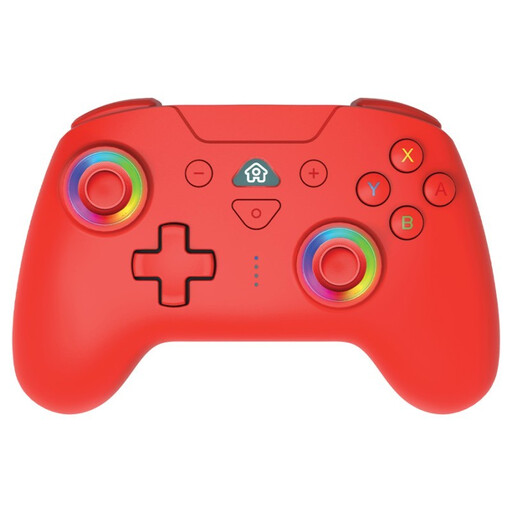
Why this choice? This profile seeks the best feature-to-price ratio. This controller includes the essentials of a Pro controller (gyroscope, vibration) at an accessible price point, without compromising on the gameplay experience.
It integrates a 6-axis gyroscope and a reliable Bluetooth connection, a far cry from the issues of entry-level models. Its 9-10 hour battery life is realistic and has been verified.
Comprehensive features, including future compatibility with the Switch 2, all at a very competitive price.
Why this choice? This gamer likes their gear to stand out. The red LED Switch controller and its customisable lighting allow them to show off their style, while the Turbo function can provide a decisive advantage in certain games.
Here, the additional features (LED, Turbo) are not mere gimmicks. They are added without sacrificing core performance: the controller maintains excellent responsiveness.
Programmable LED lighting and a Turbo function for dual customisation, both aesthetic and functional.
Why this choice? For those who chain-play matches of *Super Smash Bros. Ultimate* or *Mario Party*, comfort is not an option. The ergonomic design of this Subsonic Switch controller ensures an ideal grip to reduce fatigue during long sessions.
Its ergonomics are designed for the long haul, and its solid battery life will prevent you from running out of power mid-tournament. The adjustable vibration is a bonus for conserving battery.
Ergonomics far superior to the Joy-Cons for long sessions, and a Turbo function that's always useful in multiplayer.
We have hand-picked a complete range of accessories for you, all of which meet our demanding specifications, including customisable models with LED lighting.
The process is very simple. From the console's HOME Menu, go to "Controllers," then "Change Grip/Order." Next, press and hold the sync button on your new controller (usually a small button on the top edge) until its indicator lights start flashing. It will then appear on the screen, ready to be paired.
Nothing is 100% guaranteed until Nintendo makes an official announcement. However, accessory manufacturers like Subsonic anticipate and design their products to be compatible with upcoming standards. Choosing a Switch 2 compatible controller as indicated by the manufacturer is therefore a smart bet for the longevity of your purchase.
It all depends on what you mean by "cheap." A rock-bottom priced model will almost always fall into the traps we've described (latency, no gyroscope, unrealistic battery life). It's better to aim for an excellent price-performance ratio, which includes the essential features for a fraction of the cost of the official Pro Controller, rather than going for the lowest price, which often leads to a frustrating gaming experience.