
Livraison le jour même ou le lendemain

Qualité garantie

Débloquez vos offres de bienvenue: Livraison GRATUITE | Jusqu'à -80 % | 30 jours d'essai gratuits à JoyPlus
Téléchargez l'application
A wireless speaker can significantly improve the sound from your television, computer or smartphone. But product specs don't always tell the full story. High wattage doesn't guarantee balanced sound, and the term "wireless" can mean very different things depending on how you plan to use it.
Before you head to the checkout, take a moment to consider your room, your audio sources and how often you'll be moving the speaker around. Here are the main pitfalls to avoid and the key criteria to help you compare models with confidence.
Watts indicate electrical output capacity, but they don't tell you anything about vocal clarity or the balance between bass and treble. A powerful speaker can even become tiring in a small room if you play it at high volume.
For a television, the configuration and connections often matter more than the number on the spec sheet. A TV soundbar paired with a subwoofer can deliver far more depth than a single speaker, especially for dialogue and film soundtracks.
A Bluetooth speaker destined for the patio, camping or the beach must have a clearly stated ingress protection rating. The IP66 rating, for example, means the device is protected against dust and powerful water jets. It does not, however, guarantee resistance to immersion.
Also check the claimed battery life, bearing in mind that it varies depending on listening volume, built-in lighting and temperature. Even a waterproof speaker can be damaged by prolonged immersion if it isn't designed for it.
A soundbar that's too tall can block your TV's infrared sensor or obscure part of the picture. On a desk, a bulky multimedia speaker can eat into the space you need for your screen and keyboard.
Also check which ports you need: HDMI ARC or eARC, optical input, USB, AUX or Bluetooth. If you plan to connect a console, a computer and a television, versatile inputs will save you from having to unplug your devices every time you want to use them.
A wireless subwoofer makes placement easier, but it still needs a power socket. Measure the distance between your television and your listening position to avoid a cramped installation.
Dolby Atmos and DTS:X are formats or technologies designed to give sound a spatial dimension. Their performance depends on compatible content, the room and the listener's position. A soundbar on its own can simulate some effects, while a system with rear speakers generally offers more points of sound dispersion.
So don't stop at the logo. Check the compatible inputs, particularly HDMI eARC, as well as the devices capable of sending the relevant audio format.
Bluetooth 5.3 or Bluetooth 5.4 can simplify pairing and improve connection stability with a compatible device. However, the Bluetooth version alone doesn't determine audio quality: the supported codecs, distance and obstacles also play a part.
For a portable Bluetooth speaker, compare the following points:
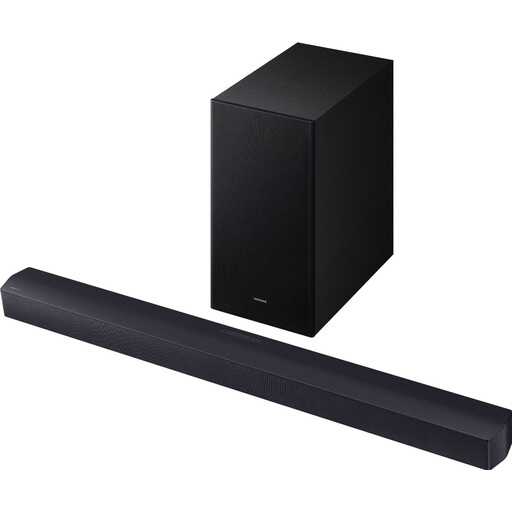
Why this choice suits this profile: This soundbar is easy to set up and improves your TV's sound without cluttering the living room with multiple speakers.
The 2.1 configuration separates the bar from the wireless subwoofer, rather than relying on a single compact speaker.
Claimed total power of 300 W, wireless subwoofer and HDMI, optical and Bluetooth connections.
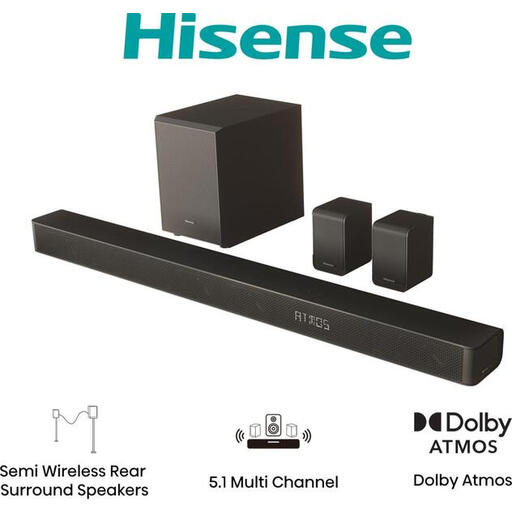
Why this choice suits this profile: Its 5.1 system is ideal for those who have the space to install a proper home cinema setup with rear speakers.
The spec sheet clearly distinguishes the bar, subwoofer and two wireless rear speakers, so you can check the space needed before buying.
Dolby Atmos, DTS:X, HDMI eARC, wireless subwoofer and rear speakers, with multiple audio modes.
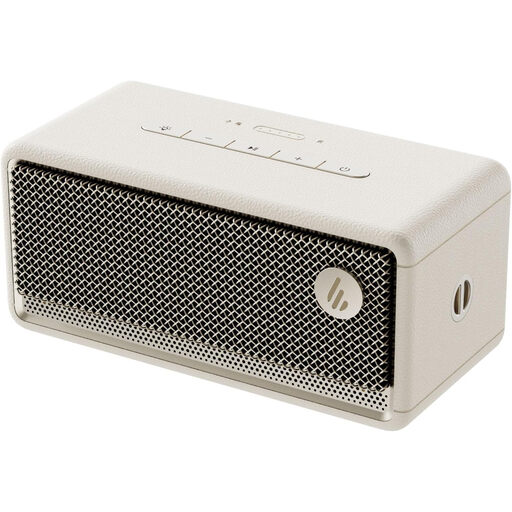
Why this choice suits this profile: This portable Bluetooth speaker is ideal for parties, outings and rooms where a permanent mains power supply isn't practical.
Its IP66 rating is clearly stated, giving you a concrete benchmark for dusty environments or areas exposed to water splashes.
Bluetooth 5.4, claimed power of 34 W RMS, battery life of up to 9 hours and ambient lighting.
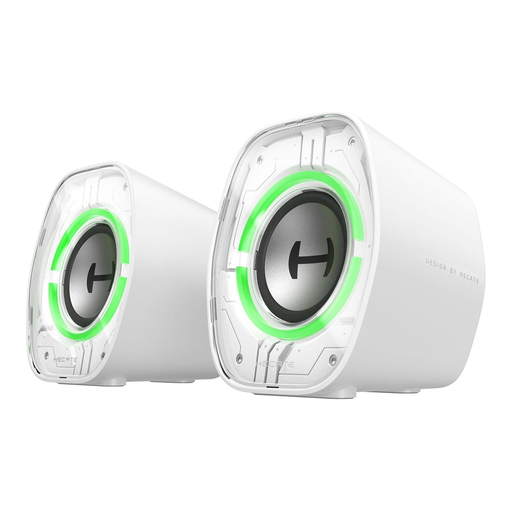
Why this choice suits this profile: Their compact design is aimed at small desks, laptops and gaming setups.
USB-C, USB-A, AUX and Bluetooth connections minimise compatibility issues with computers and tablets.
Bluetooth 5.4, three equalisation modes, RGB lighting and a tilted design suited to shallow desks.
We've put together a comprehensive, real-time updated list of products that meet these demanding selection criteria and European safety standards.
If your TV has Bluetooth, activate pairing mode on the speaker, then select it in the audio settings. With a TV soundbar, the HDMI ARC or eARC connection is often more convenient, as it usually lets you control the volume with your TV remote. The optical input remains a useful option when compatible HDMI isn't available.
The lifespan depends on the battery, the number of charge cycles, the listening volume and storage conditions. Avoid heat, humidity not covered by the IP rating and repeated full discharges. For a speaker used daily, choose a model where battery replacement or repair is documented by the manufacturer.
A battery-powered Bluetooth speaker mainly consumes power while charging. A soundbar with a subwoofer or a home cinema system is usually plugged into the mains; its consumption varies depending on volume, standby mode and the number of connected components. If you want to limit standby power consumption, unplug the devices when you're away for a long time.